
Hello everyone, I'm facing another challenge again. This time, I have a table in my database with the following data:
 Each row in the image contains multiple rows, as shown below for the case of A:
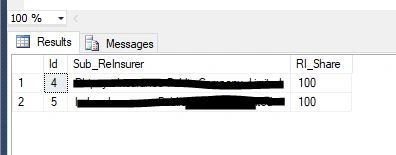
Now, the requirement is that whenever a user selects a checkbox, the data of A or B or A and B will be stored in a gridview. So, this is what I did:
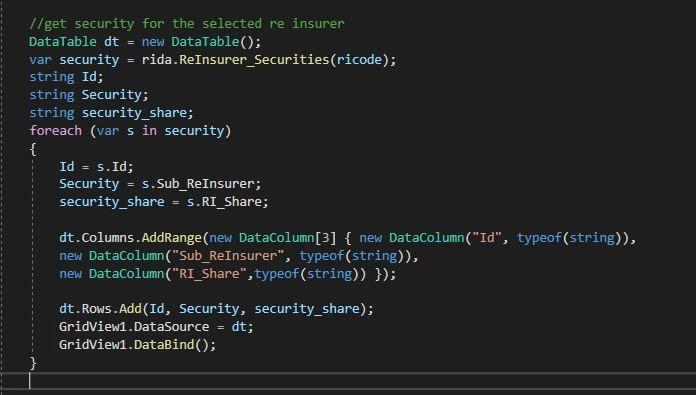
The problem is that it only displays the first row of the data inside the A or B, or A and B as shown below:
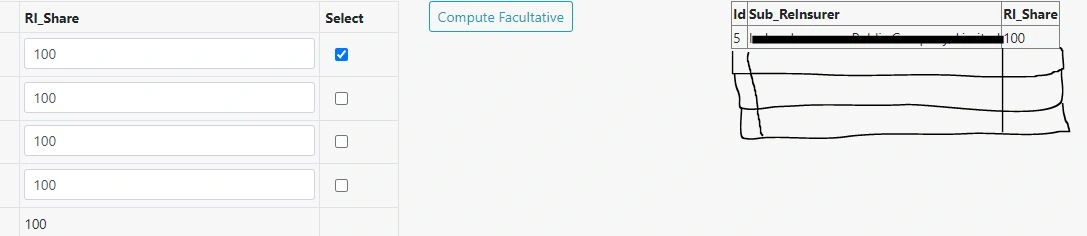
What I want is to display all rows of each selected checkbox. Any assistance is highly appreciated. Good morning everyone.







Gowtham CpRank #1,552 · 1K reputationPosted Aug 24, 2024, 1:59 AM EDT
I see your GridView is only showing the first row for each selected insurer .Try looping through all the related rows like this:
DataTable dt = new DataTable();
var security = rida.ReInsurer_Securities(ricode);

dt.Columns.AddRange(new DataColumn[3]
{
    new DataColumn("Id", typeof(string)),
    new DataColumn("Sub_ReInsurer", typeof(string)),
    new DataColumn("RI_Share", typeof(string))
});

foreach (var s in security)
{
    foreach (var row in s.RelatedRows) // Adjust 'RelatedRows' according to your structure
    {
        string Id = row.Id;
        string Security = row.Sub_ReInsurer;
        string security_share = row.RI_Share;

        dt.Rows.Add(Id, Security, security_share);
    }
}

GridView1.DataSource = dt;
GridView1.DataBind();
This should ensure that all the rows for each selected checkbox are displayed. Give it a shot and let me know how it goes!
Hope this helps