Hello Team,
am developing a C# window application to scan product barcode and when i tried to scan the Barcode i get this error which says 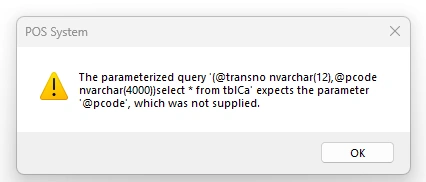
and this is my code please
private void txtPSearch_TextChanged(object sender, EventArgs e)
{
try
{
if(txtPSearch.Text == String.Empty)
{
return;
}else
{
String _pcode;
double _price;
int _qty;
cn.Open();
cm = new SqlCommand("select * from tblProduct where barcode like '" + txtPSearch.Text + "'", cn);
dr = cm.ExecuteReader();
dr.Read();
if (dr.HasRows)
{
frmQty frm = new frmQty(this);
qty = int.Parse(dr["qty"].ToString());
_pcode = dr["pcode"].ToString();
_price = double.Parse(dr["price"].ToString());
_qty = int.Parse(txtQty.Text);
dr.Close();
cn.Close();
frm.ShowDialog();
AddToCart(_pcode, _price, _qty);
}
else
{
dr.Close();
cn.Close();
}
}
}
catch (Exception ex)
{
cn.Close();
MessageBox.Show(ex.Message, stitle, MessageBoxButtons.OK, MessageBoxIcon.Warning);
}
}







Tahir AnsariRank #366 · 6.8K reputationPosted Sep 17, 2023, 3:12 AM EDT
required paramater is not supplied to query.
Emmmanuel FIADUFERank #947 · 2.2K reputationPosted Sep 17, 2023, 4:06 PM EDT
Please this is my parameter before is not working, kindly check it and help. thank you in advance
private void AddToCart(String _pcode, double _price, int _qty)
{
String id = "";
bool found = false;
int cart_qty=0;
cn.Open();
cm = new SqlCommand("select * from tblCart where transno=@transno and pcode=@pcode", cn);
cm.Parameters.AddWithValue("@transno", lblTransno.Text);
cm.Parameters.AddWithValue("@pcode", _pcode);
dr = cm.ExecuteReader();
dr.Read();
if (dr.HasRows)
{
found = true;
id = dr["id"].ToString();
cart_qty = int.Parse(dr["qty"].ToString());
}
else
{
found = false;
}
dr.Close();
cn.Close();
if(found == true)
{
// validate product quantity by adding and subtracting
if (qty < int.Parse(txtQty.Text)+ cart_qty)
{
MessageBox.Show("Unable to proceeed. Remaining qty on hand is " + qty, "Warning", MessageBoxButtons.OK, MessageBoxIcon.Warning);
return;
}
cn.Open();
cm = new SqlCommand("update tblCart set qty = (qty +" +_qty+") where id='"+id+"'", cn);
cm.ExecuteNonQuery();
cn.Close();
txtPSearch.SelectionStart = 0;
txtPSearch.SelectionLength = txtPSearch.Text.Length;
LoadCart();
this.Dispose();
}else
{
// validate product quantity to show avoid selling when product is out of stock
if (qty < int.Parse(txtQty.Text))
{
MessageBox.Show("Unable to proceeed. Remaining qty on hand is " + qty, "Warning", MessageBoxButtons.OK, MessageBoxIcon.Warning);
return;
}
cn.Open();
cm = new SqlCommand("insert into tblCart (transno, pcode, price, qty, sdate, cashier)values(@transno, @pcode, @price, @qty, @sdate,@cashier)", cn);
cm.Parameters.AddWithValue("@transno", lblTransno.Text);
cm.Parameters.AddWithValue("@pcode", _pcode);
cm.Parameters.AddWithValue("@price", _price);
cm.Parameters.AddWithValue("@qty", _qty);
cm.Parameters.AddWithValue("@sdate", DateTime.Now.ToString("dd-MM-yyyy"));
cm.Parameters.AddWithValue("@cashier", lblUser.Text);
cm.ExecuteNonQuery();
cn.Close();
MessageBox.Show("Product quatity has been successfully added", stitle, MessageBoxButtons.OK, MessageBoxIcon.Information);
txtPSearch.SelectionStart = 0;
txtPSearch.SelectionLength = txtPSearch.Text.Length;
LoadCart();
this.Dispose();
}
}
Cr BhargaviRank #420 · 5.9K reputationPosted Sep 20, 2023, 7:00 AM EDT
Please check if the required parameter is supplied to query, I dont see the required parameter is passed.
Emmmanuel FIADUFERank #947 · 2.2K reputationPosted Sep 20, 2023, 7:24 AM EDT
Ohk, I will check and revert please
Jayraj ChhayaRank #304 · 8.2K reputationPosted Dec 27, 2023, 8:08 AM EST
Problem
The error message mentioned in the problem description is not provided. However, based on the code, there are a few potential issues that could cause errors:
Null Reference Exception: If the
txtQtytextbox is empty or contains invalid data, parsing it to an integer (_qty = int.Parse(txtQty.Text)) could throw aFormatExceptionor aNullReferenceException.SQL Injection Vulnerability: The code concatenates the
txtPSearch.Textdirectly into the SQL query string, which can lead to SQL injection attacks. It is recommended to use parameterized queries to prevent this vulnerability.Cause
Without the specific error message, it is difficult to determine the exact cause of the error. However, based on the code analysis, the potential causes could be:
Invalid or empty value in the
txtQtytextbox, leading to a parsing error.Invalid barcode value in the
txtPSearchtextbox, causing the SQL query to return no rows.Database connection issues, such as incorrect connection string or database server unavailability.
Solution
To address the potential issues mentioned above, follow these steps:
txtQtytextbox value before parsing it to an integer. You can use theint.TryParsemethod to safely convert the value without throwing an exception. Here's an example:if (int.TryParse(txtQty.Text, out _qty)) { // The parsing was successful, continue with the code // ... } else { // The value in txtQty is invalid, show an error message or handle it accordingly MessageBox.Show("Invalid quantity value.", stitle, MessageBoxButtons.OK, MessageBoxIcon.Warning); }cm = new SqlCommand("SELECT * FROM tblProduct WHERE barcode LIKE @barcode", cn); cm.Parameters.AddWithValue("@barcode", txtPSearch.Text);usingstatement to automatically dispose of the connection object:using (SqlConnection cn = new SqlConnection(connectionString)) { // Code that uses the connection }Satyaprakash SamantarayRank #101 · 21.1K reputationPosted Dec 28, 2023, 3:14 AM EST
The issue comes due to the parameter called @pcode is not passed or used in your query. For that u can check in your c# code or your sql server query if any stored procedure or any functions u have used.
Check the other parameters where these are used the same way u can put the @pcode paramter there in ur c# code or sql server query.