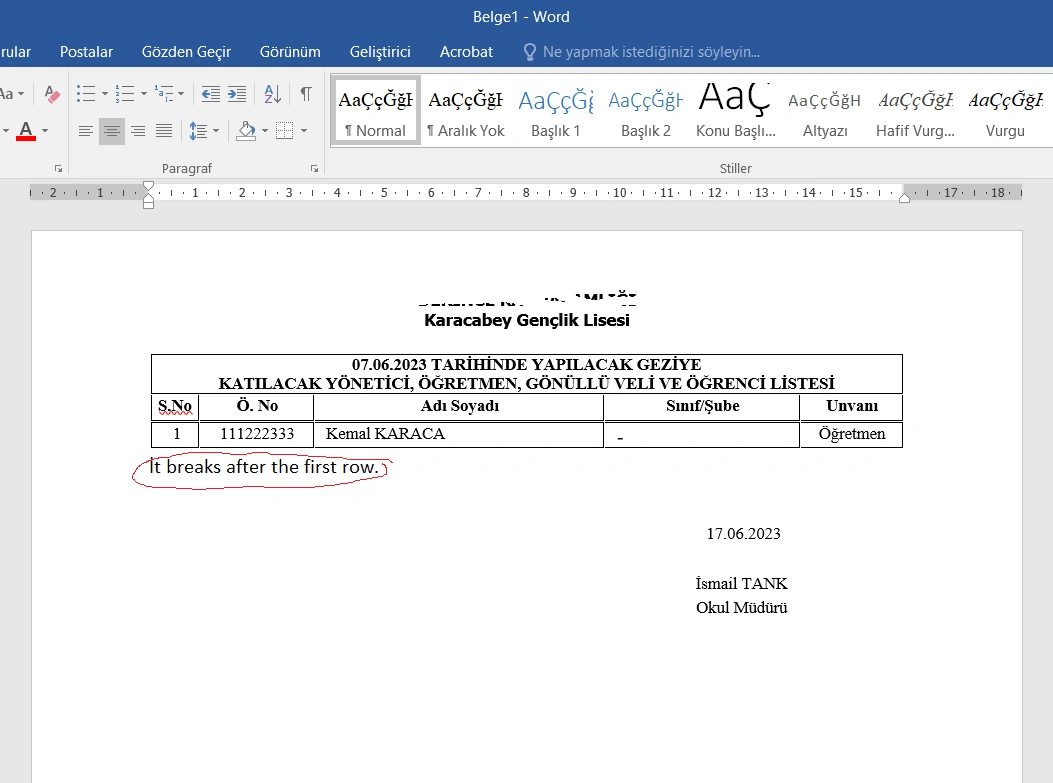
I am trying to export data from database to word document. But it breaks in the loop action. How can we loop multiple rows? It works very well without loop. But when it loops, it gives error.
C#
Object oMissing = System.Reflection.Missing.Value;
Object oTrue = true;
Object oFalse = false;
Word.Application oWord = new Word.Application();
Word.Document oWordDoc = new Word.Document();

oWord.Visible = true;
Object oTemplatePath = System.Windows.Forms.Application.StartupPath + "\\GeziListesi.docx";
oWordDoc = oWord.Documents.Add(ref oTemplatePath, ref oMissing, ref oMissing, ref oMissing);

foreach(Word.Field myMergeField in oWordDoc.Fields) {
    iTotalFields++;

    Word.Range rngFieldCode = myMergeField.Code;
    String fieldText = rngFieldCode.Text;

    if (fieldText.StartsWith(" MERGEFIELD")) {
        Int32 endMerge = fieldText.IndexOf("\\");
        Int32 fieldNameLength = fieldText.Length - endMerge;
        String fieldName = fieldText.Substring(11, endMerge - 11);

        OleDbConnection conn = new OleDbConnection("Provider=Microsoft.ACE.OLEDB.12.0;Data Source=gezievrak2541.mdb; Mode = ReadWrite");

        if (conn.State == ConnectionState.Closed) {
            conn.Open();
        }

        using(OleDbCommand cmd = new OleDbCommand("Select * from kurumbilgi25, gezibilgileri25", conn)) {
            using(OleDbDataReader dr = cmd.ExecuteReader()) {
                while (dr.Read()) {

                    fieldName = fieldName.Trim();

                    if (fieldName == "kurumu") {
                        myMergeField.Select();
                        oWord.Selection.TypeText(dr["kurumbilgi25.kurumu"].ToString());
                    }
                    if (fieldName == "gtarihi") {
                        myMergeField.Select();
                        oWord.Selection.TypeText(DateTime.Parse(dr["gtarihi"].ToString()).ToShortDateString());
                    }

                    if (fieldName == "tcno") {
                        myMergeField.Select();
                        oWord.Selection.TypeText(dr["tcno"].ToString());
                    }
                    if (fieldName == "adsoyad") {
                        myMergeField.Select();
                        oWord.Selection.TypeText(dr["adi"].ToString() + " " + dr["soyadi"].ToString());
                    }
                    if (fieldName != "sinifi") {
                        //myMergeField.Select();
                        oWord.Selection.TypeText(" ");

                    }
                    if (fieldName == ("sinifi")) {
                        myMergeField.Select();
                        oWord.Selection.TypeText(dr["sinifi"].ToString());
                    }

                    if (fieldName == "unvan") {
                        myMergeField.Select();
                        oWord.Selection.TypeText(dr["gezilistemiz25.unvani"].ToString());
                    }
                    if (fieldName == "tarih") {
                        myMergeField.Select();
                        oWord.Selection.TypeText(DateTime.Now.ToShortDateString());
                    }
                    if (fieldName == "mudur") {
                        myMergeField.Select();
                        oWord.Selection.TypeText(dr["mudur"].ToString());
                    }
                    if (fieldName == "unvan2") {
                        myMergeField.Select();
                        oWord.Selection.TypeText(dr["kurumbilgi25.unvani"].ToString());
                    }
                    GC.Collect();
                    GC.WaitForPendingFinalizers();
                    GC.Collect();
                    GC.WaitForPendingFinalizers();

                }
            }
        }
    }
}






Amit MohantyRank #112 · 20K reputationPosted Jun 15, 2023, 4:06 AM EDT
try this once
Object oMissing = System.Reflection.Missing.Value; Object oTrue = true; Object oFalse = false; Word.Application oWord = new Word.Application(); Word.Document oWordDoc = new Word.Document(); oWord.Visible = true; Object oTemplatePath = System.Windows.Forms.Application.StartupPath + "\\GeziListesi.docx"; oWordDoc = oWord.Documents.Add(ref oTemplatePath, ref oMissing, ref oMissing, ref oMissing); OleDbConnection conn = new OleDbConnection("Provider=Microsoft.ACE.OLEDB.12.0;Data Source=gezievrak2541.mdb; Mode=ReadWrite"); if (conn.State == ConnectionState.Closed) { conn.Open(); } using (OleDbCommand cmd = new OleDbCommand("SELECT * FROM kurumbilgi25, gezibilgileri25", conn)) { using (OleDbDataReader dr = cmd.ExecuteReader()) { while (dr.Read()) { foreach (Word.Field myMergeField in oWordDoc.Fields) { iTotalFields++; Word.Range rngFieldCode = myMergeField.Code; String fieldText = rngFieldCode.Text; if (fieldText.StartsWith(" MERGEFIELD")) { Int32 endMerge = fieldText.IndexOf("\\"); Int32 fieldNameLength = fieldText.Length - endMerge; String fieldName = fieldText.Substring(11, endMerge - 11); fieldName = fieldName.Trim(); if (fieldName == "kurumu") { myMergeField.Select(); oWord.Selection.TypeText(dr["kurumbilgi25.kurumu"].ToString()); } else if (fieldName == "gtarihi") { myMergeField.Select(); oWord.Selection.TypeText(DateTime.Parse(dr["gtarihi"].ToString()).ToShortDateString()); } else if (fieldName == "tcno") { myMergeField.Select(); oWord.Selection.TypeText(dr["tcno"].ToString()); } // Add other field mappings here // // } } } } } // Cleanup resources oWordDoc.Close(); oWord.Quit(); System.Runtime.InteropServices.Marshal.ReleaseComObject(oWordDoc); System.Runtime.InteropServices.Marshal.ReleaseComObject(oWord); oWordDoc = null; oWord = null; GC.Collect(); GC.WaitForPendingFinalizers(); GC.Collect(); GC.WaitForPendingFinalizers(); conn.Close();Rajkiran SwainRank #165 · 14.4K reputationPosted Jun 15, 2023, 3:42 AM EDT
using Word = Microsoft.Office.Interop.Word; using System.Data.OleDb; public void ExportDataToWord() { string templatePath = System.Windows.Forms.Application.StartupPath + "\\GeziListesi.docx"; string databasePath = "gezievrak2541.mdb"; Word.Application wordApp = new Word.Application(); Word.Document wordDoc = wordApp.Documents.Add(templatePath); try { foreach (Word.Field mergeField in wordDoc.Fields) { if (mergeField.Code.Text.Contains("MERGEFIELD")) { string fieldName = mergeField.Code.Text.Substring(11, mergeField.Code.Text.IndexOf("\\") - 11).Trim(); using (OleDbConnection conn = new OleDbConnection($"Provider=Microsoft.ACE.OLEDB.12.0;Data Source={databasePath};Mode=ReadWrite")) { conn.Open(); using (OleDbCommand cmd = new OleDbCommand("SELECT * FROM kurumbilgi25, gezibilgileri25", conn)) using (OleDbDataReader dr = cmd.ExecuteReader()) { while (dr.Read()) { if (fieldName == "kurumu") mergeField.Range.Text = dr["kurumbilgi25.kurumu"].ToString(); if (fieldName == "gtarihi") mergeField.Range.Text = DateTime.Parse(dr["gtarihi"].ToString()).ToShortDateString(); if (fieldName == "tcno") mergeField.Range.Text = dr["tcno"].ToString(); if (fieldName == "adsoyad") mergeField.Range.Text = $"{dr["adi"]} {dr["soyadi"]}"; if (fieldName == "sinifi") mergeField.Range.Text = dr["sinifi"].ToString(); if (fieldName == "unvan") mergeField.Range.Text = dr["gezilistemiz25.unvani"].ToString(); if (fieldName == "tarih") mergeField.Range.Text = DateTime.Now.ToShortDateString(); if (fieldName == "mudur") mergeField.Range.Text = dr["mudur"].ToString(); if (fieldName == "unvan2") mergeField.Range.Text = dr["kurumbilgi25.unvani"].ToString(); mergeField.Update(); } } } } } wordDoc.SaveAs("output.docx"); } catch (Exception ex) { // Handle the exception or log the error message } finally { wordDoc.Close(); wordApp.Quit(); System.Runtime.InteropServices.Marshal.ReleaseComObject(wordDoc); System.Runtime.InteropServices.Marshal.ReleaseComObject(wordApp); } }Mehmet FatihRank #1,474 · 1.1K reputationPosted Jun 15, 2023, 7:52 AM EDT
Thanks both of you. But I tried both of them. It is the same result. In the second codes it gives this error. It gives the error object deleted when pulling the next data.
Error CS1061 'Field' does not contain a definition of 'Range' and no accessible extension method 'Range' can be reached that accepts a first argument of type 'Field' (maybe you are missing a use or reference to the constraint?)
Tuhin PaulRank #7 · 71.9K reputationPosted Jun 15, 2023, 10:03 PM EDT
Review the SQL query being executed within the loop (Select * from kurumbilgi25, gezibilgileri25). This query returns the desired data and that the table names are correct. Also the field names (e.g., "kurumu", "gtarihi", "tcno") in your database match the field names used in the Word document's merge fields. Any discrepancies can cause issues when trying to populate the Word document.
Mehmet FatihRank #1,474 · 1.1K reputationPosted Jun 16, 2023, 9:58 AM EDT
They are true. It reads the first row in the database correctly. It gives an error while reading the next row.