I am trying to execute a simple sql select statement using C# and I want to return the number of rows. What is the correct syntax.
SELECT Count(*) FROM InvData
Know the answer? Post it. Somebody with the same question will find it here.
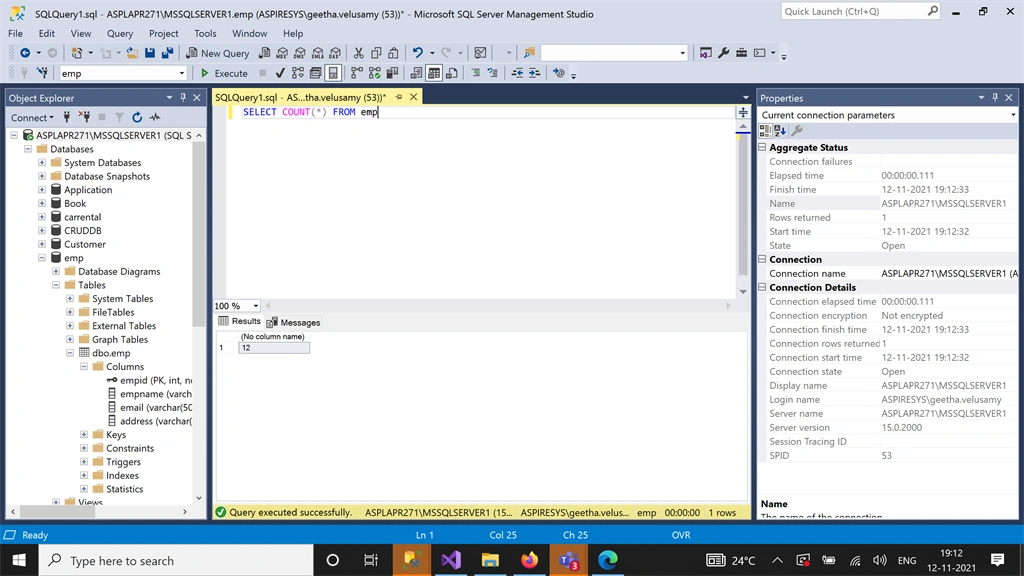
Try the snippet below, you may need to research some of the other classes to get your connectionString (DSN= etc), but this worked for me.
using System.Data.Odbcpublic static void ReadData(string connectionString)
{
string queryString = "SELECT count(*) from INV";
using (OdbcConnection connection = new OdbcConnection(connectionString))
{
OdbcCommand command = new OdbcCommand(queryString, connection);
connection.Open();
// Execute the DataReader and access the data.
OdbcDataReader reader = command.ExecuteReader();
while (reader.Read())
{
Console.WriteLine("CustomerID={0", reader[0]);
// Call Close when done reading.
reader.Close();public static void ReadData(string connectionString){ string queryString = "SELECT count(*) from INV"; using (OdbcConnection connection = new OdbcConnection(connectionString)) { OdbcCommand command = new OdbcCommand(queryString, connection); connection.Open(); int count = command.ExecuteScalar(); Console.WriteLine("Count is: {0}", count); }}cmd.CommandText = "SELECT COUNT(*) FROM InvData";
Int32 count = (Int32) cmd.ExecuteScalar();
above code helps you to make it working.public static int Count(string connectionString)
{
string query = "Select Count(*) From InvData";
int count="";
using (SqlConnection con = new SqlConnection(Your data source ConnectionString))
{?SqlCommand cmd = new SqlCommand(query, con);?cmd.CommandType = CommandType.Text;?con.Open();?count = cmd.ExecuteScalar();?}
return count;?}
Here, Using statement is used so no need to close the connection, it will close automatically.
ExecuteScalar is used to retrieve single value from database, so for counting the data ExecuteScalar can be used.

Answer a question in the forums and earn +20 SHARP for every answer.
See unanswered questions Arun PottiAnswers in the forums20answers02
 Tahir AnsariAnswers in the forums5answers03
 Kamlesh KumarAnswers in the forums5answers04
 Sam HobbsAnswers in the forums4answers05
 Željko PerićAnswers in the forums3answersFull leaderboard →
 DevSocialUpcoming · 3rd editionAI Agents ConferenceDec 1–3, 2026Live onlineFree to attend5days leftRegister

Ananth GRank #1,176 · 1.5K reputationPosted Nov 3, 2016, 3:51 AM EDT