Can anyone tell me how to extract only required text from Word document using C#.
About Word document:
It contains some Simple text and Audio text and I want to Extract that text from word file and generate the Excel file.
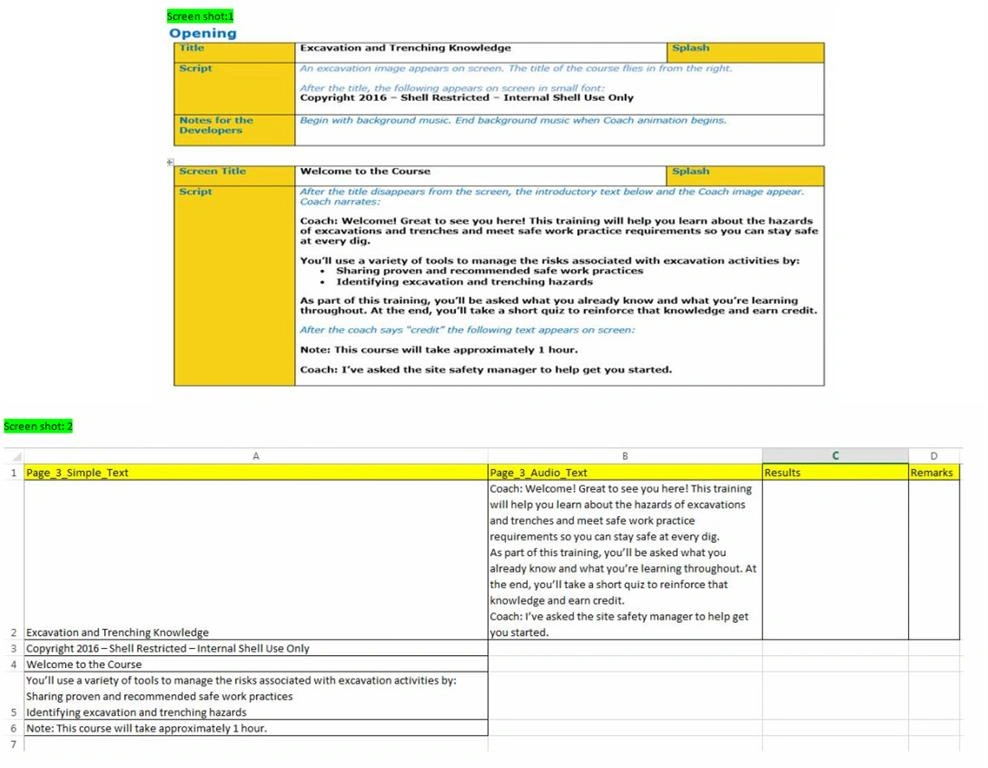
Below storyboard Screen Shot-1 contains Simple text and Audio text and where you can see 2 Text color Blue and Black. Problem is to identify the Black color Text because it has some Simple Text and Audio Text and I want that Text into Excel in separate columns as displayed in Screen shot-2.
and i'm able to extract the text from Word document into Excel but problem is how can I identify Simple text and Audio text without changing the font style and color to generate Excel file.
Any help in this will be highly appreciated.
Thanks in advance.







Akshay PhadkeRank #161 · 14.6K reputationPosted Jun 24, 2016, 3:14 AM EDT
Rohit Mehta123 reputationPosted Jun 29, 2016, 8:33 PM EDT
Ankur Bharata2 reputationPosted Jul 28, 2016, 8:25 AM EDT
Since you want to extract text from the word (DOC) file based on color, I think you might need to load the file as an image first.
So first thing to do is to load or convert the word doc file to image. I found the following threads that might help:
http://stackoverflow.com/questions/20326478/convert-word-file-pages-to-jpg-images-using-c-sharp
http://stackoverflow.com/questions/24830027/issue-with-converting-doc-to-png
After this, you need to find the non-black colored text in the image and hide it. You need to create a region that contains only non-black colored pixels. I think this is applicable using Microsoft .NET graphics object.
Also, there might be some sdks (like leadtools) that can do all the above (loading DOC file, find non-black colored text and then save the result as Excell, etc.). I found the following link that might help:
https://www.leadtools.com/help/leadtools/v19/dh/to/leadtools.topics.documents.converters~doxc.topics.documentconverters_using.html