
Hi ,
When I try to open a file in Git Changes, this type of pop-up appears. Is there any solution to this? Why do these things happen?
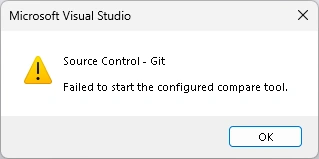
Kindly acknowledge if anyone has a solution for it.
Hi ,
When I try to open a file in Git Changes, this type of pop-up appears. Is there any solution to this? Why do these things happen?
Kindly acknowledge if anyone has a solution for it.
Know the answer? Post it. Somebody with the same question will find it here.
Answer a question in the forums and earn +20 SHARP for every answer.
See unanswered questions Arun PottiAnswers in the forums20answers02
 Tahir AnsariAnswers in the forums5answers03
 Kamlesh KumarAnswers in the forums5answers04
 Sam HobbsAnswers in the forums4answers05
 Željko PerićAnswers in the forums3answersFull leaderboard →
 DevSocialUpcoming · 3rd editionAI Agents ConferenceDec 1–3, 2026Live onlineFree to attend5days leftRegister

Jayraj ChhayaRank #304 · 8.2K reputationPosted Aug 20, 2025, 6:36 AM EDT
Hello,
This error means Visual Studio can’t find the Git compare tool you have configured.
Fix:
In Visual Studio go to Tools → Options → Source Control → Git Global Settings, set Diff/Merge tool to Visual Studio.
Or reset in terminal:
git config --global diff.tool vsdiffmerge
git config --global difftool.vsdiffmerge.cmd "\"C:/Program Files (x86)/Microsoft Visual Studio/2022/Community/Common7/IDE/CommonExtensions/Microsoft/DiffTool/vsdiffmerge.exe\" \"$LOCAL\" \"$REMOTE\" //t"
This ensures Git uses Visual Studio’s built-in compare tool and removes the error.