Skip to content
Loading
  • Amit Mohanty
    0
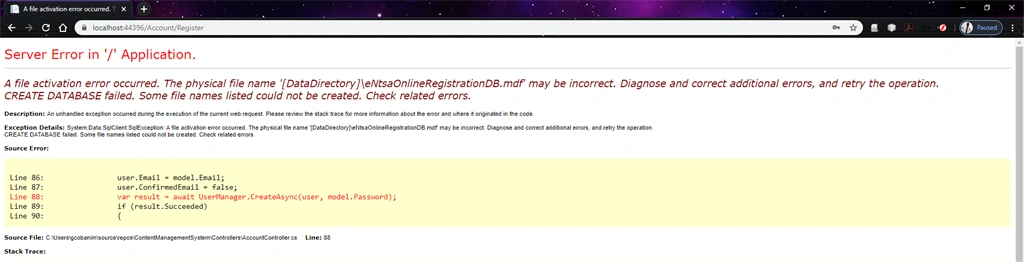
    Hey, the declaration of AttachDbFilename is wrong.
    Use this
    AttachDbFilename =|DataDirectory|\eNtsaOnlineRegistrationDB.mdf;
    0
  • 0
    Hi Amit
     
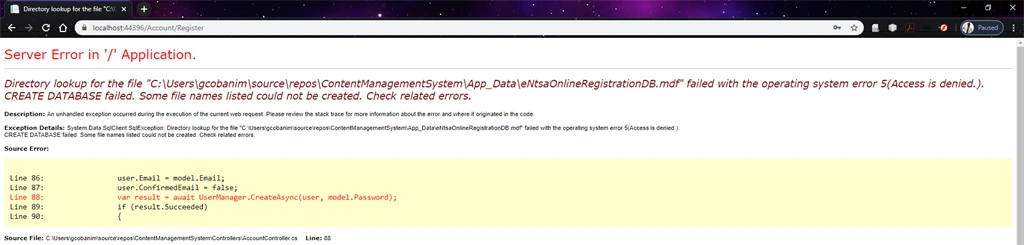
    After the amends from the path, Question is does that directory needs to be created? Its not there, how do i pass this if not, please see the attaced screen shot. 
    0
  • Rajeesh Menoth
    0
    Hi,
     
    Please check the following similar thread :
     
    https://stackoverflow.com/questions/6703368/sp-attach-single-file-db-error-failed-with-the-operating-system-error-5access 
    0
  • Jignesh Kumar
    0
    Hi,
     
    You need to replace [] sign with ||, Please find below link,
    https://www.connectionstrings.com/sqlconnection/attach-a-database-file-located-in-the-data-directory-on-connect-to-a-local-sql-server-express-instance/ 
    0
  • 0
    Rajesh
     
    I have followed the link, as per sent below. Now i am getting this exception that it exists. The MSSQ Server is changed to local account now. What else do i need to change? 
    0
  • Amit Mohanty
    0
    Yes you have to create that folder if it is not there.
    0
  • 0
    I dont follow Amit
     
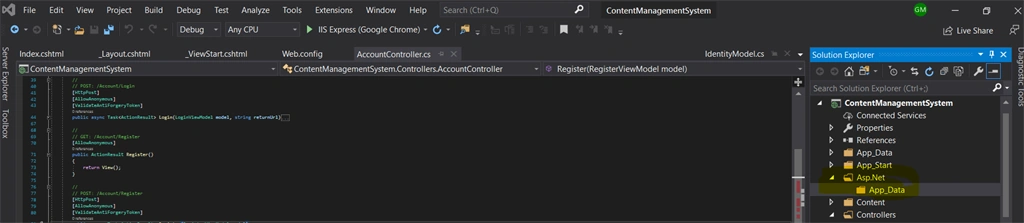
    The path does exist on the project folder on my Visual Studio, where else could i have to create it? I dont understand mate. Show me an example(default, the path as to say). 
    0
  • Amit Mohanty
    0
    Click on Solution Explore -- right click on project name -- add -- add asp.net folder -- app_data
    0
  • 0
    Ok i have done that so far, must the app_data have..mdf inside?
    0
  • Amit Mohanty
    0
    Hey you have already App_Data folder under your project. No need to create AspNet--AppData folders.
     
    Copy the .mdf file and paste it to App_Data folder
    0
  • 0
    No Amit
     
    My question i think is, the folder App_Data had already has the file inside.mdf. See my screen shot, why began to ask below question for that reason. Or am i again misunderstood you well? 
    0
  • Amit Mohanty
    0
    Hey if you have the .mdf file in App_data folder then try below connection string
    1.   
    2.     <add name = "eNtsaOnlineRegistrationDB" connectionString = "Data Source=(LocalDb)\MSSQLLocalDB;AttachDbFilename=|DataDirectory|\eNtsaOnlineRegistrationDB.mdf;Initial Catalog=eNtsaOnlineRegistration; Integrated Security=True" providerName="System.Data.SqlClient"/>  
    3.  
    0