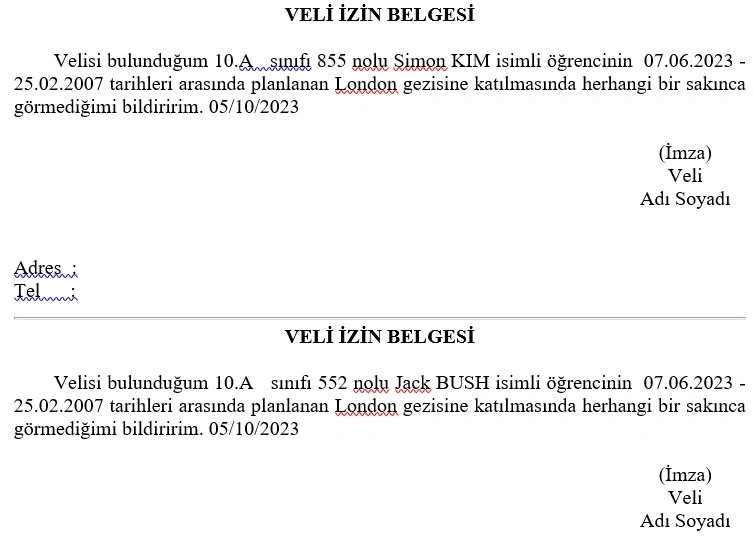
I want to fill out the form below by sequentially pulling the data from the database with Word Automation. A separate form will be filled out for each person. My codes pulls the same person. What's the problem?
This is the result.
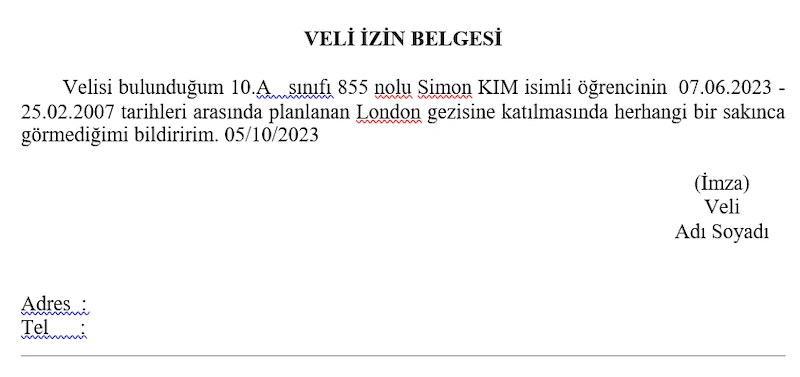 This is the thing I want to do :
My codes are here :
C#
private void VelizinBelDok()
{
    try
    {
        System.Threading.Thread.Sleep(100);
        Cursor.Current = Cursors.WaitCursor;

        int iTotalFields = 0;
        Object oMissing = System.Reflection.Missing.Value;
        Object oTrue = true;
        Object oFalse = false;
        Word.Application oWord = new Word.Application();
        Word.Document oWordDoc = new Word.Document();
        oWord.Visible = true;
        oWord.WindowState = Word.WdWindowState.wdWindowStateMinimize;
        oWord.WindowState = Word.WdWindowState.wdWindowStateMaximize;

        Object oTemplatePath = System.Windows.Forms.Application.StartupPath + "\\Belgeler\\VelizinBel.docx";
        oWordDoc = oWord.Documents.Add(ref oTemplatePath, ref oMissing, ref oMissing, ref oMissing);


        //Word.Range rngFieldCode = myMergeField.Code;
        //String fieldText = rngFieldCode.Text;

        //if (fieldText.StartsWith(" MERGEFIELD"))
        //{
        //    Int32 endMerge = fieldText.IndexOf("\\");
        //    Int32 fieldNameLength = fieldText.Length - endMerge;
        //    String fieldName = fieldText.Substring(11, endMerge - 11);

        using (var conn = new OleDbConnection("Provider=Microsoft.ACE.OLEDB.12.0;Data Source = gezievrak2541.accdb; Jet OLEDB:Database Password = Fatih2541; Mode = ReadWrite"))
        {
            conn.Open();

            using (var cmd = new OleDbCommand("Select * from gezilistemiz25,gezibilgileri25 WHERE unvani='Ögrenci'", conn))
            {
                using (OleDbDataReader dr = cmd.ExecuteReader())
                {
                    while (dr.Read())
                    {
                        foreach (Word.Field myMergeField in oWordDoc.Fields)
                        {
                            Word.Range rngFieldCode = myMergeField.Code;
                            String fieldText = rngFieldCode.Text;

                            if (fieldText.StartsWith(" MERGEFIELD"))
                            {
                                Int32 endMerge = fieldText.IndexOf("\\");
                                Int32 fieldNameLength = fieldText.Length - endMerge;
                                String fieldName = fieldText.Substring(11, endMerge - 11);

                                fieldName = fieldName.Trim();

                                if (fieldName == "sinifi")
                                {
                                    myMergeField.Select();
                                    oWord.Selection.TypeText(dr["sinifi"].ToString());
                                }

                                if (fieldName == "ono")
                                {
                                    myMergeField.Select();
                                    oWord.Selection.TypeText(dr["ono"].ToString());
                                }
                                if (fieldName == "adi")
                                {
                                    myMergeField.Select();
                                    oWord.Selection.TypeText(dr["adi"].ToString());
                                }

                                if (fieldName == "soyadi")
                                {
                                    myMergeField.Select();
                                    oWord.Selection.TypeText(dr["soyadi"].ToString());
                                }

                                if (fieldName == "gtarihi")
                                {
                                    myMergeField.Select();
                                    oWord.Selection.TypeText(DateTime.Parse(dr["gtarihi"].ToString()).ToShortDateString());
                                }

                                if (fieldName == "dtarihi")
                                {
                                    myMergeField.Select();
                                    oWord.Selection.TypeText(DateTime.Parse(dr["gezilistemiz25.dtarihi"].ToString()).ToShortDateString());
                                }

                                if (fieldName == "gyeri")
                                {
                                    myMergeField.Select();
                                    oWord.Selection.TypeText(dr["gyeri"].ToString());
                                }
                                iTotalFields++;
                            }
                        }

                    oWordDoc.Activate();
                    oWord.Activate();
                }
            }

            conn.Close();
            cmd.Dispose();
            conn.Dispose();
            //GC.WaitForPendingFinalizers();
            //GC.Collect();
        }
        oWord.ActiveDocument.SaveAs2(Path.Combine(Environment.GetFolderPath(Environment.SpecialFolder.Desktop), "Veli Izin Belgesi.docx"));
                oWordDoc.Close(ref oFalse, ref oMissing, ref oMissing);
                oWord.Quit();
                System.Runtime.InteropServices.Marshal.ReleaseComObject(oWordDoc);
                System.Runtime.InteropServices.Marshal.ReleaseComObject(oWord);
                oWordDoc = null;
                oWord = null;
                //GC.WaitForPendingFinalizers();
                //GC.Collect();
                Cursor.Current = Cursors.Default;
                MessageBox.Show("Veli Izin Belgesi Word formatinda masaüstüne kaydedildi!");

             }
    }
    catch (Exception hata)
    {
        MessageBox.Show("Islem Sirasinda Hata Olustu." + hata.Message);
    }
}






Muhammad Imran AnsariRank #326 · 7.6K reputationPosted Oct 5, 2023, 6:04 PM EDT
To create separate documents for each person, you should move the creation of a new Word document (oWordDoc) inside the while (dr.Read()) loop. This way, for each record, you create a new Word document and populate it with that person's data, here's a modified version of your code:
using (var conn = new OleDbConnection("Provider=Microsoft.ACE.OLEDB.12.0;Data Source = gezievrak2541.accdb; Jet OLEDB:Database Password = Fatih2541; Mode = ReadWrite"))
{
    conn.Open();

    using (var cmd = new OleDbCommand("Select * from gezilistemiz25,gezibilgileri25 WHERE unvani='Ögrenci'", conn))
    {
        using (OleDbDataReader dr = cmd.ExecuteReader())
        {
            while (dr.Read())
            {
                // Create a new Word document for each person
                Word.Application oWord = new Word.Application();
                Word.Document oWordDoc = new Word.Document();
                oWord.Visible = true;
                oWord.WindowState = Word.WdWindowState.wdWindowStateMinimize;
                oWord.WindowState = Word.WdWindowState.wdWindowStateMaximize;

                Object oTemplatePath = System.Windows.Forms.Application.StartupPath + "\\Belgeler\\VelizinBel.docx";
                oWordDoc = oWord.Documents.Add(ref oTemplatePath, ref oMissing, ref oMissing, ref oMissing);

                // Populate the Word document with data from the current record
                foreach (Word.Field myMergeField in oWordDoc.Fields)
                {
                    // Populate the fields as you did in your original code
                    // ...

                    iTotalFields++;
                }

                oWordDoc.Activate();
                oWord.Activate();

                // Save the document with a unique name (e.g., based on person's name or ID)
                string documentName = dr["adi"].ToString() + "_" + dr["soyadi"].ToString() + ".docx";
                oWord.ActiveDocument.SaveAs2(Path.Combine(Environment.GetFolderPath(Environment.SpecialFolder.Desktop), documentName));

                // Close the Word document and release resources
                oWordDoc.Close(ref oFalse, ref oMissing, ref oMissing);
                oWord.Quit();
                System.Runtime.InteropServices.Marshal.ReleaseComObject(oWordDoc);
                System.Runtime.InteropServices.Marshal.ReleaseComObject(oWord);
                oWordDoc = null;
                oWord = null;
            }
        }
    }

    conn.Close();
    cmd.Dispose();
    conn.Dispose();
}