- Condition One applies Blue color
- Condition two applies Pink color
- Condition three applies Green color
- Condition four applies Yellow color
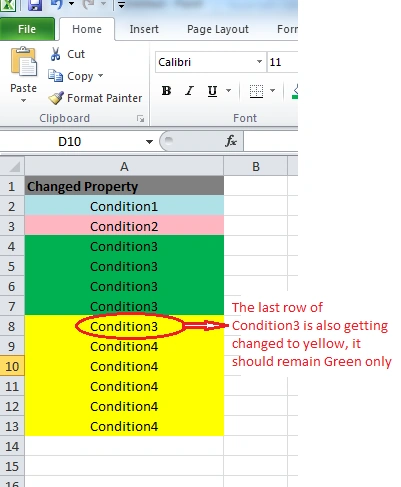
When the color in Condition 4 is applied, it changes the last row color of Condition 3. Kindly advise.
Note: I am using Excel Interop version- 1.7.0.0.







Keyur PatelRank #1,216 · 1.5K reputationPosted Mar 16, 2015, 10:56 PM EDT
I am not sure,whether it's correct or not but i think, something problem in your condition loop.
Excel cell start with row 1 , column 1. try to start with your loop row 1 instead of 0.
Please check in debug mode, cell address of last condition 3.
If you are still having an issue than please share your code.
T K25 reputationPosted Mar 16, 2015, 11:03 PM EDT
Keyur PatelRank #1,216 · 1.5K reputationPosted Mar 17, 2015, 1:38 AM EDT
Please try with following loop. Remove Count -1 from loop.
}
T K25 reputationPosted Mar 17, 2015, 1:50 AM EDT
Keyur PatelRank #1,216 · 1.5K reputationPosted Mar 17, 2015, 2:00 AM EDT
We can use conditionalFormat in excel. You can check from following links.
https://support.office.com/en-au/article/Use-a-formula-to-apply-conditional-formatting-fed60dfa-1d3f-4e13-9ecb-f1951ff89d7f
http://www.wikihow.com/Apply-Conditional-Formatting-in-Excel
T K25 reputationPosted Mar 17, 2015, 2:21 AM EDT
Keyur PatelRank #1,216 · 1.5K reputationPosted Mar 17, 2015, 3:03 AM EDT
https://www.snip2code.com/Snippet/613/How-to-set-a-conditional-formatting-in-a
http://stackoverflow.com/questions/15216047/programatically-adding-conditional-formatting-in-excel-2007
T K25 reputationPosted Mar 17, 2015, 3:06 AM EDT