hey guys, its me again lol.
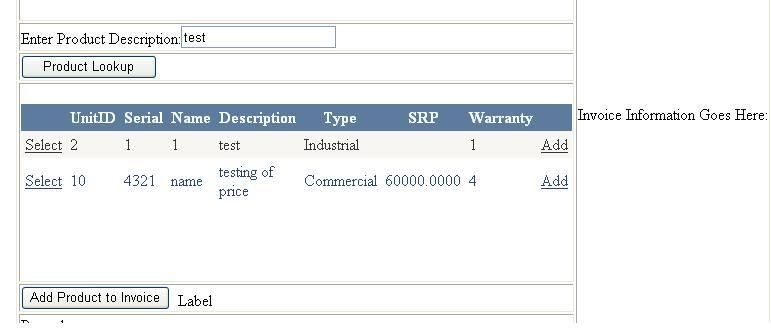
anyway. my interface looks like this ... thats a sample interface that bugging me out. as i have 2 options.
option #1. enable the add button(button field) to get the value of the unit or serialnumber and insert it to a container table.
option #2. use select and the "add product to invoice" button (found below).
im not really that familiar with tinkering with the button field so im leaning more towards option #2. problem is im stuck with this property: gridview1.selectedrow.
i dont know whats next, is there a method that i can use to extract the value of a specified column?
thanks
Loading







Kirtan PatelRank #292 · 8.6K reputationPosted Nov 24, 2009, 1:51 AM EST
Seems Problem is With PageLoad Method if you are filling GridView Programatically then PageLoad Event Should be Like Below . label may loose value because of PostBack so do code like below if you are filling GridView Programatically :)
PageLoad()
{
if(!IsPostBack)
{
//your Code to Fill GridView
}
}
then change the Value Of Label in
protected void GridView1_SelectedIndexChanged(object sender, EventArgs e)
{
Label1.Text = GridView1.Rows[0].Cells[0].Text;
}
if still facing problem then paste whole page Code Behind Code Here or Just Mail Me at [email protected] because alignment not properly shown here on forum :)
Rujuta133 reputationPosted Nov 23, 2009, 9:27 PM EST
 protected void GridView1_SelectedIndexChanging(object sender, GridViewSelectEventArgs e)
    {
        int s;
        s = e.NewSelectedIndex;
        string id;
        id = GridView1.Rows[s].Cells[1].Text;
    }
Here id will contain the value of the specific cell.
I feel its quite easy this way.
Hope it'll help you...
Mark Uy130 reputationPosted Nov 24, 2009, 1:10 AM EST
Mark Uy130 reputationPosted Nov 24, 2009, 1:23 AM EST
any further help?
Mark Uy130 reputationPosted Nov 24, 2009, 2:16 AM EST
{
if (!IsPostBack)
{
SqlConnection conInvoice = new SqlConnection
(@"Data Source=.\SQLEXPRESS;AttachDbFileName=|DataDirectory|\TRANE.mdf;Integrated Security=True;User Instance=True");
conInvoice.Open();
SqlDataSource1.SelectCommand = "SELECT * FROM [Unit] WHERE ([UnitDesc] LIKE '%' + @UnitDesc + '%')";
SqlDataSource1.DataBind();
}
}
protected void btnLookup_Click(object sender, EventArgs e)
{
SqlConnection conInvoice = new SqlConnection
(@"Data Source=.\SQLEXPRESS;AttachDbFileName=|DataDirectory|\TRANE.mdf;Integrated Security=True;User Instance=True");
conInvoice.Open();
SqlDataSource1.SelectCommand = "SELECT * FROM [Unit] WHERE ([UnitDesc] LIKE '%' + @UnitDesc + '%')";
SqlDataSource1.DataBind();
}
protected void GridView1_SelectedIndexChanged(object sender, EventArgs e)
{
Label1.Text = GridView1.Rows[0].Cells[0].Text;
}
}
sadly it didnt work. the label becomes blank. any more ideas?
Mark Uy130 reputationPosted Nov 24, 2009, 3:24 AM EST
protected void GridView1_SelectedIndexChanged(object sender, EventArgs e)
{
Label1.Text = GridView1.SelectedRow.Cells[1].Text;
}
thanks for the help anyways. be back again in the future