I want to pull the following data into each row one by one according to the val1 value that changes each time. Column 1 contains val1 values. I enter column1 values manually. I want to fill the rows with data by searching with selenium in each row according to these entered val1 values. But my code pulls the first val1 value to each line. My codes are as follows.
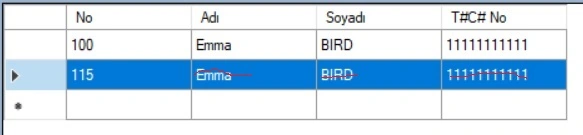
C#
               for (int i = 0; i < dataGridView1.Rows.Count; i++)
            {
              var val1 = dataGridView1.Rows[i].Cells[0].Value.ToString();//Student’s number
                var val2 = drv.FindElement(By.Id("txtAdi")).GetAttribute("value"); // adi
                var val3 = drv.FindElement(By.Id("txtSoyadi")).GetAttribute("value"); // soyadi
                var val4 = drv.FindElement(By.Id("txtKisiTCKimlikNo")).GetAttribute("value"); // T.C. No


  // I want to pull the following data into each row one by one according to the val1 value that changes each time.

        dataGridView1.Rows[i].Cells[1].Value = val2; //captured data
        dataGridView1.Rows[i].Cells[2].Value = val3; //captured data
        dataGridView1.Rows[i].Cells[3].Value = val4; //captured data

    }






Naimish MakwanaRank #324 · 7.7K reputationPosted Jan 4, 2024, 11:17 PM EST
Try below code.
for (int i = 0; i < dataGridView1.Rows.Count; i++)
{
    var val1 = dataGridView1.Rows[i].Cells[0].Value.ToString(); // Student’s number

    // Create a new instance of the WebDriver for each row
    using (var drv = new ChromeDriver())
    {
        // Navigate to the website or perform necessary actions
        drv.Navigate().GoToUrl("your_website_url");

        // Locate the input field and fill it with the current val1 value
        drv.FindElement(By.Id("your_input_field_id")).SendKeys(val1);

        // Perform other actions or submit the form if needed
        // ...

        // Retrieve the data from the website based on the entered val1 value
        var val2 = drv.FindElement(By.Id("txtAdi")).GetAttribute("value"); // adi
        var val3 = drv.FindElement(By.Id("txtSoyadi")).GetAttribute("value"); // soyadi
        var val4 = drv.FindElement(By.Id("txtKisiTCKimlikNo")).GetAttribute("value"); // T.C. No

        // Update your dataGridView1 with the retrieved data
        dataGridView1.Rows[i].Cells[1].Value = val2; // captured data
        dataGridView1.Rows[i].Cells[2].Value = val3; // captured data
        dataGridView1.Rows[i].Cells[3].Value = val4; // captured data
    }
}
Thanks
Mehmet FatihRank #1,474 · 1.1K reputationPosted Jan 5, 2024, 4:48 AM EST
Thanks four your help. Naimish.