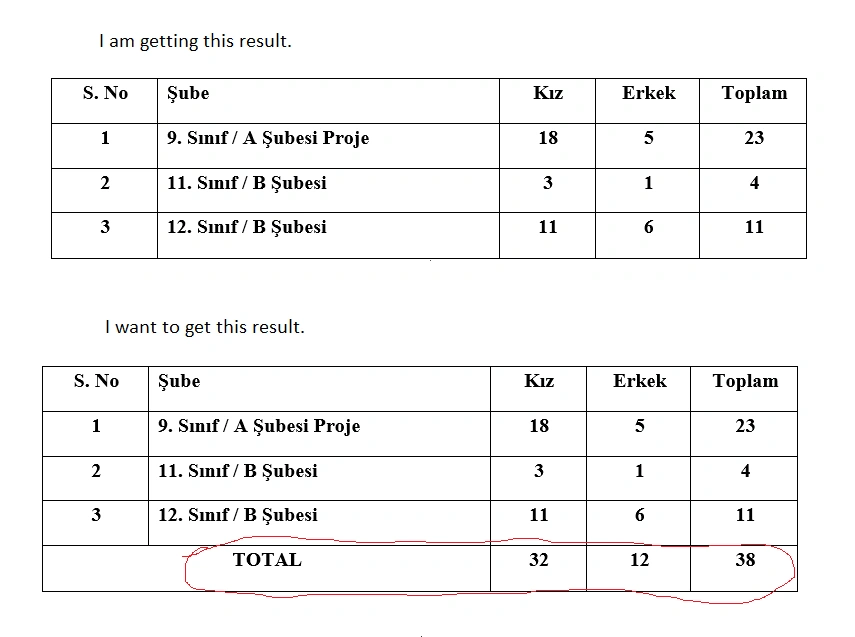
I want to include the grand totals of the data I pulled into the word document. However, I couldn't make it. Is there anyone who can help with this? These are my codes.
C#
using System;
using System.ComponentModel;
using System.Data;
using System.Data.OleDb;
using System.Reflection;
using System.Threading;
using System.Windows.Forms;
using Word = Microsoft.Office.Interop.Word;
private DataTable GetDataSource()
{
    var dt = new DataTable();
    using (var conn = new OleDbConnection("Provider=Microsoft.ACE.OLEDB.12.0;Data Source = gezievrak2541.accdb; Jet OLEDB:Database Password = Fatih2541; Mode = ReadWrite"))
    {
        conn.Open();
        using (var adapter = new OleDbDataAdapter("SELECT COUNT (sinifi) as sno,sinifi, SUM(IIF(cinsiyet = 'Kiz', 1, 0)) as kiz,SUM(IIF(cinsiyet = 'Erkek', 1, 0)) as erkek, COUNT(*) as toplam  FROM gezilistemiz25  where sinifi IS NOT NULL GROUP BY  sinifi order BY Left(sinifi,1) desc,Left(sinifi,13) asc,Left(sinifi,12) asc", conn))
        {
            adapter.Fill(dt);
        }
        conn.Close();
        dt.Dispose();
        return dt;
    }
}
private void Sabitbilgi()
{
    DataTable dt = GetDataSource();
    int iTotalFields = 0;
    object oMissing = Missing.Value;
    Word.Application oWord = new Word.Application();
    oWord.Visible = true;
    object oTemplatePath = Application.StartupPath + "\\GeziPlani.docx";
    Word.Document oWordDoc = oWord.Documents.Add(ref oTemplatePath, ref oMissing, ref oMissing, ref oMissing);
    object Index = "sinifi";
    Word.Table tbl = oWordDoc.Bookmarks.get_Item(ref Index).Range.Tables[1];
    int i = 1; foreach (DataRow r in dt.Rows) r["sno"] = i++; // satir numarasi verir
    foreach (DataRow dr in dt.Rows)
    {
        Word.Row newRow = tbl.Rows.Add(ref oMissing);
        for (int j = 1; j <= dt.Columns.Count; j++)
        {
            newRow.Cells[j].Range.Text = dr[j - 1].ToString();
        }
    }
}







Amit MohantyRank #112 · 20K reputationPosted Jul 3, 2023, 10:14 AM EDT
You can't assign sno value as string value, because its type in integer. Check this:
private DataTable GetDataSource() { var dt = new DataTable(); using (var conn = new OleDbConnection("Provider=Microsoft.ACE.OLEDB.12.0;Data Source = gezievrak2541.accdb; Jet OLEDB:Database Password = Fatih2541; Mode = ReadWrite")) { conn.Open(); using (var adapter = new OleDbDataAdapter("SELECT COUNT (sinifi) as sno,sinifi, SUM(IIF(cinsiyet = 'Kiz', 1, 0)) as kiz,SUM(IIF(cinsiyet = 'Erkek', 1, 0)) as erkek, COUNT(*) as toplam FROM gezilistemiz25 where sinifi IS NOT NULL GROUP BY sinifi order BY Left(sinifi,1) desc,Left(sinifi,13) asc,Left(sinifi,12) asc", conn)) { adapter.Fill(dt); } conn.Close(); // Calculate the grand totals object totalKiz = dt.Compute("SUM(kiz)", string.Empty); object totalErkek = dt.Compute("SUM(erkek)", string.Empty); object totalToplam = dt.Compute("SUM(toplam)", string.Empty); DataRow grandTotalsRow = dt.NewRow(); grandTotalsRow["sno"] = DBNull.Value; grandTotalsRow["sinifi"] = "TOTAL"; grandTotalsRow["kiz"] = totalKiz; grandTotalsRow["erkek"] = totalErkek; grandTotalsRow["toplam"] = totalToplam; dt.Rows.Add(grandTotalsRow); return dt; } } private void Sabitbilgi() { DataTable dt = GetDataSource(); int iTotalFields = 0; object oMissing = Missing.Value; Word.Application oWord = new Word.Application(); oWord.Visible = true; object oTemplatePath = Application.StartupPath + "\\GeziPlani.docx"; Word.Document oWordDoc = oWord.Documents.Add(ref oTemplatePath, ref oMissing, ref oMissing, ref oMissing); object Index = "sinifi"; Word.Table tbl = oWordDoc.Bookmarks.get_Item(ref Index).Range.Tables[1]; int i = 1; foreach (DataRow r in dt.Rows) { r["sno"] = i++; // satir numarasi verir Word.Row newRow = tbl.Rows.Add(ref oMissing); for (int j = 1; j <= dt.Columns.Count; j++) { newRow.Cells[j].Range.Text = r[j - 1].ToString(); } } }Amit MohantyRank #112 · 20K reputationPosted Jul 4, 2023, 2:16 AM EDT
Try this for merge first two column of total row:
foreach (DataRow r in dt.Rows) { r["sno"] = i++; // satir numarasi verir Word.Row newRow = tbl.Rows.Add(ref oMissing); if(i == dt.Rows.Count) { newRow.Cells[1].Merge(newRow.Cells[2]); newRow.Cells[1].Range.Text = r[1].ToString(); for (int j = 3; j <= dt.Columns.Count; j++) { newRow.Cells[j].Range.Text = r[j - 1].ToString(); } } else { for (int j = 1; j <= dt.Columns.Count; j++) { newRow.Cells[j].Range.Text = r[j - 1].ToString(); } } }Prasad RaveendranRank #320 · 7.8K reputationPosted Jul 1, 2023, 11:30 PM EDT
I understand that you are pulling data from database. I have given you a sample which will provide some insights on how to calculate the column sum and display it as a new row at the bottom.
Please consider this as a sample code, and introduce additional line of code after the line
DataTable dt = GetDataSource();
// Calculate the totals int kizCountTotal = 0; int erkekCountTotal = 0; int toplamCountTotal = 0; foreach (DataRow row in dt.Rows) { kizCountTotal += (int)row["kiz"]; erkekCountTotal += (int)row["erkek"]; toplamCountTotal += (int)row["toplam"]; } // Create a new row for the totals DataRow totalsRow = dt.NewRow(); totalsRow["SNO"] = DBNull.Value; // If you want to leave this column empty totalsRow["sinifi"] = "Total"; totalsRow["kiz"] = kizCountTotal; totalsRow["erkek"] = erkekCountTotal; totalsRow["toplam"] = toplamCountTotal; // Add the totals row to the datatable dt.Rows.Add(totalsRow);Amit MohantyRank #112 · 20K reputationPosted Jul 2, 2023, 1:48 AM EDT
using System; using System.ComponentModel; using System.Data; using System.Data.OleDb; using System.Reflection; using System.Threading; using System.Windows.Forms; using Word = Microsoft.Office.Interop.Word; private DataTable GetDataSource() { var dt = new DataTable(); using (var conn = new OleDbConnection("Provider=Microsoft.ACE.OLEDB.12.0;Data Source = gezievrak2541.accdb; Jet OLEDB:Database Password = Fatih2541; Mode = ReadWrite")) { conn.Open(); using (var adapter = new OleDbDataAdapter("SELECT COUNT (sinifi) as sno, sinifi, SUM(IIF(cinsiyet = 'Kiz', 1, 0)) as kiz, SUM(IIF(cinsiyet = 'Erkek', 1, 0)) as erkek, COUNT(*) as toplam FROM gezilistemiz25 where sinifi IS NOT NULL GROUP BY sinifi WITH ROLLUP order BY Left(sinifi,1) desc, Left(sinifi,13) asc, Left(sinifi,12) asc", conn)) { adapter.Fill(dt); } conn.Close(); dt.Dispose(); return dt; } } private void Sabitbilgi() { DataTable dt = GetDataSource(); int iTotalFields = 0; object oMissing = Missing.Value; Word.Application oWord = new Word.Application(); oWord.Visible = true; object oTemplatePath = Application.StartupPath + "\\GeziPlani.docx"; Word.Document oWordDoc = oWord.Documents.Add(ref oTemplatePath, ref oMissing, ref oMissing, ref oMissing); object Index = "sinifi"; Word.Table tbl = oWordDoc.Bookmarks.get_Item(ref Index).Range.Tables[1]; int i = 1; foreach (DataRow r in dt.Rows) r["sno"] = i++; // satir numarasi verir // Iterate through the rows and columns to populate the table for (int row = 1; row <= dt.Rows.Count; row++) { DataRow dr = dt.Rows[row - 1]; Word.Row newRow = tbl.Rows.Add(ref oMissing); for (int col = 1; col <= dt.Columns.Count; col++) { newRow.Cells[col].Range.Text = dr[col - 1].ToString(); } } // Add a blank row for the grand totals tbl.Rows.Add(ref oMissing); // Populate the grand totals row DataRow grandTotals = dt.Rows[dt.Rows.Count - 1]; for (int col = 1; col <= dt.Columns.Count; col++) { tbl.Cell(tbl.Rows.Count, col).Range.Text = grandTotals[col - 1].ToString(); } }Mehmet FatihRank #1,474 · 1.1K reputationPosted Jul 2, 2023, 5:30 AM EDT
Thanks for your intrest Amit. I have tried your codes but it gives this error. "System.InvalidCastException: 'The specified assignment is not valid.'"
Mehmet FatihRank #1,474 · 1.1K reputationPosted Jul 2, 2023, 5:58 AM EDT
Thanks for your intrest Amit but I have tried your codes and they give this result. It doesn't count the total results.
Mehmet FatihRank #1,474 · 1.1K reputationPosted Jul 2, 2023, 6:09 AM EDT
Thank you Prasad. Your solution is closer to the result. However, it gives this error. "'The specified assignment is not valid.'"
foreach (DataRow row in dt.Rows)
{
    kizCountTotal += (int)row["kiz"];
    erkekCountTotal += (int)row["erkek"];
    toplamCountTotal += (int)row["toplam"];
}
I understood that the problem was in the sql codes, but I could not solve it. It cannot get the grand totals of the numbers of boys and girls.
Amit MohantyRank #112 · 20K reputationPosted Jul 3, 2023, 7:46 AM EDT
Try this:
// Calculate the grand totals
object totalKiz = dt.Compute("SUM(kiz)", string.Empty);
object totalErkek = dt.Compute("SUM(erkek)", string.Empty);
object totalToplam = dt.Compute("SUM(toplam)", string.Empty);

DataRow grandTotalsRow = dt.NewRow();
grandTotalsRow["sno"] = DBNull.Value;
grandTotalsRow["sinifi"] = "TOTAL";
grandTotalsRow["kiz"] = totalKiz;
grandTotalsRow["erkek"] = totalErkek;
grandTotalsRow["toplam"] = totalToplam;

dt.Rows.Add(grandTotalsRow);
Full code:
private DataTable GetDataSource() { var dt = new DataTable(); using (var conn = new OleDbConnection("Provider=Microsoft.ACE.OLEDB.12.0;Data Source = gezievrak2541.accdb; Jet OLEDB:Database Password = Fatih2541; Mode = ReadWrite")) { conn.Open(); using (var adapter = new OleDbDataAdapter("SELECT COUNT (sinifi) as sno,sinifi, SUM(IIF(cinsiyet = 'Kiz', 1, 0)) as kiz,SUM(IIF(cinsiyet = 'Erkek', 1, 0)) as erkek, COUNT(*) as toplam FROM gezilistemiz25 where sinifi IS NOT NULL GROUP BY sinifi order BY Left(sinifi,1) desc,Left(sinifi,13) asc,Left(sinifi,12) asc", conn)) { adapter.Fill(dt); } conn.Close(); // Calculate the grand totals object totalKiz = dt.Compute("SUM(kiz)", string.Empty); object totalErkek = dt.Compute("SUM(erkek)", string.Empty); object totalToplam = dt.Compute("SUM(toplam)", string.Empty); DataRow grandTotalsRow = dt.NewRow(); grandTotalsRow["sno"] = DBNull.Value; grandTotalsRow["sinifi"] = "TOTAL"; grandTotalsRow["kiz"] = totalKiz; grandTotalsRow["erkek"] = totalErkek; grandTotalsRow["toplam"] = totalToplam; dt.Rows.Add(grandTotalsRow); return dt; } } private void Sabitbilgi() { int totalRowCount; DataTable dt = GetDataSource(); int iTotalFields = 0; object oMissing = Missing.Value; Word.Application oWord = new Word.Application(); oWord.Visible = true; object oTemplatePath = Application.StartupPath + "\\GeziPlani.docx"; Word.Document oWordDoc = oWord.Documents.Add(ref oTemplatePath, ref oMissing, ref oMissing, ref oMissing); object Index = "sinifi"; Word.Table tbl = oWordDoc.Bookmarks.get_Item(ref Index).Range.Tables[1]; int i = 1; foreach (DataRow r in dt.Rows) { r["sno"] = i++; // satir numarasi verir Word.Row newRow = tbl.Rows.Add(ref oMissing); for (int j = 1; j <= dt.Columns.Count; j++) { newRow.Cells[j].Range.Text = r[j - 1].ToString(); } } // Format the last row (grand totals) with bold text tbl.Rows[dt.Rows.Count].Range.Bold = 1; }Mehmet FatihRank #1,474 · 1.1K reputationPosted Jul 3, 2023, 8:27 AM EDT
Amit, I have tried your last code. But I have got this error.
Amit MohantyRank #112 · 20K reputationPosted Jul 3, 2023, 9:23 AM EDT
Remove the
out int totalRowCountparameater from GetDatasource methodMehmet FatihRank #1,474 · 1.1K reputationPosted Jul 3, 2023, 9:41 AM EDT
I have removed the
out int totalRowCount. After removing that line, it gives the error for line int totalRowCount; "CS0168 variable 'totalRowCount' is expressed but never used". When I deactive it, then it gives the following mistake.Mehmet FatihRank #1,474 · 1.1K reputationPosted Jul 3, 2023, 10:34 AM EDT
Amit, thanks. The problem has been solved thanks to you. Your are great. Can I make one last request from you? Is there a possibility to remove the numbering in the total row and merge it with the Grand total column as in the image?
Mehmet FatihRank #1,474 · 1.1K reputationPosted Jul 4, 2023, 2:51 AM EDT
It gives thie error for merging. System.Runtime.InteropServices.COMException: 'There is no requested item in the group.'
Amit MohantyRank #112 · 20K reputationPosted Jul 4, 2023, 5:16 AM EDT
check this once
foreach (DataRow r in dt.Rows) { r["sno"] = i++; // satir numarasi verir Word.Row newRow = tbl.Rows.Add(ref oMissing); for (int j = 1; j <= dt.Columns.Count; j++) { newRow.Cells[j].Range.Text = r[j - 1].ToString(); } } // Merge the first two columns of the last row Word.Row lastRow = tbl.Rows[tbl.Rows.Count]; lastRow.Cells[1].Merge(lastRow.Cells[2]);Mehmet FatihRank #1,474 · 1.1K reputationPosted Jul 4, 2023, 6:35 AM EDT
It is merging the two cells in the last row, but also is numbering the last row. How can we remove the numbering on the last line?
Amit MohantyRank #112 · 20K reputationPosted Jul 4, 2023, 6:55 AM EDT
// Merge the first two columns of the last row Word.Row lastRow = tbl.Rows[tbl.Rows.Count]; lastRow.Cells[1].Range.Text = ""; lastRow.Cells[1].Merge(lastRow.Cells[2]);Mehmet FatihRank #1,474 · 1.1K reputationPosted Jul 4, 2023, 7:29 AM EDT
Dear Amit, Thanks for your interest and efforts. It is exactly the thing I want.
Prasad RaveendranRank #320 · 7.8K reputationPosted Jul 1, 2023, 3:01 PM EDT
Please take a look at the below sample code. This will give you some insight on how we can introduce a row which will calculate the total and display at the bottom.
using System;
using System.Data;

class Program
{
    static void Main()
    {
        // Assuming you have your dataset with three columns - ID, Name, Price
        DataSet dataSet = new DataSet();

        // Create a DataTable with the columns
        DataTable dataTable = new DataTable();
        dataTable.Columns.Add("ID", typeof(int));
        dataTable.Columns.Add("Name", typeof(string));
        dataTable.Columns.Add("Price", typeof(decimal));

        // Add rows to the DataTable
        dataTable.Rows.Add(1, "Product A", 10);
        dataTable.Rows.Add(2, "Product B", 20);
        dataTable.Rows.Add(3, "Product C", 30);

        // Add the DataTable to the DataSet
        dataSet.Tables.Add(dataTable);

        // Calculate the total value of the Price column
        decimal total = 0;
        foreach (DataRow row in dataTable.Rows)
        {
            total += (decimal)row["Price"];
        }

        // Create a new row with the total value
        DataRow newRow = dataTable.NewRow();
        newRow["ID"] = "Total";
        newRow["Name"] = "";
        newRow["Price"] = total;

        // Add the new row to the DataTable
        dataTable.Rows.Add(newRow);

        // Print the updated dataset
        PrintDataSet(dataSet);
    }

    static void PrintDataSet(DataSet dataSet)
    {
        foreach (DataTable table in dataSet.Tables)
        {
            Console.WriteLine("Table: " + table.TableName);
            foreach (DataColumn column in table.Columns)
            {
                Console.Write(column.ColumnName + "\t");
            }
            Console.WriteLine();

            foreach (DataRow row in table.Rows)
            {
                foreach (var item in row.ItemArray)
                {
                    Console.Write(item.ToString() + "\t");
                }
                Console.WriteLine();
            }

            Console.WriteLine();
        }
    }
}
In this example, we create a DataSet and a DataTable to store the dataset. We add rows to the DataTable and calculate the total value of the Price column. Then, we create a new row with the total value and add it to the DataTable. Finally, we print the updated DataSet using the PrintDataSet method.