i want create a grid view like below image.data will get from DB. except pending. and the gridview style like below image
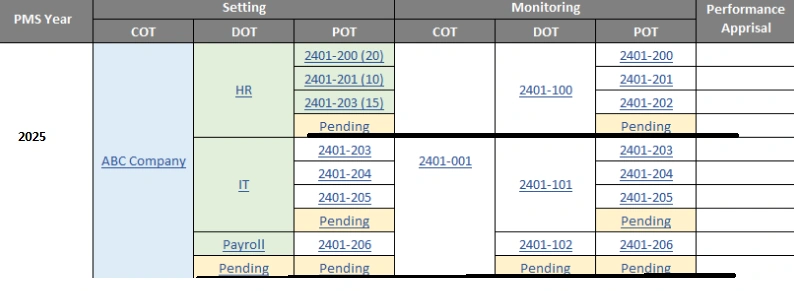
i want create a grid view like below image.data will get from DB. except pending. and the gridview style like below image
Know the answer? Post it. Somebody with the same question will find it here.
Answer a question in the forums and earn +20 SHARP for every answer.
See unanswered questions Arun PottiAnswers in the forums20answers02
 Tahir AnsariAnswers in the forums5answers03
 Kamlesh KumarAnswers in the forums5answers04
 Sam HobbsAnswers in the forums4answers05
 Željko PerićAnswers in the forums3answersFull leaderboard →
 DevSocialUpcoming · 3rd editionAI Agents ConferenceDec 1–3, 2026Live onlineFree to attend5days leftRegister

Amira BedhiafiRank #601 · 4K reputationPosted Jan 16, 2025, 4:12 PM EST
What technologies are you using ?
lejoRank #3,526 · 412 reputationPosted Jan 16, 2025, 11:06 PM EST
asp.net with c#
Tuhin PaulRank #7 · 71.9K reputationPosted Jan 17, 2025, 1:45 PM EST
Part 1:
Here is the code try once:
Model class -
using System.ComponentModel.DataAnnotations;

namespace PerformanceGrid.Models
{
    public class Department
    {
        public int Id { get; set; }
        public string Name { get; set; }
        public List Codes { get; set; }
    }

    public class DepartmentCode
    {
        public int Id { get; set; }
        public string Code { get; set; }
        public bool IsPending { get; set; }
        public int DepartmentId { get; set; }
        public Department Department { get; set; }
    }

    public class PerformanceData
    {
        public int Id { get; set; }
        public int Year { get; set; }
        public string CompanyName { get; set; }
        public List Departments { get; set; }
    }
}
DBContext class:
using Microsoft.EntityFrameworkCore;
using PerformanceGrid.Models;

namespace PerformanceGrid.Data
{
    public class ApplicationDbContext : DbContext
    {
        public ApplicationDbContext(DbContextOptions options)
            : base(options)
        {
        }

        public DbSet PerformanceData { get; set; }
        public DbSet Departments { get; set; }
        public DbSet DepartmentCodes { get; set; }

        protected override void OnModelCreating(ModelBuilder modelBuilder)
        {
            // Seed initial data
            modelBuilder.Entity().HasData(
                new PerformanceData { Id = 1, Year = 2025, CompanyName = "ABC Company" }
            );

            modelBuilder.Entity().HasData(
                new Department { Id = 1, Name = "HR" },
                new Department { Id = 2, Name = "IT" },
                new Department { Id = 3, Name = "Payroll" }
            );

            // Add more seed data as needed
        }
    }
}
Controller class:
using Microsoft.AspNetCore.Mvc; using Microsoft.EntityFrameworkCore; using PerformanceGrid.Data; using PerformanceGrid.Models; namespace PerformanceGrid.Controllers { public class PerformanceController : Controller { private readonly ApplicationDbContext _context; public PerformanceController(ApplicationDbContext context) { _context = context; } public async Task Index() { var performanceData = await _context.PerformanceData .Include(p => p.Departments) .ThenInclude(d => d.Codes) .FirstOrDefaultAsync(); return View(performanceData); } } }Tuhin PaulRank #7 · 71.9K reputationPosted Jan 17, 2025, 1:49 PM EST
Part 2:
Index.cshtml
@model PerformanceGrid.Models.PerformanceData


    Performance Monitoring Grid


                    PMS Year
                    Setting
                    Monitoring
                    Performance Appraisal


                    COT
                    DOT
                    POT
                    COT
                    DOT
                    POT


                @foreach (var department in Model.Departments)
                {

                        @if (department == Model.Departments.First())
                        {

                                @Model.Year


                                    @Model.CompanyName


                        }
                        @department.Name


                                @foreach (var code in department.Codes)
                                {

                                        @(code.IsPending ? "Pending" : code.Code)

}


                        @($"2401-{department.Id:D3}")
                        @($"2401-{(department.Id + 100):D3}")


                                @foreach (var code in department.Codes.Take(3))
                                {
                                    @code.Code
}
                                Pending


                }

                    Pending
                    Pending
                    Pending

                    Pending
Program.cs
using Microsoft.EntityFrameworkCore;
using PerformanceGrid.Data;

var builder = WebApplication.CreateBuilder(args);

// Add services to the container.
builder.Services.AddControllersWithViews();
builder.Services.AddDbContext(options =>
    options.UseSqlServer(builder.Configuration.GetConnectionString("DefaultConnection")));

var app = builder.Build();

// Configure the HTTP request pipeline.
if (!app.Environment.IsDevelopment())
{
    app.UseExceptionHandler("/Home/Error");
    app.UseHsts();
}

app.UseHttpsRedirection();
app.UseStaticFiles();

app.UseRouting();

app.UseAuthorization();

app.MapControllerRoute(
    name: "default",
    pattern: "{controller=Performance}/{action=Index}/{id?}");

app.Run();
`appsettings.json`:
{
  "ConnectionStrings": {
    "DefaultConnection": "Server=(localdb)\\mssqllocaldb;Database=PerformanceGrid;Trusted_Connection=True;MultipleActiveResultSets=true"
  }
}
wwwroot/css/site.css
.container {
    max-width: 1200px;
    margin: 0 auto;
    padding: 1rem;
}

.text-2xl {
    font-size: 1.5rem;
    line-height: 2rem;
}

.font-bold {
    font-weight: 700;
}

.mb-4 {
    margin-bottom: 1rem;
}

.w-full {
    width: 100%;
}

.border-collapse {
    border-collapse: collapse;
}

.border {
    border: 1px solid #e5e7eb;
}

.p-2 {
    padding: 0.5rem;
}

.bg-gray-200 {
    background-color: #e5e7eb;
}

.bg-blue-50 {
    background-color: #eff6ff;
}

.bg-green-50 {
    background-color: #f0fdf4;
}

.bg-yellow-100 {
    background-color: #fef9c3;
}

.text-blue-600 {
    color: #2563eb;
}

.hover\:underline:hover {
    text-decoration: underline;
}

.space-y-1 > * + * {
    margin-top: 0.25rem;
}

.overflow-x-auto {
    overflow-x: auto;
}

.min-w-\[100px\] {
    min-width: 100px;
}
This implementation includes:
1. Entity Framework Core models and DbContext
2. A controller to handle the data retrieval
3. A Razor view that matches the original grid design
4. CSS styling to match the original appearance
5. Database configuration and seeding
6. Proper routing and dependency injection setup
Tuhin PaulRank #7 · 71.9K reputationPosted Jan 17, 2025, 2:02 PM EST
Check out this react js implementation.
page.tsx
import PerformanceGrid from "@/performance-grid"

export default function Page() {
  return (

      Performance Monitoring Grid


)
}
db.ts
// Simulated database data
export const performanceData: PerformanceData = {
  year: 2025,
  company: "ABC Company",
  departments: [
    {
      name: "HR",
      codes: [
        { code: "2401-200" },
        { code: "2401-201" },
        { code: "2401-203" },
        { status: "pending" }
      ]
    },
    {
      name: "IT",
      codes: [
        { code: "2401-203" },
        { code: "2401-204" },
        { code: "2401-205" },
        { status: "pending" }
      ]
    },
    {
      name: "Payroll",
      codes: [
        { code: "2401-206" }
      ]
    }
  ]
}
performance.ts
export interface DepartmentCode {
  code: string;
  status?: 'pending';
}

export interface Department {
  name: string;
  codes: DepartmentCode[];
  subdepartments?: Department[];
}

export interface PerformanceData {
  year: number;
  company: string;
  departments: Department[];
}
performance-grid.tsx
"use client"

import { performanceData } from "@/lib/db"
import type { DepartmentCode, Department } from "@/types/performance"
import { cn } from "@/lib/utils"

export default function PerformanceGrid() {
  return (


            PMS Year
            Setting
            Monitoring
            Performance Appraisal


            COT
            DOT
            POT
            COT
            DOT
            POT


              {performanceData.year}


                {performanceData.company}


            HR


                {performanceData.departments[0].codes.map((code, index) => (

                    {code.status === "pending" ? "Pending" : code.code}

))}


            2401-100
            2401-101


                {["2401-200", "2401-201", "2401-202", "Pending"].map((code, index) => (

                    {code}

))}


            IT


                {performanceData.departments[1].codes.map((code, index) => (

                    {code.status === "pending" ? "Pending" : code.code}

))}


            2401-001
            2401-101


                {["2401-203", "2401-204", "2401-205", "Pending"].map((code, index) => (

                    {code}

))}


            Payroll


                {performanceData.departments[2].codes.map((code, index) => (

                    {code.status === "pending" ? "Pending" : code.code}

))}


            2401-102

            2401-206


            Pending
            Pending
            Pending

            Pending


)
}