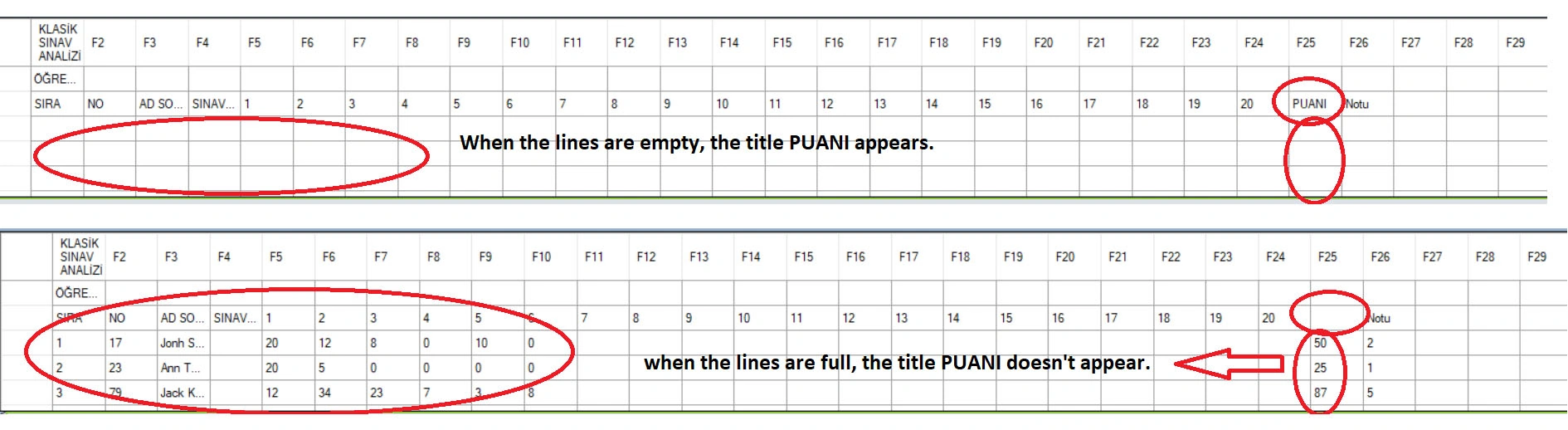
I'm going crazy please help. I am pulling the data from Excel into datagrdiview. However, when the data under the SCORE heading is empty, the title appears. I couldn't understand why it didn't appear when it was full.
C#
        private void button2_Click(object sender, EventArgs e)
        {
            try
            {
                comboBox1.SelectedIndex = -1;
                OpenFileDialog openFileDialog = new OpenFileDialog();
                openFileDialog.Filter = "Excel Files|*.xls;*.xlsx";
                openFileDialog.ShowDialog();

                if (!string.IsNullOrEmpty(openFileDialog.FileName))
                {

                    OleDbcon = new OleDbConnection(@"Provider =Microsoft.ACE.OLEDB.12.0;Data Source=" + openFileDialog.FileName + ";Extended Properties='Excel 12.0;IMEX=1;'");
                    OleDbcon.Open();
                    DataTable dt = OleDbcon.GetOleDbSchemaTable(OleDbSchemaGuid.Tables,new object[] { null, null, null, "TABLE" });
                    OleDbcon.Close();

                    comboBox1.Items.Clear();

                    for (int i = 0; i < dt.Rows.Count; i++)
                    {
                        string sheetName = dt.Rows[i]["TABLE_NAME"].ToString();
                        sheetName = sheetName.Substring(0, sheetName.Length + i++);
                        i++;

                        var str = sheetName;
                        str = new string((from c in str
                                          where char.IsWhiteSpace(c) || char.IsLetterOrDigit(c)
                                          select c
                            ).ToArray());

                        comboBox1.DisplayMember = sheetName;
                        comboBox1.Items.Add(str);

                    }

                }
            }
            catch (Exception ex)
            {
                // Hata alirsak ekrana bastiriyoruz.
                MessageBox.Show("Dosya Seçilmedi!Hata :" + ex.Message);
            }
        }
 private void comboBox1_SelectedIndexChanged(object sender, EventArgs e)
 {
     try
     {
         OleDbDataAdapter oledbDa = new OleDbDataAdapter("Select * from [" + comboBox1.DisplayMember + "]", OleDbcon);
         DataTable dt = new DataTable();
         oledbDa.Fill(dt);
         dataGridView1.DataSource = dt;
     }
     catch (Exception err)
     {
         MessageBox.Show("Hata! " + err.Message, "Hata Olustu.Dosya Seçilmedi!", MessageBoxButtons.OK, MessageBoxIcon.Error);
     }
 }
/forums/uploadfile/56c12d/04072024123540PM/Excel-Mark.xlsx







Mehmet FatihRank #1,474 · 1.1K reputationPosted Apr 8, 2024, 4:45 AM EDT
You misunderstood the situation. The title is in a cell in the middle. The title is not visible where it is shown in the picture.Unfortunately, this is not exactly what I want.
Mehmet FatihRank #1,474 · 1.1K reputationPosted Apr 8, 2024, 6:26 AM EDT
If you examine the Excel file, you can see that the cell contains the title. When the data under the title is empty, the PUANI title appears. However, it does not appear when it is full.
Abhishek YadavRank #217 · 11.3K reputationPosted Apr 8, 2024, 5:45 AM EDT
It seems like the issue is with the way you are accessing the data from Excel and displaying it in the DataGridView. When the data under the SCORE heading is empty, it is possible that the column is not being included in the DataTable that you are binding to the DataGridView.
To resolve this issue, you can modify your code to check if the column exists in the DataTable before binding it to the DataGridView. You can use the following code snippet as a reference:
private void comboBox1_SelectedIndexChanged(object sender, EventArgs e)
{
    try
    {
        OleDbDataAdapter oledbDa = new OleDbDataAdapter("Select * from [" + comboBox1.DisplayMember + "]", OleDbcon);
        DataTable dt = new DataTable();
        oledbDa.Fill(dt);

        // Check if the SCORE column exists in the DataTable
        if (dt.Columns.Contains("SCORE"))
        {
            // Set the DataGridView DataSource only if the SCORE column exists
            dataGridView1.DataSource = dt;
        }
        else
        {
            // Display a message or handle the situation where the SCORE column is missing
            MessageBox.Show("SCORE column is missing in the Excel sheet.", "Missing Column", MessageBoxButtons.OK, MessageBoxIcon.Error);
        }
    }
    catch (Exception err)
    {
        MessageBox.Show("Hata! " + err.Message, "Hata Olustu.Dosya Seçilmedi!", MessageBoxButtons.OK, MessageBoxIcon.Error);
    }
}
This modification will ensure that the DataGridView is only bound to the DataTable if the SCORE column exists in the DataTable. Otherwise, it will display an error message informing the user that the column is missing.
Jithu ThomasRank #437 · 5.7K reputationPosted Apr 8, 2024, 2:18 AM EDT
private void button2_Click(object sender, EventArgs e)
{
    try
    {
        comboBox1.SelectedIndex = -1;
        OpenFileDialog openFileDialog = new OpenFileDialog();
        openFileDialog.Filter = "Excel Files|*.xls;*.xlsx";
        openFileDialog.ShowDialog();

        if (!string.IsNullOrEmpty(openFileDialog.FileName))
        {

            OleDbcon = new OleDbConnection(@"Provider =Microsoft.ACE.OLEDB.12.0;Data Source=" + openFileDialog.FileName + ";Extended Properties='Excel 12.0;IMEX=1;'");
            OleDbcon.Open();
            DataTable dt = OleDbcon.GetOleDbSchemaTable(OleDbSchemaGuid.Tables, new object[] { null, null, null, "TABLE" });
            OleDbcon.Close();

            comboBox1.Items.Clear();

            for (int i = 0; i < dt.Rows.Count; i++)
            {
                string sheetName = dt.Rows[i]["TABLE_NAME"].ToString();
                sheetName = sheetName.Substring(0, sheetName.Length + i++);
                i++;

                var str = sheetName;
                str = new string((from c in str
                                  where char.IsWhiteSpace(c) || char.IsLetterOrDigit(c)
                                  select c
                                 ).ToArray());

                comboBox1.DisplayMember = sheetName;
                comboBox1.Items.Add(str);

            }

        }
    }
    catch (Exception ex)
    {
        // Hata alirsak ekrana bastiriyoruz.
        MessageBox.Show("Dosya Seçilmedi!Hata :" + ex.Message);
    }
}

private void comboBox1_SelectedIndexChanged(object sender, EventArgs e)
{
    try
    {
        OleDbDataAdapter oledbDa = new OleDbDataAdapter("Select * from [" + comboBox1.DisplayMember + "]", OleDbcon);
        DataTable dt = new DataTable();
        oledbDa.Fill(dt);

        // Check for missing "SCORE" column and add it if necessary
        if (!dt.Columns.Contains("SCORE"))
        {
            dt.Columns.Add("SCORE"); // Add the SCORE column if missing
        }

        // Handle empty "SCORE" values
        foreach (DataRow row in dt.Rows)
        {
            if (row["SCORE"] == null || string.IsNullOrEmpty(row["SCORE"].ToString()))
            {
                row["SCORE"] = "N/A"; // Or any default value you prefer
            }
        }

        dataGridView1.DataSource = dt;
    }
    catch (Exception err)
    {
        MessageBox.Show("Hata! " + err.Message, "Hata Olustu.Dosya Seçilmedi!", MessageBoxButtons.OK, MessageBoxIcon.Error);
    }
}
Try with the above code.