
I need to create Hierarchy folder creation using c# below this sp out . i having like tree strcture(Hierarchy) folder need to create
once folder creation is succeed need save some files in respective folder please help me on this.
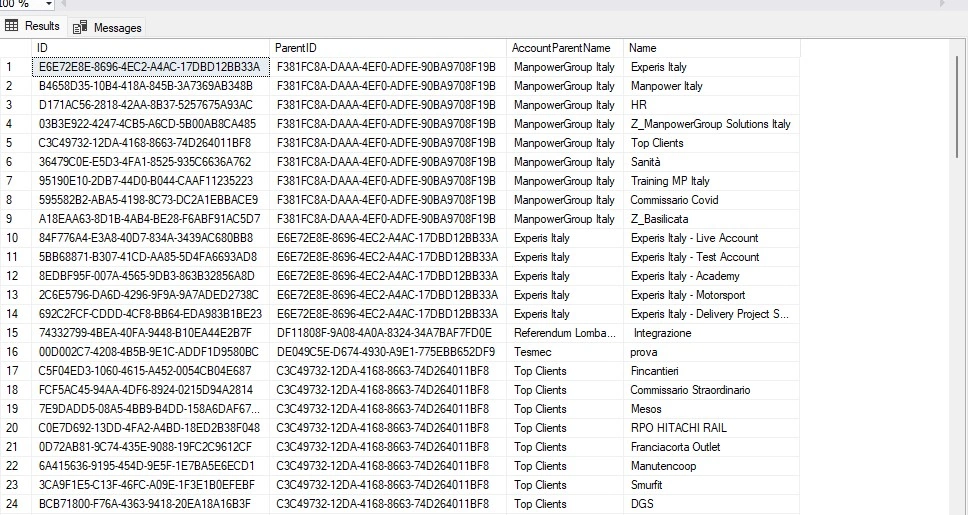
I need to create Hierarchy folder creation using c# below this sp out . i having like tree strcture(Hierarchy) folder need to create
once folder creation is succeed need save some files in respective folder please help me on this.
Know the answer? Post it. Somebody with the same question will find it here.
Answer a question in the forums and earn +20 SHARP for every answer.
See unanswered questions Arun PottiAnswers in the forums20answers02
 Tahir AnsariAnswers in the forums5answers03
 Kamlesh KumarAnswers in the forums5answers04
 Sam HobbsAnswers in the forums4answers05
 Željko PerićAnswers in the forums3answersFull leaderboard →
 DevSocialUpcoming · 3rd editionAI Agents ConferenceDec 1–3, 2026Live onlineFree to attend5days leftRegister

Jithu ThomasRank #437 · 5.7K reputationPosted Jul 27, 2024, 7:01 AM EDT
using System;
using System.Collections.Generic;
using System.Data.SqlClient;
using System.IO;

public class FolderData
{
    public Guid ID { get; set; }
    public Guid? ParentID { get; set; }
    public string AccountParentName { get; set; }
    public string Name { get; set; }
}

class Program
{
    static void Main()
    {
        var folderDataList = GetFolderDataFromDatabase();
        var folderTree = BuildFolderTree(folderDataList);
        CreateFolders(folderTree, @"C:\BaseFolderPath");
    }

    private static List GetFolderDataFromDatabase()
    {
        var folderDataList = new List();
        string connectionString = "Enter your_connection_string";
        string query = "SELECT ID, ParentID, AccountParentName, Name FROM YourTable";

        using (SqlConnection connection = new SqlConnection(connectionString))
        {
            SqlCommand command = new SqlCommand(query, connection);
            connection.Open();

            using (SqlDataReader reader = command.ExecuteReader())
            {
                while (reader.Read())
                {
                    var folderData = new FolderData
                    {
                        ID = reader.GetGuid(0),
                        ParentID = reader.IsDBNull(1) ? (Guid?)null : reader.GetGuid(1),
                        AccountParentName = reader.GetString(2),
                        Name = reader.GetString(3)
                    };
                    folderDataList.Add(folderData);
                }
            }
        }

        return folderDataList;
    }

    private static Dictionary> BuildFolderTree(List folderDataList)
    {
        var folderTree = new Dictionary>();

        foreach (var folderData in folderDataList)
        {
            if (folderData.ParentID.HasValue)
            {
                if (!folderTree.ContainsKey(folderData.ParentID.Value))
                {
                    folderTree[folderData.ParentID.Value] = new List();
                }
                folderTree[folderData.ParentID.Value].Add(folderData);
            }
            else
            {
                if (!folderTree.ContainsKey(Guid.Empty))
                {
                    folderTree[Guid.Empty] = new List();
                }
                folderTree[Guid.Empty].Add(folderData);
            }
        }

        return folderTree;
    }

    private static void CreateFolders(Dictionary> folderTree, string baseFolderPath)
    {
        if (!Directory.Exists(baseFolderPath))
        {
            Directory.CreateDirectory(baseFolderPath);
        }

        CreateSubFolders(folderTree, Guid.Empty, baseFolderPath);
    }

    private static void CreateSubFolders(Dictionary> folderTree, Guid parentId, string parentPath)
    {
        if (!folderTree.ContainsKey(parentId)) return;

        foreach (var folderData in folderTree[parentId])
        {
            string currentFolderPath = Path.Combine(parentPath, folderData.Name);

            if (!Directory.Exists(currentFolderPath))
            {
                Directory.CreateDirectory(currentFolderPath);
            }

            // Save files in the respective folder
            File.WriteAllText(Path.Combine(currentFolderPath, "example.txt"), "This is an example file content");

            CreateSubFolders(folderTree, folderData.ID, currentFolderPath);
        }
    }
}
Please try this.....