Hi masters,
I have some doubts on C# Windows forms.
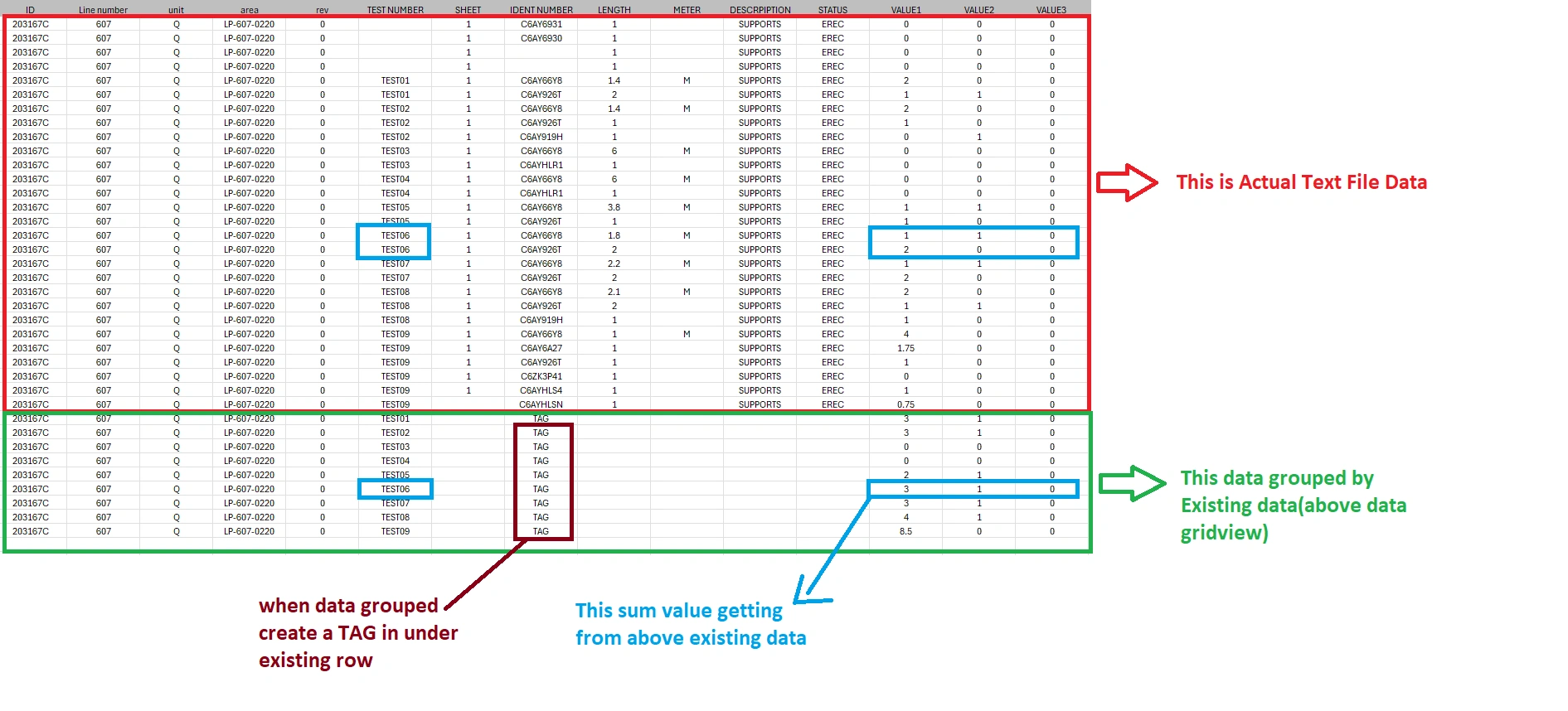
Actual Data from text file Marked-RED COLOR.(using datagridview)
NEED TO MODIFY DATA LIKE -GREEN COLOR(the data will come same datagridview)
so how to acheive, advise me with simple c# code
Know the answer? Post it. Somebody with the same question will find it here.
Answer a question in the forums and earn +20 SHARP for every answer.
See unanswered questions Arun PottiAnswers in the forums20answers02
 Tahir AnsariAnswers in the forums5answers03
 Kamlesh KumarAnswers in the forums5answers04
 Sam HobbsAnswers in the forums4answers05
 Željko PerićAnswers in the forums3answersFull leaderboard →
 DevSocialUpcoming · 3rd editionAI Agents ConferenceDec 1–3, 2026Live onlineFree to attend5days leftRegister

Jithu ThomasRank #437 · 5.7K reputationPosted Jul 25, 2024, 10:16 AM EDT
Please try on the updated script.
using System; using System.Collections.Generic; using System.IO; using System.Linq; using System.Windows.Forms; public class DataRow { public string ID { get; set; } public string LineNumber { get; set; } public string Unit { get; set; } public string Area { get; set; } public string Rev { get; set; } public string TestNumber { get; set; } public string Sheet { get; set; } public string IdentNumber { get; set; } public double Length { get; set; } public string Meter { get; set; } public string Description { get; set; } public string Status { get; set; } public double Value1 { get; set; } public double Value2 { get; set; } public double Value3 { get; set; } } public partial class Form1 : Form { public Form1() { InitializeComponent(); // Load data from file var dataRows = LoadDataFromFile("data.txt"); // Populate DataGridView with original data PopulateDataGridView(dataGridView1, dataRows); // Add grouped rows and refresh DataGridView var updatedDataRows = AddGroupedRows(dataRows); PopulateDataGridView(dataGridView1, updatedDataRows); } private List LoadDataFromFile(string filePath) { var dataRows = new List(); var lines = File.ReadAllLines(filePath); foreach (var line in lines) { var columns = line.Split(new[] { ' ', '\t' }, StringSplitOptions.RemoveEmptyEntries); dataRows.Add(new DataRow { ID = columns[0], LineNumber = columns[1], Unit = columns[2], Area = columns[3], Rev = columns[4], TestNumber = columns[5], Sheet = columns[6], IdentNumber = columns[7], Length = double.Parse(columns[8]), Meter = columns[9], Description = columns[10], Status = columns[11], Value1 = double.Parse(columns[12]), Value2 = double.Parse(columns[13]), Value3 = double.Parse(columns[14]) }); } return dataRows; } private void PopulateDataGridView(DataGridView dataGridView, List dataRows) { dataGridView.DataSource = dataRows; } private List AddGroupedRows(List dataRows) { var groupedData = dataRows .GroupBy(row => row.TestNumber) .Select(group => new DataRow { ID = "TAG", LineNumber = "", Unit = "", Area = "", Rev = "", TestNumber = group.Key, Sheet = "", IdentNumber = "", Length = group.Sum(row => row.Length), Meter = "", Description = "", Status = "", Value1 = group.Sum(row => row.Value1), Value2 = group.Sum(row => row.Value2), Value3 = group.Sum(row => row.Value3) }).ToList(); var allRows = new List(dataRows); allRows.AddRange(groupedData); return allRows; } }Rajadurai127 reputationPosted Jul 25, 2024, 1:34 AM EDT
Not working Bro
Rajadurai127 reputationPosted Jul 26, 2024, 4:23 AM EDT
Hi Jithu,
Its working
Thank You
Jithu ThomasRank #437 · 5.7K reputationPosted Jul 24, 2024, 9:29 AM EDT
using System;
using System.Collections.Generic;
using System.IO;
using System.Linq;
using System.Windows.Forms;

namespace DataGridViewExample
{
    public partial class Form1 : Form
    {
        private List dataRows;

        public Form1()
        {
            InitializeComponent();
            LoadDataFromFile("data.txt");
            PopulateDataGridView();
            AddGroupedRows();
        }

        private void LoadDataFromFile(string filePath)
        {
            dataRows = new List();
            var lines = File.ReadAllLines(filePath);

            foreach (var line in lines)
            {
                var columns = line.Split(new[] { ' ' }, StringSplitOptions.RemoveEmptyEntries);
                dataRows.Add(new DataRow
                {
                    ID = columns[0],
                    LineNumber = columns[1],
                    Unit = columns[2],
                    Area = columns[3],
                    Rev = columns[4],
                    TestNumber = columns[5],
                    Sheet = columns[6],
                    IdentNumber = columns[7],
                    Length = double.Parse(columns[8]),
                    Meter = columns[9],
                    Description = columns[10],
                    Status = columns[11],
                    Value1 = int.Parse(columns[12]),
                    Value2 = int.Parse(columns[13]),
                    Value3 = int.Parse(columns[14])
                });
            }
        }

        private void PopulateDataGridView()
        {
            dataGridView1.DataSource = dataRows;
        }

        private void AddGroupedRows()
        {
            var groupedData = dataRows
                .GroupBy(row => row.TestNumber)
                .Select(group => new DataRow
                {
                    ID = "TAG",
                    LineNumber = "",
                    Unit = "",
                    Area = "",
                    Rev = "",
                    TestNumber = group.Key,
                    Sheet = "",
                    IdentNumber = "",
                    Length = group.Sum(row => row.Length),
                    Meter = "",
                    Description = "",
                    Status = "",
                    Value1 = group.Sum(row => row.Value1),
                    Value2 = group.Sum(row => row.Value2),
                    Value3 = group.Sum(row => row.Value3)
                });

            foreach (var row in groupedData)
            {
                dataRows.Add(row);
            }

            dataGridView1.DataSource = null; // Reset the binding to refresh the DataGridView
            dataGridView1.DataSource = dataRows;
        }
    }

    public class DataRow
    {
        public string ID { get; set; }
        public string LineNumber { get; set; }
        public string Unit { get; set; }
        public string Area { get; set; }
        public string Rev { get; set; }
        public string TestNumber { get; set; }
        public string Sheet { get; set; }
        public string IdentNumber { get; set; }
        public double Length { get; set; }
        public string Meter { get; set; }
        public string Description { get; set; }
        public string Status { get; set; }
        public int Value1 { get; set; }
        public int Value2 { get; set; }
        public int Value3 { get; set; }
    }
}
Please try this