i wanna increment number in gridview devexpress
like in first row and first Cell in column "A"
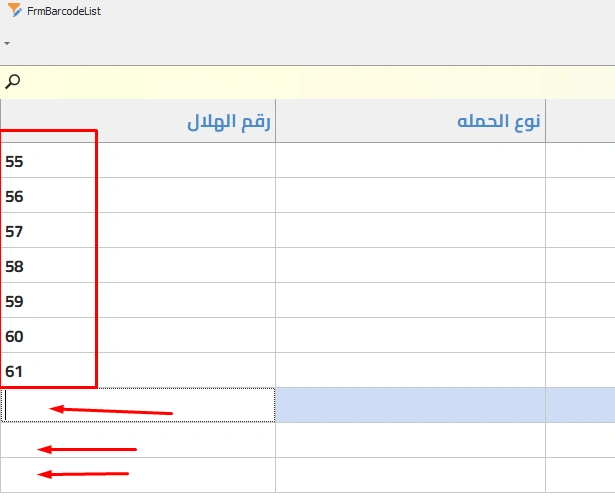
i wanna set number like 55 in first row and first cell and press enter to increment number in above cell in current column
like in Excell Sheet i press Ctrl and click and Move mouse down to increment number
i want it here in gridview devexpress
like this Pic
Please Helppp ?!!!







Jithu ThomasRank #437 · 5.7K reputationPosted Jul 9, 2024, 1:45 AM EDT
private void GridView1_KeyDown(object sender, KeyEventArgs e)
{
    if (e.KeyCode == Keys.Enter)
    {
        GridView view = sender as GridView;
        if (view.FocusedColumn.FieldName == "A")
        {
            int rowHandle = view.FocusedRowHandle;
            if (rowHandle >= 0)
            {
                int currentValue = Convert.ToInt32(view.GetRowCellValue(rowHandle, view.FocusedColumn));
                int nextRowHandle = view.GetNextVisibleRow(rowHandle);
                if (nextRowHandle >= 0)
                {
                    view.SetRowCellValue(nextRowHandle, view.FocusedColumn, currentValue + 1);
                    view.FocusedRowHandle = nextRowHandle;
                    view.FocusedColumn = view.FocusedColumn;
                }
            }
            e.Handled = true; // Prevent default behavior
        }
    }
}
please try the above mentioned snippet