 Hi. I can write checkbox and TextBox configuration to richtextbox with this code.
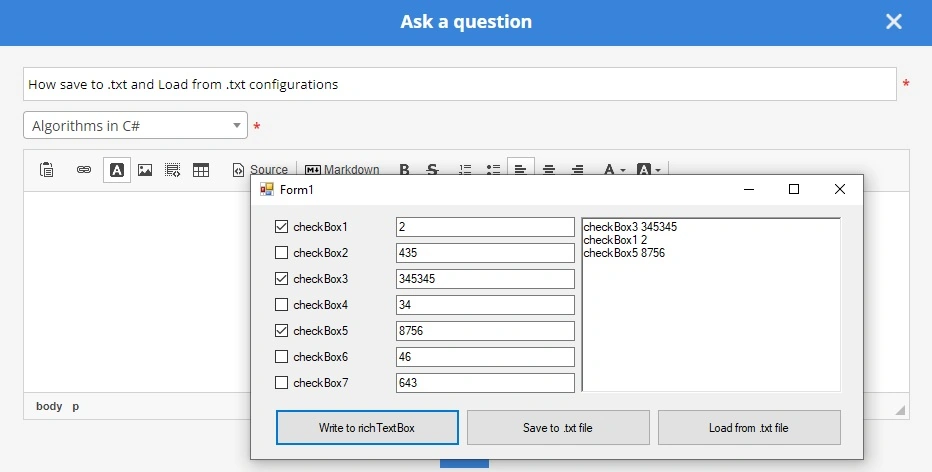 Question: how can i save checkbox and textbox configuration to .txt file and then load from .txt file?
Hi. I can write checkbox and TextBox configuration to richtextbox with this code.
Question: how can i save checkbox and textbox configuration to .txt file and then load from .txt file?
Know the answer? Post it. Somebody with the same question will find it here.
Answer a question in the forums and earn +20 SHARP for every answer.
See unanswered questions Arun PottiAnswers in the forums20answers02
 Tahir AnsariAnswers in the forums5answers03
 Kamlesh KumarAnswers in the forums5answers04
 Sam HobbsAnswers in the forums4answers05
 Željko PerićAnswers in the forums3answersFull leaderboard →
 DevSocialUpcoming · 3rd editionAI Agents ConferenceDec 1–3, 2026Live onlineFree to attend4days leftRegister

Tuhin PaulRank #7 · 71.9K reputationPosted Mar 4, 2023, 4:48 PM EST
Yes, you can save the configuration of checkboxes and textboxes to a .txt file and then load it from the same file. Here is an example code snippet that demonstrates how to do this, you can take reference from here:
// Save checkbox and textbox configuration to a .txt file
private void SaveToFile(Control.ControlCollection controls, string fileName)
{
    try
    {
        using (StreamWriter sw = new StreamWriter(fileName))
        {
            foreach (Control c in controls)
            {
                if (c is CheckBox)
                {
                    CheckBox cb = (CheckBox)c;
                    sw.WriteLine(cb.Name + "=" + cb.Checked);
                }
                else if (c is TextBox)
                {
                    TextBox tb = (TextBox)c;
                    sw.WriteLine(tb.Name + "=" + tb.Text);
                }
            }
        }
    }
    catch (Exception ex)
    {
        MessageBox.Show("An error occurred while saving configuration data: " + ex.Message);
    }
}

// Load checkbox and textbox configuration from a .txt file
private void LoadFromFile(Control.ControlCollection controls, string fileName)
{
    try
    {
        using (StreamReader sr = new StreamReader(fileName))
        {
            while (!sr.EndOfStream)
            {
                string line = sr.ReadLine();
                string[] parts = line.Split(new char[] { '=' }, 2);
                if (parts.Length == 2)
                {
                    Control c = controls.Find(parts[0], true).FirstOrDefault();
                    if (c != null)
                    {
                        if (c is CheckBox)
                        {
                            bool value = false;
                            if (bool.TryParse(parts[1], out value))
                            {
                                ((CheckBox)c).Checked = value;
                            }
                        }
                        else if (c is TextBox)
                        {
                            ((TextBox)c).Text = parts[1];
                        }
                    }
                }
            }
        }
    }
    catch (Exception ex)
    {
        MessageBox.Show("An error occurred while loading configuration data: " + ex.Message);
    }
}
In the SaveToFile method, it iterates over all controls in the Control.ControlCollection and writes the name and value of each CheckBox and TextBox control to the specified .txt file. In the LoadFromFile method, it reads the name and value of each control from the .txt file and updates the corresponding control in the Control.ControlCollection.
Vusal Mastaliyev29 reputationPosted Mar 4, 2023, 2:34 PM EST
That's how I heard
private void SaveToFile() { string path = Path.Combine(AppDomain.CurrentDomain.BaseDirectory, "configuration"); if (!Directory.Exists(path)) { Directory.CreateDirectory(path); } //Fayl yolu v? adi string fileName = Path.Combine(AppDomain.CurrentDomain.BaseDirectory, "configuration", "config.txt"); //CheckBox-larin v? TextBox-larin d?y?rl?rinin fayla yazilmasi using (StreamWriter sw = new StreamWriter(fileName)) { foreach (Control c in this.Controls) { if (c is CheckBox) { CheckBox cb = (CheckBox)c; sw.WriteLine(cb.Name + "=" + cb.Checked); } else if (c is TextBox) { TextBox tb = (TextBox)c; sw.WriteLine(tb.Name + "=" + tb.Text); } } } }private void LoadFromFile() { //Fayl yolu v? adi string fileName = Path.Combine(AppDomain.CurrentDomain.BaseDirectory, "configuration", "config.txt"); //Faylin mövcudlugunu yoxlayiriq if (File.Exists(fileName)) { //Fayldan m?lumatlarin oxunmasi using (StreamReader sr = new StreamReader(fileName)) { string line; while ((line = sr.ReadLine()) != null) { string[] parts = line.Split('='); if (parts.Length == 2) { Control c = this.Controls[parts[0]]; if (c is CheckBox) { CheckBox cb = (CheckBox)c; cb.Checked = bool.Parse(parts[1]); } else if (c is TextBox) { TextBox tb = (TextBox)c; tb.Text = parts[1]; } } } } } }Tuhin PaulRank #7 · 71.9K reputationPosted Mar 6, 2023, 8:28 PM EST
@Vusal, thanks!