
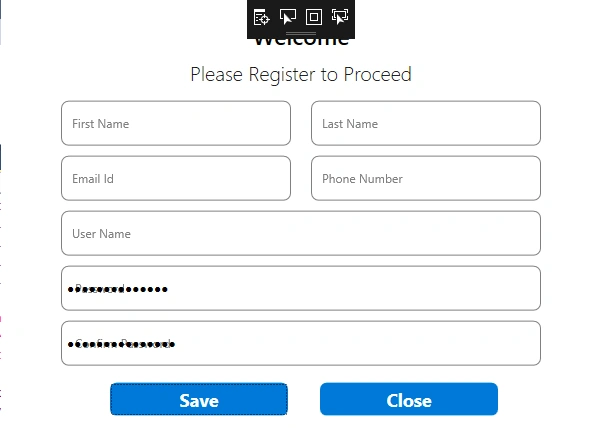
I want to add placeholder to a password box i have achived that uptp some extent but the problem is that when i type the password, then the watermark text remains there like the image attached below:
- <Border Margin="0,0,0,10" Grid.Column="0" Grid.Row="4" CornerRadius="7" BorderThickness="1" Grid.ColumnSpan="2" BorderBrush="Gray">
- <PasswordBox Grid.Row="1" Margin="3,1,1,1" Grid.Column="1" x:Name="txtConfirmPassword" BorderThickness="0,0,0,0" VerticalContentAlignment="Center" HorizontalContentAlignment="Left" Height="35" >
- <PasswordBox.Style>
- <Style xmlns:sys="clr-namespace:System;assembly=mscorlib" TargetType="{x:Type PasswordBox}">
- <Style.Resources>
- <VisualBrush x:Key="CueBannerBrush" AlignmentX="Left" Stretch="None">
- <VisualBrush.Visual>
- <Label Content="Confirm Password" Foreground="Gray" Padding="10"/>
- VisualBrush.Visual>
- VisualBrush>
- Style.Resources>
- <Style.Triggers>
- <DataTrigger Binding="{Binding Password}" Value="{x:Null}">
- <Setter Property="Background" Value="{StaticResource CueBannerBrush}" />
- DataTrigger>
- <Trigger Property="IsKeyboardFocused" Value="True">
- <Setter Property="Background" Value="White"/>
- Trigger>
- Style.Triggers>
- Style>
- PasswordBox.Style>
- PasswordBox>
- Border>







Piyush PansuriyaRank #454 · 5.5K reputationPosted Feb 5, 2019, 1:30 AM EST
Salman BegRank #284 · 8.8K reputationPosted Feb 5, 2019, 3:36 AM EST
Jignesh KumarRank #91 · 22.9K reputationPosted Feb 5, 2019, 4:52 PM EST
Shweta LodhaRank #31 · 39.8K reputationPosted Feb 6, 2019, 5:30 PM EST