I work on asp.net razor page model . i face issue i can't edit datatable on same page by edit cell without redirect to another page
I need to edit cell on same page
my code details as below :
C#
public class UserModel
{
    public string Id { get; set; }
    public string Name { get; set; }
    public string Email { get; set; }
    // add other user properties as needed
}

public class IndexModel : PageModel
{
    private readonly YourDbContext _dbContext; // replace with your DbContext class

    public IndexModel(YourDbContext dbContext)
    {
        _dbContext = dbContext;
    }

    public List Users { get; set; }

    public void OnPost(string userId)
    {
        Users = _dbContext.Users
            .Where(u => u.Id == userId)
            .Select(u => new UserModel
            {
                Id = u.Id,
                Name = u.Name,
                Email = u.Email
                // map other user properties as needed
            })
            .ToList();
    }
}
I need to edit data on table by edit every cell on rows
TypeScript
@if (Users != null && Users.Count > 0)
{


                ID
                Name
                Email


            @foreach (var user in Users)
            {

                    @user.Id
                    @user.Name
                    @user.Email

          Edit


            }


}
so How to allow edit cell by enabled for edit then close it after edit
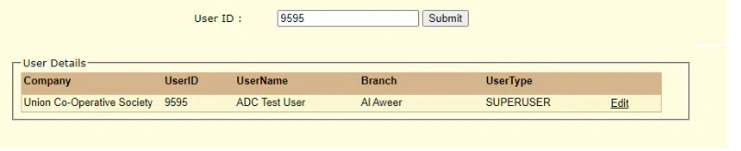
this is image for what i need to do







Tuhin PaulRank #7 · 71.9K reputationPosted Jun 10, 2023, 8:10 AM EDT
1. Update your Razor page with the necessary JavaScript/jQuery code:
@if (Users != null && Users.Count > 0)
{


                ID
                Name
                Email

                Action


            @foreach (var user in Users)
            {

                    @user.Id
                    @user.Name
                    @user.Email


                        Edit


            }


        $(document).ready(function () {
            // Handle click event of the Edit button
            $('.edit-btn').on('click', function () {
                var userId = $(this).data('id');
                var $editableFields = $('[data-id="' + userId + '"] .editable');

                // Enable editing for all editable fields within the row
                $editableFields.prop('contenteditable', true);
                $editableFields.addClass('editing');
            });

            // Handle blur event when focus is lost from an editable field
            $('.editable').on('blur', function () {
                var userId = $(this).data('id');
                var property = $(this).data('property');
                var newValue = $(this).text().trim();

                // Send AJAX request to update the value in the database
                $.ajax({
                    url: '/YourController/UpdateUserProperty',
                    type: 'POST',
                    data: {
                        userId: userId,
                        property: property,
                        newValue: newValue
                    },
                    success: function () {
                        // Disable editing and remove the editing class
                        $('[data-id="' + userId + '"] .editable').prop('contenteditable', false).removeClass('editing');
                    },
                    error: function () {
                        alert('An error occurred while updating the value. Please try again.');
                    }
                });
            });
        });

}
2. Create an action method in your controller to handle the AJAX request and update the user property in the database:
 public IActionResult UpdateUserProperty(string userId, string property, string newValue)
{
    // Retrieve the user from the database using the userId
    var user = _dbContext.Users.FirstOrDefault(u => u.Id == userId);

    if (user != null)
    {
        // Update the specified property value
        switch (property)
        {
            case "Name":
                user.Name = newValue;
                break;
            case "Email":
                user.Email = newValue;
                break;
            // Add other cases for additional properties as needed
        }

        _dbContext.SaveChanges();
    }

    return Ok();
}
You can modify the cell values directly by clicking on them, and the changes will be saved when you move the focus out of the cell. The changes are sent to the server via an AJAX request and the updated value is saved in the database.
Prasad RaveendranRank #320 · 7.8K reputationPosted Jun 10, 2023, 1:22 AM EDT
Note: This is a basic example to demonstrate the functionality of editing a row directly in the table. In a real-world scenario, you would typically perform the data update operation on the server-side, using AJAX or other means, and handle any validation or error scenarios accordingly.
Please refer the attached sample.