Skip to content
Loading
    
  •     
  •         class="form-group">    
  •             @Html.LabelFor(model => model.UserEmailAddress, htmlAttributes: new { @class = "control-label col-md-2" })    
  •             class="col-md-10">    
  •                 @Html.EditorFor(model => model.UserEmailAddress, new { htmlAttributes = new { @class = "form-control" } })    
  •                 @Html.ValidationMessageFor(model => model.UserEmailAddress, "", new { @class = "text-danger" })    
  •                 
  •             
  •     
  •         class="form-group">    
  •             class="col-md-offset-2 col-md-10">    
  •                 "submit" value="Create" class="btn btn-default" />    
  •                 
  •             
  •         
  • }    
  •     
  •     
  •     @Html.ActionLink("Back to List", "Index")    
  •     
  •     
  • @section Scripts {    
  •     @Scripts.Render("~/bundles/jqueryval")    
  • }  
  • 3. Now finally you controller should look like 
    1. public ActionResult CheckExistingEmail(string UserEmailAddress)  
    2.         {  
    3.             bool ifEmailExist = false;  
    4.             try  
    5.             {  
    6.                 using (var context = new PracticseEntities())  
    7.                 {  
    8.                     ifEmailExist = context.UserEmails.Any(em => em.Email == UserEmailAddress.ToLower());  
    9.                     return Json(!ifEmailExist, JsonRequestBehavior.AllowGet);  
    10.                 }  
    11.             }  
    12.             catch (Exception ex)  
    13.             {  
    14.                 return Json(false, JsonRequestBehavior.AllowGet);  
    15.             }  
    16.   
    17.         }  
    4. You have to make sure the data annotation mention in model for email should match tall the specification
     
    [Remote("CheckExistingEmail", "User", ErrorMessage = "Email already exists!")]
     
    Here "CheckExistingEmail" indicates action and "User" indicates controller.
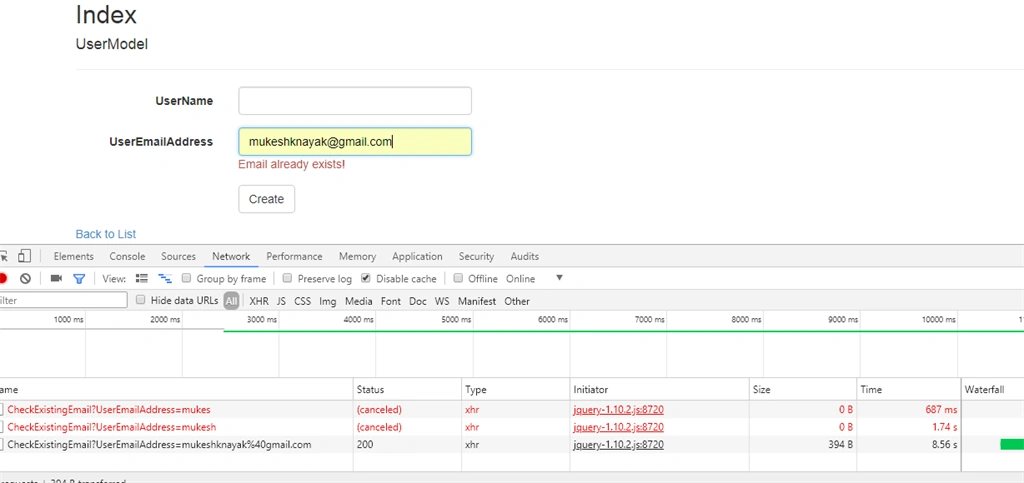
    Now i have used entity framework to check the UserEmail table whethether enterd email already exist or not. Finaly you will land upon following output :
    Regards,
    Mukesh Nayak 
    +1
  • Manav Pandya
    0
    Hello
     
    For that you can refer some article as below :
     
    http://www.c-sharpcorner.com/article/remote-validation-in-mvc-5-to-check-if-username-and-email-id-exists/
     
    http://www.c-sharpcorner.com/UploadFile/d87001/remote-validation-in-mvc/
     
    http://www.c-sharpcorner.com/UploadFile/3d39b4/remote-validation-in-Asp-Net-mvc/
     
    Thanks 
    0
  • Sanwar Ranwa
    0
    https://bikeshsrivastava.blogspot.in/2016/09/part-37remote-validation-in-mvc-5to.html
    0
  • Sagar  Pandurang Kap
    0
    Hi,
    You can get answer from below links :-
     
    https://stackoverflow.com/questions/14371683/how-to-remote-validate-email-or-check-if-email-exists
    http://www.c-sharpcorner.com/UploadFile/f1047f/check-if-usernameemail-already-registered-using-remote-vali/
    http://www.c-sharpcorner.com/article/remote-validation-in-mvc-5-to-check-if-username-and-email-id-exists/
     
    Hope it helps....
    0