how to bind the label to gridview
when that mobile value is null from database then that label is not display or not bind to gridview
Know the answer? Post it. Somebody with the same question will find it here.



Answer a question in the forums and earn +20 SHARP for every answer.
See unanswered questions Arun PottiAnswers in the forums20answers02
 Tahir AnsariAnswers in the forums5answers03
 Kamlesh KumarAnswers in the forums5answers04
 Sam HobbsAnswers in the forums4answers05
 Željko PerićAnswers in the forums3answersFull leaderboard →
 DevSocialUpcoming · 3rd editionAI Agents ConferenceDec 1–3, 2026Live onlineFree to attend5days leftRegister

Santhosh Kumar JayaramanRank #563 · 4.3K reputationPosted Jan 2, 2013, 2:52 AM EST
public string ProcessMyDataItem(object myValue)
{
if (myValue == null)
{
return "0 value";
}
return myValue.ToString();
}
prathyusha173 reputationPosted Jan 2, 2013, 6:52 PM EST
prathyusha173 reputationPosted Jan 2, 2013, 7:16 PM EST
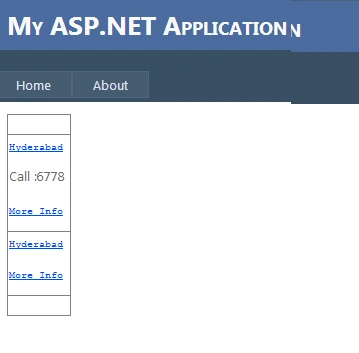
i am attached the output file in that where call:null is not display because the call value is null
when call has value that would be bind to gridview so please check it once and send me the code
Santhosh Kumar JayaramanRank #563 · 4.3K reputationPosted Jan 2, 2013, 7:17 PM EST
prathyusha173 reputationPosted Jan 2, 2013, 7:26 PM EST
Neha SharmaRank #569 · 4.3K reputationPosted Jan 2, 2013, 10:08 PM EST
you can mention text of label like Text='<%# Bind("OriginCIType_ID") %>' or can take it in columns -> aspboundfields like: