How to change Items in a c-sharp list.
I learn now data bindingbasics and I am confronted with c-sharp list-class
I have the following list class declaration
List
//Populate list data source with data items
this.raceCarDrivers.Add(new Class2("M. Schumacher", 500));
this.raceCarDrivers.Add(new Class2("R. Schumacher", 501));
this.raceCarDrivers.Add(new Class2("A. Senna", 502));
this.raceCarDrivers.Add(new Class2("A. Prost", 503));
this.raceCarDrivers.Add(new Class2("F. Schoebel", 504));
//I want to change the second property (Wins) of M. Schumacher:
++this.raceCarDrivers.Wins;
this.winsTextBox.Text = raceCarDrivers.Wins.ToString();*/
//But I get he error message: System.Collection.Generics.List
the class2 is as follows:
using System;
using System.Collections.Generic;
using System.Linq;
using System.Text;
using System.ComponentModel;

namespace DataBindingBasics01
{
    class Class2
    {
        string name;
        int wins;

        public Class2(string name, int wins)
        {
            this.name = name;
            this.wins = wins;
        }

        //event
        public event PropertyChangedEventHandler PropertyChanged;

        public string Name
        {
            get { return this.name; }
            set { this.name = value;
            this.OnPropertyChanged("Name");
            }
        }
        public int Wins
        {
            get { return this.wins; }
            set { this.wins = value;
            this.OnPropertyChanged("Wins");
            }
        }

        //helper from the event
        void OnPropertyChanged(string propertyName)
        {
            if (this.PropertyChanged != null)
            {
                //this = object sender
                this.PropertyChanged(this, new PropertyChangedEventArgs(propertyName));
            }
        }
    }
}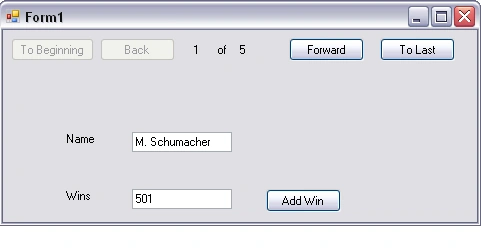
When I click to "Add Win" button there should be one more win for M. Schumacher







Chetan SanghaniRank #244 · 10.2K reputationPosted Jun 1, 2024, 9:13 AM EDT
To change the value of the "Wins" property for a specific item in the list, you need to access that item by index and then modify its property. Here's how you can do it:
// Find the index of the item you want to modify
int index = raceCarDrivers.FindIndex(driver => driver.Name == "M. Schumacher");

// If the item is found, increment its "Wins" property
if (index != -1)
{
    raceCarDrivers[index].Wins++;
    this.winsTextBox.Text = raceCarDrivers[index].Wins.ToString();
}
This code snippet first finds the index of the item with the name "M. Schumacher" in the list using the
FindIndexmethod. Then, if the item is found (index != -1), it increments the "Wins" property of that item and updates the winsTextBox with the new value.Prasad RaveendranRank #320 · 7.8K reputationPosted Jun 1, 2024, 5:45 PM EDT
The error you're encountering is due to trying to access a property
Winsdirectly on the listraceCarDrivers, which doesn't make sense becauseraceCarDriversis a list ofClass2objects, not a singleClass2object. You need to access the propertyWinson a specific item within the list.Here's how you can update the
Winsproperty of a specific driver and update theTextBoxaccordingly:using System; using System.Collections.Generic; using System.Linq; using System.Text; using System.ComponentModel; namespace DataBindingBasics01 { class Class2 : INotifyPropertyChanged { string name; int wins; public Class2(string name, int wins) { this.name = name; this.wins = wins; } //event public event PropertyChangedEventHandler PropertyChanged; public string Name { get { return this.name; } set { this.name = value; this.OnPropertyChanged("Name"); } } public int Wins { get { return this.wins; } set { this.wins = value; this.OnPropertyChanged("Wins"); } } //helper from the event void OnPropertyChanged(string propertyName) { if (this.PropertyChanged != null) { //this = object sender this.PropertyChanged(this, new PropertyChangedEventArgs(propertyName)); } } } class Program { static void Main(string[] args) { List raceCarDrivers = new List(); // Populate list data source with data items raceCarDrivers.Add(new Class2("M. Schumacher", 500)); raceCarDrivers.Add(new Class2("R. Schumacher", 501)); raceCarDrivers.Add(new Class2("A. Senna", 502)); raceCarDrivers.Add(new Class2("A. Prost", 503)); raceCarDrivers.Add(new Class2("F. Schoebel", 504)); // I want to change the second property (Wins) of M. Schumacher: Class2 driver = raceCarDrivers.FirstOrDefault(d => d.Name == "M. Schumacher"); if (driver != null) { driver.Wins++; Console.WriteLine($"Wins of M. Schumacher: {driver.Wins}"); // Assuming winsTextBox is a TextBox control in a UI, update it accordingly // this.winsTextBox.Text = driver.Wins.ToString(); } } } }Here's a breakdown of what was done:
Class2class implements theINotifyPropertyChangedinterface to support data binding.raceCarDriverslist is populated with instances ofClass2.FirstOrDefaultand theWinsproperty is incremented.Winsvalue is printed to the console. If you have a UI (like aTextBox), you can update it with the newWinsvalue.Ensure you have the necessary using directives if you're integrating this into a larger project:
using System;
using System.Collections.Generic;
using System.ComponentModel;
using System.Linq;
This code demonstrates updating the property of a specific object in a list and handling UI updates accordingly.