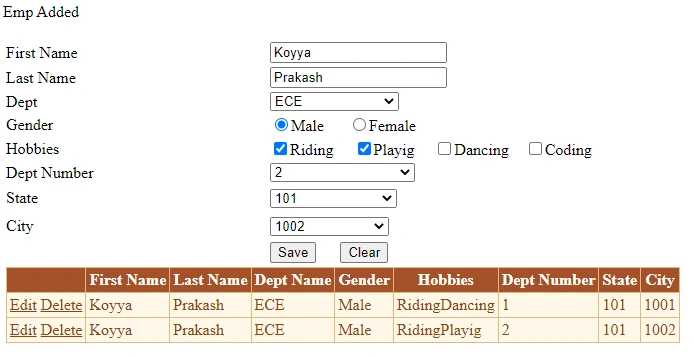
how to clear all fields pls help me
Know the answer? Post it. Somebody with the same question will find it here.
Answer a question in the forums and earn +20 SHARP for every answer.
See unanswered questions Arun PottiAnswers in the forums20answers02
 Tahir AnsariAnswers in the forums5answers03
 Kamlesh KumarAnswers in the forums5answers04
 Sam HobbsAnswers in the forums4answers05
 Željko PerićAnswers in the forums3answersFull leaderboard →
 DevSocialUpcoming · 3rd editionAI Agents ConferenceDec 1–3, 2026Live onlineFree to attend5days leftRegister

Vishal JoshiRank #377 · 6.7K reputationPosted Nov 4, 2022, 12:29 AM EDT
Hello
There are several ways to clear form fiels.
One you can reload the page.
Another way you need to write custom function as shown in below code.
protected void btnReset_Click(object sender, EventArgs e) { //Loop through all the control present on the web page/form foreach (Control ctrl in form1.Controls) { //check for all the TextBox controls on the page and clear them if (ctrl.GetType() == typeof(TextBox)) { ((TextBox)(ctrl)).Text = string.Empty; } //check for all the Label controls on the page and clear them else if (ctrl.GetType() == typeof(Label)) { ((Label)(ctrl)).Text = string.Empty; } //check for all the DropDownList controls on the page and reset it to the very first item e.g. "-- Select One --" else if (ctrl.GetType() == typeof(DropDownList)) { ((DropDownList)(ctrl)).SelectedIndex = 0; } //check for all the CheckBox controls on the page and unchecked the selection else if (ctrl.GetType() == typeof(CheckBox)) { ((CheckBox)(ctrl)).Checked = false; } //check for all the CheckBoxList controls on the page and unchecked all the selections else if (ctrl.GetType() == typeof(CheckBoxList)) { ((CheckBoxList)(ctrl)).ClearSelection(); } //check for all the RadioButton controls on the page and unchecked the selection else if (ctrl.GetType() == typeof(RadioButton)) { ((RadioButton)(ctrl)).Checked = false; } //check for all the RadioButtonList controls on the page and unchecked the selection else if (ctrl.GetType() == typeof(RadioButtonList)) { ((RadioButtonList)(ctrl)).ClearSelection(); } } }Rijwan AnsariRank #82 · 24.2K reputationPosted Nov 3, 2022, 9:48 PM EDT
You can write code to clear each field value or reload the page after save click.
Add below code after save.
Amit MohantyRank #112 · 20K reputationPosted Nov 4, 2022, 12:33 AM EDT
If you want clear all fields after save add below code.
Response.Redirect(Request.Url.AbsoluteUri);
If you want clear all fields on clear button click user below code.
Response.Redirect("~/YourPage.aspx", false);
Sachin SinghRank #66 · 26.2K reputationPosted Nov 4, 2022, 1:38 AM EDT
better use javascript.
$("#btnClear").click(function(){ $("[id^='txtcontrolName']").val(''); // same for all fields })Satya KarkiRank #78 · 24.6K reputationPosted Nov 3, 2022, 9:49 PM EDT
You can try the option shown in the below blogs.
https://stackoverflow.com/questions/3794136/clear-all-fields-in-asp-net-form
https://dotprogramming.blogspot.com/2016/01/clear-all-form-fields-after-submit-data.html
Brahma Prakash ShuklaRank #633 · 3.8K reputationPosted Nov 6, 2022, 2:03 AM EST
https://stackoverflow.com/questions/3794136/clear-all-fields-in-asp-net-form
Rajeev KumarRank #1,334 · 1.3K reputationPosted Mar 14, 2023, 3:56 AM EDT
If you want to clear all fields without any message then you can apply this code in button click event
protected void Button1_Click(object sender, EventArgs e)
{ Response.Redirect(Request.Url.AbsoluteUri); }
otherwise write it Response.Redirect(Request.Url.AbsoluteUri); after saving the data .