Hi Team
I need help with two things, one on my column Select a user must be able to click when selecting a module name then the image of this module must show picture. How can i do this on this given code below?
PHP
     Booking Courses
    The courses available for booking or registration by the student.


        ping()) {
    die("Database connection failed.");
}

// Query to fetch available courses for the logged-in user
$sql = "
SELECT ac.course_id, ac.course_name, ac.duration, ac.image
FROM available_courses ac
LEFT JOIN student_modules sm ON ac.course_name = sm.module_name AND sm.student_id = ?
WHERE sm.student_id IS NULL";

// Prepare the SQL statement
$stmt = $conn->prepare($sql);
if (!$stmt) {
    die("Error preparing the query: " . $conn->error);
}

// Bind the parameters
$stmt->bind_param("i", $user_id); // Bind the user_id parameter

// Execute the statement
if (!$stmt->execute()) {
    die("Error executing the query: " . $stmt->error);
}

// Get the result
$result = $stmt->get_result();

// Base directory for images
$baseDir = '../img/Courses/';


// Check if courses exist for the logged-in user
if ($result->num_rows > 0) {
    echo '';
    echo '';
    echo '';
    echo 'Select';
    echo 'Image';
    echo 'Course Name';
    echo 'Duration';
    echo '';
    echo '';
    echo '';
    while ($row = $result->fetch_assoc()) {
        $imagePath = $baseDir . htmlspecialchars($row['image']);
        echo '';
        echo '';
        echo '';
        echo '' . htmlspecialchars($row['course_name']) . '';
        echo '' . htmlspecialchars($row['duration']) . '';
        echo '';
    }
    echo '';
    echo '';
} else {
    echo 'No courses available at the moment.
';
}

// Close the statement and the connection
$stmt->close();
$conn->close();
?>


Register
Sarthak VarshneyRank #46 · 32K reputationPosted Jan 23, 2025, 8:59 AM EST
-
-
-
Updated Code ExampleAdd a Dropdown to Select Modules
Replace or add to your current table structure with a
dropdown for modules.Load Images Dynamically Using JavaScript
Use JavaScript to update the displayed image when a user selects a module from the dropdown.
Fetch Images via AJAX (Optional)
If you want the dropdown to dynamically fetch images based on a selected value, you can use an AJAX request to get the image URL from the server without reloading the page.
HTML and JavaScript for Dynamic Image Display
Below is the revised section for dynamic image loading:
Booking Courses The courses available for booking or registration by the student. prepare($sql); $stmt->bind_param("i", $user_id); $stmt->execute(); $result = $stmt->get_result(); // Check if courses exist if ($result->num_rows > 0) { echo ''; echo 'Select a module'; while ($row = $result->fetch_assoc()) { $course_id = htmlspecialchars($row['course_id']); $course_name = htmlspecialchars($row['course_name']); $image = htmlspecialchars($row['image']); echo '' . $course_name . ''; } echo ''; echo ' '; echo ''; echo ''; echo ' '; } else { echo 'No courses available at the moment. '; } $stmt->close(); $conn->close(); ?> Register // JavaScript to handle dynamic image update const dropdown = document.getElementById('moduleDropdown'); const moduleImageDiv = document.getElementById('moduleImage'); const moduleImage = moduleImageDiv.querySelector('img'); dropdown.addEventListener('change', function () { const selectedOption = this.options[this.selectedIndex]; const imagePath = selectedOption.getAttribute('data-image'); if (imagePath) { moduleImage.src = `../img/Courses/${imagePath}`; moduleImage.style.display = 'block'; // Show image } else { moduleImage.src = ''; moduleImage.style.display = 'none'; // Hide image if no selection } });-
-
-
-
Optional: Using AJAX for Real-Time FetchingDropdown with
data-imageAttributesEach
in the dropdown includes adata-imageattribute containing the image path.Dynamic Image Update
JavaScript listens for the
changeevent on the dropdown and updates the image'ssrcattribute accordingly.Image Display Container
An empty
![]()
#moduleImagediv, which updates dynamically.Fallback for No Image Selected
If no module is selected, the image is hidden.
If your images or course details are stored in different locations or need additional database queries, you can use AJAX to fetch the image dynamically from the server. Here's a simplified approach:
PHP Endpoint (
fetch_image.php)prepare($sql); $stmt->bind_param("i", $course_id); $stmt->execute(); $stmt->bind_result($image); $stmt->fetch(); echo json_encode(['image' => $image]); $stmt->close(); $conn->close(); } ?>JavaScript AJAX Request
Replace the
changeevent listener in the earlier script with the following:dropdown.addEventListener('change', function () { const selectedCourseId = this.value; if (selectedCourseId) { fetch('fetch_image.php', { method: 'POST', headers: { 'Content-Type': 'application/x-www-form-urlencoded' }, body: `course_id=${selectedCourseId}` }) .then(response => response.json()) .then(data => { if (data.image) { moduleImage.src = `../img/Courses/${data.image}`; moduleImage.style.display = 'block'; } else { moduleImage.src = ''; moduleImage.style.display = 'none'; } }) .catch(error => console.error('Error fetching image:', error)); } });Tuhin PaulRank #7 · 71.9K reputationPosted Jan 23, 2025, 8:48 PM EST
Add a Click Event Listener for Module Names:
![]()
Modified Code: Add an empty image container ( or SQL JavaScript 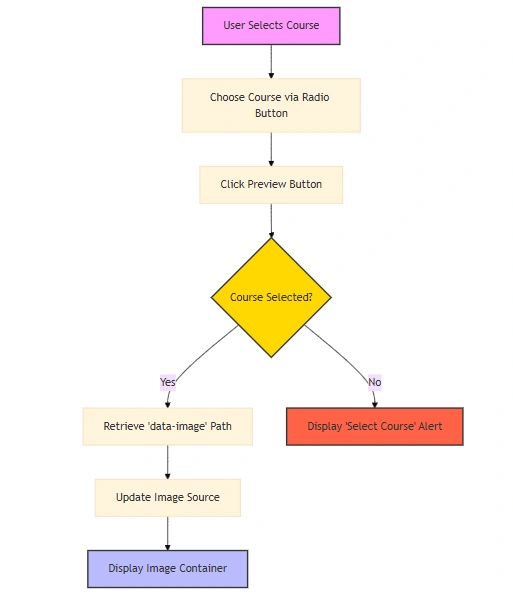
![]()
Add a
data-imageattribute to store the image path for each module name.fetch_assoc()) { $imagePath = $baseDir . htmlspecialchars($row['image']); echo ''; echo ''; echo ''; echo '' . htmlspecialchars($row['course_name']) . ''; echo '' . htmlspecialchars($row['duration']) . ''; echo ''; } ?>Add JavaScript for Interaction:
document.addEventListener("DOMContentLoaded", function () { const moduleNames = document.querySelectorAll(".module-name"); const imageContainer = document.getElementById("module-image"); moduleNames.forEach(module => { module.addEventListener("click", function () { const imagePath = this.getAttribute("data-image"); imageContainer.src = imagePath; imageContainer.style.display = "block"; // Show the image }); }); });this approach requires slightly more complex (requires JavaScript)
Tuhin PaulRank #7 · 71.9K reputationPosted Jan 23, 2025, 8:51 PM EST
Another approach is image display via Form submission
Modify the Form to Include a Hidden Input for the Selected Module:
checkbox).Modified Code: Update the table to include radio buttons instead of checkboxes.
Add a "Preview" button to trigger the image preview..
fetch_assoc()) { $imagePath = $baseDir . htmlspecialchars($row['image']); echo ''; echo ''; echo ''; echo '' . htmlspecialchars($row['course_name']) . ''; echo '' . htmlspecialchars($row['duration']) . ''; echo ''; } ?>Add a "Preview" button next to the register button:
Add JavaScript to dynamically preview the image:
document.getElementById("preview-btn").addEventListener("click", function () { const selectedCourse = document.querySelector('input[name="selected_course"]:checked'); if (selectedCourse) { const imagePath = selectedCourse.getAttribute("data-image"); const imageContainer = document.getElementById("module-image"); imageContainer.src = imagePath; imageContainer.style.display = "block"; } else { alert("Please select a course to preview its image."); } });Here this approach is slower; page reload needed for server logic
Answer a question in the forums and earn +20 SHARP for every answer.
See unanswered questionsTop experts