
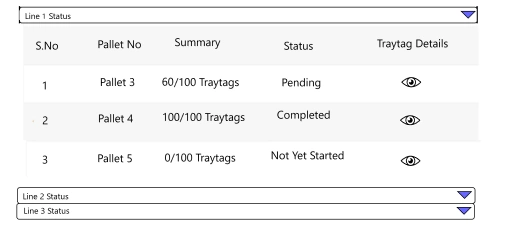
How to display expander List like line status and need display the line staus details inside expdender if lick line status .
how can implement above like attached image
Know the answer? Post it. Somebody with the same question will find it here.
Answer a question in the forums and earn +20 SHARP for every answer.
See unanswered questions Arun PottiAnswers in the forums20answers02
 Tahir AnsariAnswers in the forums5answers03
 Kamlesh KumarAnswers in the forums5answers04
 Sam HobbsAnswers in the forums4answers05
 Željko PerićAnswers in the forums3answersFull leaderboard →
 DevSocialUpcoming · 3rd editionAI Agents ConferenceDec 1–3, 2026Live onlineFree to attend5days leftRegister

Raj KumarRank #25 · 44.2K reputationPosted Apr 18, 2023, 9:39 AM EDT
This might be helpful for you:
https://www.c-sharpcorner.com/UploadFile/mahesh/using-xaml-expander-in-wpf/
Tuhin PaulRank #7 · 71.9K reputationPosted Apr 18, 2023, 11:22 AM EDT
To display a list of items with expandable details, you can use the TreeView control in WPF. The TreeView control allows you to display hierarchical data in a tree-like structure, where each item can be expanded or collapsed to show or hide its child items. To implement this in your application, you can create a TreeView control and bind it to a collection of items that represent your line statuses. Each item in the collection should have a property that represents its details, which will be displayed in the expander when the item is expanded.
Venkat GovindRank #2,911 · 494 reputationPosted Apr 18, 2023, 10:49 AM EDT
i tried also not able achive as expecting task
Tuhin PaulRank #7 · 71.9K reputationPosted Apr 18, 2023, 11:24 AM EDT
code that demonstrates how to create a TreeView with expandable items
LineStatuses is the collection of line statuses, and each status has a Name property and a Details property, which is a collection of strings representing its details. The HierarchicalDataTemplate is used to define the template for each item in the tree, and the TreeView control automatically generates the expanders for each item.