I have a datatable which contain image path ,i want export to excel
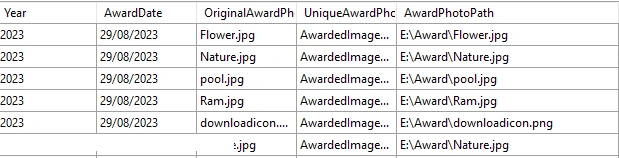
my datatable is below
I have a datatable which contain image path ,i want export to excel
my datatable is below
Know the answer? Post it. Somebody with the same question will find it here.
Answer a question in the forums and earn +20 SHARP for every answer.
See unanswered questions Arun PottiAnswers in the forums20answers02
 Tahir AnsariAnswers in the forums5answers03
 Kamlesh KumarAnswers in the forums5answers04
 Sam HobbsAnswers in the forums4answers05
 Željko PerićAnswers in the forums3answersFull leaderboard →
 DevSocialUpcoming · 3rd editionAI Agents ConferenceDec 1–3, 2026Live onlineFree to attend5days leftRegister

Abhishek YadavRank #217 · 11.3K reputationPosted Sep 1, 2023, 2:16 AM EDT
To export a datatable to an Excel file using C# in ASP.NET, you can make use of the EPPlus library. Here's an example:
First, install the EPPlus NuGet package in your project.
Add the following using statements at the top of your code file:
using OfficeOpenXml; using System.IO;private void ExportToExcel(DataTable dataTable) { using (var package = new ExcelPackage()) { ExcelWorksheet worksheet = package.Workbook.Worksheets.Add("Sheet1"); // Set the column headers for (int column = 0; column < dataTable.Columns.Count; column++) { worksheet.Cells[1, column + 1].Value = dataTable.Columns[column].ColumnName; } // Populate the rows for (int row = 0; row < dataTable.Rows.Count; row++) { for (int column = 0; column < dataTable.Columns.Count; column++) { worksheet.Cells[row + 2, column + 1].Value = dataTable.Rows[row][column].ToString(); } } // Auto-fit the columns worksheet.Cells.AutoFitColumns(); // Save the Excel file using (var memoryStream = new MemoryStream()) { package.SaveAs(memoryStream); memoryStream.Position = 0; Response.Clear(); Response.ContentType = "application/vnd.openxmlformats-officedocument.spreadsheetml.sheet"; Response.AddHeader("Content-Disposition", "attachment; filename=exported_data.xlsx"); Response.BinaryWrite(memoryStream.ToArray()); Response.End(); } } }ExportToExcelmethod with your datatable as the parameter:DataTable myDataTable = // Your existing datatable here ExportToExcel(myDataTable);When you call the
ExportToExcelmethod, it will create an Excel file with the datatable's data and start downloading it to the user's browser. The file will be named "exported_data.xlsx".Vishal YelveRank #178 · 13.6K reputationPosted Sep 1, 2023, 1:47 AM EDT
HI Sandeep,
You can use Open XML to download datatable data in excel
Do refer below links
https://www.aspsnippets.com/Articles/Export-GridView-Data-to-Excel-using-OpenXml-in-ASPNet.aspx
https://stackoverflow.com/questions/11811143/export-datatable-to-excel-with-open-xml-sdk-in-c-sharp
private static void WriteExcelFile(DataTable table, string outputPath)
        {
            using (SpreadsheetDocument document = SpreadsheetDocument.Create(outputPath, SpreadsheetDocumentType.Workbook))
            {
                WorkbookPart workbookPart = document.AddWorkbookPart();
                workbookPart.Workbook = new Workbook();

                WorksheetPart worksheetPart = workbookPart.AddNewPart();
                var sheetData = new SheetData();
                worksheetPart.Worksheet = new Worksheet(sheetData);

                Sheets sheets = workbookPart.Workbook.AppendChild(new Sheets());
                Sheet sheet = new Sheet() { Id = workbookPart.GetIdOfPart(worksheetPart), SheetId = 1, Name = "mySheet" };

                sheets.Append(sheet);

                Row headerRow = new Row();

                List columns = new List();
                foreach (System.Data.DataColumn column in table.Columns)
                {
                    columns.Add(column.ColumnName);

                    Cell cell = new Cell();
                    cell.DataType = CellValues.String;
                    cell.CellValue = new CellValue(column.ColumnName);
                    headerRow.AppendChild(cell);
                }

                sheetData.AppendChild(headerRow);

                foreach (DataRow dsrow in table.Rows)
                {
                    Row newRow = new Row();
                    foreach (String col in columns)
                    {
                        Cell cell = new Cell();
                        cell.DataType = CellValues.String;
                        cell.CellValue = new CellValue(dsrow[col].ToString());
                        newRow.AppendChild(cell);
                    }

                    sheetData.AppendChild(newRow);
                }

                workbookPart.Workbook.Save();
            }
        }