Hi Team
I have a barcode app, somehow my connection string are correct, but when i try to run this app its giving me this weird and dont know how to resolve it. See below the screen show for more details,
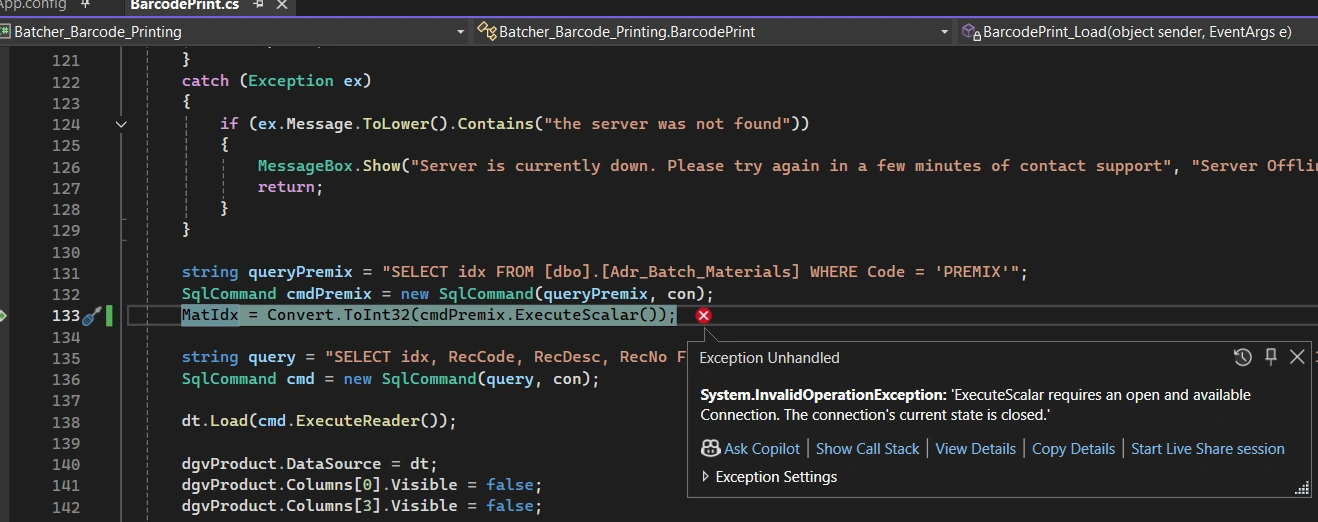
Hi Team
I have a barcode app, somehow my connection string are correct, but when i try to run this app its giving me this weird and dont know how to resolve it. See below the screen show for more details,
Know the answer? Post it. Somebody with the same question will find it here.
Answer a question in the forums and earn +20 SHARP for every answer.
See unanswered questions Arun PottiAnswers in the forums20answers02
 Tahir AnsariAnswers in the forums5answers03
 Kamlesh KumarAnswers in the forums5answers04
 Sam HobbsAnswers in the forums4answers05
 Željko PerićAnswers in the forums3answersFull leaderboard →
 DevSocialUpcoming · 3rd editionAI Agents ConferenceDec 1–3, 2026Live onlineFree to attend5days leftRegister

Nikunj SatasiyaRank #302 · 8.3K reputationPosted Jul 21, 2024, 3:14 PM EDT
Hi Gcobani,
As i can review your code, the error you're encountering when using ExecuteScalar() with the query SELECT idx FROM [dbo].[Adr_Batch_Materials] WHERE Code = 'PREMIX' is likely due to the query potentially returning multiple rows.
The ExecuteScalar() method is designed to retrieve a single value.
Solution 1:
If you expecting only single record as per your WHERE condition, you shoud check your data there might duplicate record exist in the table [dbo].[Adr_Batch_Materials] WHERE Code = 'PREMIX'
Solution 2.:
Modify the your query if you expecting single value return by your query.
SELECT TOP 1 idx FROM [dbo].[Adr_Batch_Materials] WHERE Code = 'PREMIX'OR
SELECT COUNT(idx) FROM [dbo].[Adr_Batch_Materials] WHERE Code = 'PREMIX'You can take refrence from this sample code:
string connectionString = "your_connection_string_here";
string query = "SELECT COUNT(idx) FROM [dbo].[Adr_Batch_Materials] WHERE Code = 'PREMIX'";  // Example query

      using (SqlConnection connection = new SqlConnection(connectionString))
      {
          SqlCommand command = new SqlCommand(query, connection);
          try
             {
                connection.Open();
                int count = (int)command.ExecuteScalar();
                //MessageBox.Show("Count is: " + count);
             }
           catch (Exception ex)
             {
                MessageBox.Show("An error occurred: " + ex.Message);
             }
       }
Note:
When you expect your query to return multiple rows, you should use methods that are designed to handle multiple results, such as ExecuteReader() in ADO.NET. This method provides a forward-only, read-only iterator over the result set that allows you to handle each row returned by the query one at a time. Here’s how you can use ExecuteReader() to process multiple rows.
Amit MohantyRank #112 · 20K reputationPosted Jul 19, 2024, 10:17 AM EDT
Make sure you are opening the connection before executing the command.
Jaimin ShethiyaRank #177 · 13.7K reputationPosted Jul 22, 2024, 5:13 AM EDT
Hello,
Your database connection was closed that's why it throw an error.
Please refer the below code.
if(con.State == ConnectionState.Closed)
{
	con.Open();
}

string queryPremix = "SELECT ids FROM [dbo].[Ard_Batch_Materials] WHERE code = 'PREMIX'";
SqlCommand cmdPremix = new SqlCommand(queryPremix, con);
MatIdx = Convert.ToInt32(cmdPremix.ExecuteScalar());
Thanks
Vishal JoshiRank #377 · 6.7K reputationPosted Jul 20, 2024, 2:04 AM EDT
Hello,
As per the exception message, you need to open a connection before executing the command. Try the below code.
con.Open();
SqlCommand cmdPremix = new SqlCommand(queryPremix, con);
MatIdx = Convert.ToInt32(cmdPremix.ExecuteScalar());
Thanks
Amit MohantyRank #112 · 20K reputationPosted Jul 22, 2024, 2:44 AM EDT
Try this:
string connectionString = "your_connection_string_here";
string queryPremix = "SELECT idx FROM [dbo].[Adr_Batch_Materials] WHERE Code = 'PREMIX'";
using (SqlConnection con = new SqlConnection(connectionString))
{
    SqlCommand cmdPremix = new SqlCommand(queryPremix, con);

    try
    {
        con.Open();
        object result = cmdPremix.ExecuteScalar();
        int MatIdx = (result != null) ? Convert.ToInt32(result) : 0;
        Console.WriteLine("MatIdx: " + MatIdx);
    }
    catch (Exception ex)
    {
        Console.WriteLine("An error occurred: " + ex.Message);
    }
}