I work on razor asp.net page model . i need to implement tree view with children's checkboxes then submit changes on every parent from selected checkboxes so are you have any sample on razor page asp.net
can you help me by provide me sample or attachement by csharp asp.net razor for tree view with children checkbox
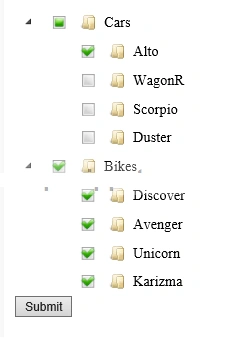
sample below :







Amit MohantyRank #112 · 20K reputationPosted Jun 19, 2023, 1:33 AM EDT
Check the below example, this may help you:
@page @model TreeViewModel @foreach (var node in Model.TreeNodes) { @node.Name @if (node.Children != null && node.Children.Any()) { @foreach (var child in node.Children) { @child.Name } } }// TreeView.cshtml.cs public class TreeViewModel : PageModel { public List TreeNodes { get; set; } public void OnGet() { // Initialize your tree nodes here TreeNodes = GetTreeNodes(); } public void OnPost(List selectedNodes) { // Process the selected nodes if (selectedNodes != null) { foreach (var node in TreeNodes) { node.IsChecked = selectedNodes.Contains(node.Id); CheckChildrenNodes(node, selectedNodes); } } // Perform other actions or redirect as needed // e.g., return RedirectToPage("Index"); } private void CheckChildrenNodes(TreeNode parentNode, List selectedNodes) { if (parentNode.Children != null && parentNode.Children.Any()) { foreach (var child in parentNode.Children) { child.IsChecked = selectedNodes.Contains(child.Id); CheckChildrenNodes(child, selectedNodes); } } } private List GetTreeNodes() { // Retrieve your tree nodes from the database or any other data source var treeNodes = new List { new TreeNode { Id = 1, Name = "Parent 1", IsChecked = false, Children = new List { new TreeNode { Id = 2, Name = "Child 1.1", IsChecked = false, Children = new List { new TreeNode { Id = 3, Name = "Grandchild 1.1.1", IsChecked = false, Children = null }, new TreeNode { Id = 4, Name = "Grandchild 1.1.2", IsChecked = false, Children = null } } }, new TreeNode { Id = 5, Name = "Child 1.2", IsChecked = false, Children = null } } }, new TreeNode { Id = 6, Name = "Parent 2", IsChecked = false, Children = null } }; return treeNodes; } }// TreeNode.cs public class TreeNode { public int Id { get; set; } public string Name { get; set; } public bool IsChecked { get; set; } public List Children { get; set; } }Vishal YelveRank #178 · 13.6K reputationPosted Jun 19, 2023, 2:51 AM EDT
Hi Ahmed,
Dor refer below article's
https://www.c-sharpcorner.com/article/c-treeview-to-mvc-razor-view/
https://www.aspsnippets.com/Articles/Implement-TreeView-with-CheckBoxes-from-Database-using-jQuery-in-ASPNet-MVC.aspx
ahmed salahRank #2,240 · 628 reputationPosted Jun 19, 2023, 3:49 AM EDT
can you help me to customize this function
GetTreeNodes() to get from database
select * from tblWebModule where parentmenucode='00' ParentMenuCode ChildMenuCode MenuName 00 1 Cycle Count 00 2 Asset Count 00 3 Admin 00 4 Reports 00 5 Print 00 6 Others 00 7 Transfer 00 8 Available Qty 00 13 Shareholders 00 9 Stock Position 00 10 Store Stock Level 00 11 B2B Orders 00 12 Vegetable 00 15 Item Near Expiry 00 16 Imported Items 00 17 Daily Stock Count 00 18 Warehouse LPOs 00 20 Stock Issue 00 22 Error Recording 00 24 Despach Invoice 00 25 Branch Stock Issue 00 26 Auto Order 00 14 Visibility Display 00 19 Order Template 00 23 PRV Notification 00 21 Arabic Desc to get children select * from tblwebuseraccess where userid='9595' Userid ParentCode ChildCode Access LoggedUser DateStamp 9595 00 1 1 888 2023-02-21 09:11:57.943 9595 1 1 1 888 2023-02-21 09:11:57.943 9595 1 2 1 888 2023-02-21 09:11:57.947 9595 1 7 1 888 2023-02-21 09:11:57.947 9595 1 3 1 888 2023-02-21 09:11:57.947 9595 1 4 1 888 2023-02-21 09:11:57.947 9595 1 5 1 888 2023-02-21 09:11:57.950 9595 1 6 1 888 2023-02-21 09:11:57.950 9595 1 8 1 888 2023-02-21 09:11:57.950 9595 1 9 1 888 2023-02-21 09:11:57.950 9595 1 10 1 888 2023-02-21 09:11:57.950 9595 1 11 1 888 2023-02-21 09:11:57.953 9595 00 2 1 888 2023-02-21 09:11:57.953 9595 2 1 0 888 2023-02-21 09:11:57.953 9595 2 2 1 888 2023-02-21 09:11:57.957 9595 2 4 0 888 2023-02-21 09:11:57.957 9595 2 3 0 888 2023-02-21 09:11:57.957 9595 2 5 0 888 2023-02-21 09:11:57.960 9595 2 6 0 888 2023-02-21 09:11:57.960 9595 2 7 1 888 2023-02-21 09:11:57.960 9595 2 8 0 888 2023-02-21 09:11:57.960 9595 2 9 1 888 2023-02-21 09:11:57.960 9595 00 3 1 888 2023-02-21 09:11:57.963 9595 3 1 0 888 2023-02-21 09:11:57.963 9595 3 2 0 888 2023-02-21 09:11:57.963 9595 3 3 0 888 2023-02-21 09:11:57.967 9595 3 4 0 888 2023-02-21 09:11:57.967 9595 3 5 0 888 2023-02-21 09:11:57.967 9595 3 6 0 888 2023-02-21 09:11:57.967 9595 3 7 0 888 2023-02-21 09:11:57.970 9595 3 8 0 888 2023-02-21 09:11:57.970 9595 3 9 1 888 2023-02-21 09:11:57.970 9595 3 10 0 888 2023-02-21 09:11:57.970 9595 3 11 0 888 2023-02-21 09:11:57.973 9595 3 12 0 888 2023-02-21 09:11:57.973 9595 3 13 0 888 2023-02-21 09:11:57.973 9595 3 14 0 888 2023-02-21 09:11:57.973 9595 3 15 0 888 2023-02-21 09:11:57.977 9595 3 16 0 888 2023-02-21 09:11:57.977 9595 3 17 0 888 2023-02-21 09:11:57.977 9595 3 18 0 888 2023-02-21 09:11:57.980 9595 3 19 0 888 2023-02-21 09:11:57.980 9595 3 20 0 888 2023-02-21 09:11:57.980 9595 3 21 1 888 2023-02-21 09:11:57.980 9595 00 4 1 888 2023-02-21 09:11:57.983 9595 4 2 1 888 2023-02-21 09:11:57.983 9595 4 6 1 888 2023-02-21 09:11:57.987 9595 4 3 1 888 2023-02-21 09:11:57.987 9595 4 4 0 888 2023-02-21 09:11:57.987 9595 4 5 1 888 2023-02-21 09:11:57.990 9595 4 7 1 888 2023-02-21 09:11:57.990 9595 4 8 0 888 2023-02-21 09:11:57.990 9595 4 9 0 888 2023-02-21 09:11:57.990 9595 4 10 0 888 2023-02-21 09:11:57.990 9595 4 11 0 888 2023-02-21 09:11:57.993 9595 4 12 0 888 2023-02-21 09:11:57.993 9595 4 13 0 888 2023-02-21 09:11:57.997 9595 4 14 0 888 2023-02-21 09:11:57.997 9595 4 15 0 888 2023-02-21 09:11:57.997 9595 4 16 0 888 2023-02-21 09:11:58.000 9595 4 17 0 888 2023-02-21 09:11:58.000 9595 4 18 0 888 2023-02-21 09:11:58.000 9595 4 19 0 888 2023-02-21 09:11:58.000 9595 4 1 0 888 2023-02-21 09:11:58.003 9595 4 20 0 888 2023-02-21 09:11:58.003 9595 4 21 0 888 2023-02-21 09:11:58.003Prasad RaveendranRank #320 · 7.8K reputationPosted Jun 19, 2023, 1:07 PM EDT
Requesting you to review the sample code attached. I hope this would help you for understanding the checkbox with children.