Skip to content
Loading
  • Sachin Singh
    +2
    follow this
    1. Create table tblCheckin    
    2. (    
    3.     CheckInID int not null,    
    4.     CheckIn datetime null,    
    5.     sortoder int not null    
    6.     CONSTRAINT pk_tblCheckin PRIMARY KEY (CheckInID)    
    7. );    
    8. Create table tblCheckout    
    9. (    
    10.     
    11.     CheckOutID int not null,    
    12.     CheckOut datetime null,    
    13.     sortoder int not null    
    14.     CONSTRAINT pk_tblCheckout PRIMARY KEY (CheckOutID)    
    15.     
    16. );    
    17. Create table tblWoker    
    18. (    
    19.     Empid int IDENTITY(1,1) not null,    
    20.     Name varchar(300) not null,    
    21.     Worker varchar(300) not null,    
    22.     Cnic varchar(300) not null,    
    23.     CardNumber varchar(300) not null,    
    24.     FlatNumber varchar(300) not null,    
    25.     Designation varchar(300) not null,   
    26.     CheckInID INT NULL,  
    27.     CheckOutID  INT NULL,  
    28.     CONSTRAINT pk_tblWoker PRIMARY KEY (Empid),    
    29.     CONSTRAINT fk_tblCheckin FOREIGN KEY (CheckInID) REFERENCES tblCheckin (CheckInID),    
    30.     CONSTRAINT fk_tblCheckout FOREIGN KEY (CheckOutID) REFERENCES tblCheckout (CheckOutID),    
    31. );    
     
    +2
  • +2
    Msg 257, Level 16, State 3, Procedure SpCheckInCheckOut, Line 21 [Batch Start Line 0]
    Implicit conversion from data type datetime to int is not allowed. Use the CONVERT function to run this query.
    +2
  • +2
    1. CREATE PROCEDURE spEmployee    
    2. (    
    3.  @Name Varchar(250),         
    4.  @Worker Varchar(250),         
    5.  @Cnic Varchar(250),        
    6.  @CardNumber Varchar(250),        
    7.  @FlatNumber Varchar(250),        
    8.  @Designation Varchar(250),  
    9.  @CheckinID INT=0,        
    10.  @CheckIn DateTime null,        
    11.  @CheckOutID INT=0,          
    12.  @CheckOut DateTime null,  
    13.  @Action Varchar(25)  
    14. )   
    15. AS   
    16. BEGIN   
    17. IF @Action='SaveData'  
    18.     BEGIN  
    19.     INSERT INTO tblWoker(Name,Worker,Cnic,CardNumber,FlatNumber,Designation)  
    20.     VALUES (@Name,@Worker,@Cnic,@CardNumber,@FlatNumber,@Designation);  
    21. DECLARE @Wrkid int = 0;  
    22. SET @Wrkid=SCOPE_IDENTITY()  
    23. INSERT INTO tblCheckin(CheckInID,CheckIn)VALUES(@Wrkid,@CheckinID,@CheckIn,0)  
    24. INSERT INTO tblCheckout(CheckOutID,CheckOut)VALUES(@Wrkid,@CheckOutID,0,NULL,0)  
    25. END  
    26. IF @Action = 'UpdateData'  
    27. BEGIN  
    28. UPDATE tblCheckout SET CheckOutID=@CheckOutID,CheckOut=@CheckOut;  
    29. END  
    30. END  
    Msg 110, Level 15, State 1, Procedure spEmployee, Line 23 [Batch Start Line 0]
    There are fewer columns in the INSERT statement than values specified in the VALUES clause. The number of values in the VALUES clause must match the number of columns specified in the INSERT statement.
    +2
  • +2
    1. private void BtnSubmit_Click(object sender, EventArgs e)  
    2.        {  
    3.            SqlConnection connection = new SqlConnection(myconn);  
    4.   
    5.            if (string.IsNullOrEmpty(txtName.Text))  
    6.            {  
    7.                MessageBox.Show("Please Enter Worker Name !!!","Error",MessageBoxButtons.OK,MessageBoxIcon.Error);  
    8.            }  
    9.            else if (string.IsNullOrEmpty(txtCnic.Text))  
    10.            {  
    11.                MessageBox.Show("Please Enter A CNIC-NO !!!", "Error", MessageBoxButtons.OK, MessageBoxIcon.Error);  
    12.            }  
    13.            else  
    14.            {  
    15.                try  
    16.                {  
    17.                      
    18.                      
    19.                    SqlCommand cmd = new SqlCommand("SpCheckInCheckOut", connection);  
    20.                    connection.Open();  
    21.                    cmd.Parameters.AddWithValue("@Name", ddlName.Text);  
    22.                    cmd.Parameters.AddWithValue("@Action", "Checkin");                      
    23.                    cmd.Parameters.AddWithValue("@Worker", txtWorker.Text);  
    24.                    cmd.Parameters.AddWithValue("@Cnic", txtCnic.Text);  
    25.                    cmd.Parameters.AddWithValue("@CardNumber", txtCardNumber.Text);  
    26.                    cmd.Parameters.AddWithValue("@FlatNumber", txtFlatNumber.Text);  
    27.                    cmd.Parameters.AddWithValue("@Designation", txtDesignation.Text);  
    28.                    cmd.Parameters.AddWithValue("@CheckIn", dtpTimeIn.Text);  
    29.                    cmd.Parameters.AddWithValue("@CheckOut", dtpTimeOut.Text);  
    30.                    int NumRes = cmd.ExecuteNonQuery();  
    31.                    if (NumRes > 0)  
    32.                    {  
    33.                        MessageBox.Show("Record Saved Successfully !!!");  
    34.                    }  
    35.                    else  
    36.                        MessageBox.Show("Please Try Again !!!");  
    37.                }  
    38.                catch (Exception ex)  
    39.                {  
    40.                    MessageBox.Show("Error:- " + ex.Message);  
    41.                }  
    42.                connection.Close();  
    43.            }  
    44.              
    45.        }  
    1. USE [StaffDB]  
    2. GO  
    3. /****** Object:  StoredProcedure [dbo].[SpCheckInCheckOut]    Script Date: 6/22/2022 11:39:33 AM ******/  
    4. SET ANSI_NULLS ON  
    5. GO  
    6. SET QUOTED_IDENTIFIER ON  
    7. GO  
    8. ALTER procedure [dbo].[SpCheckInCheckOut]       
    9. @Name Varchar(250)='',       
    10. @Woker Varchar(250)='',       
    11. @Cnic Varchar(250)='',      
    12. @CardNumber Varchar(250)='',      
    13. @FlatNumber Varchar(250)='',      
    14. @Designation Varchar(250)='',      
    15. @CheckinID INT=0,      
    16. @CheckIn DateTime,      
    17. @CheckOutID INT=0,        
    18. @CheckOut DateTime,      
    19. @Action Varchar(7)=''       
    20. AS       
    21. BEGIN       
    22. IF(@Action='Checkin')      
    23. BEGIN       
    24. INSERT INTO Worker(FirstName,Worker,Cnic,CardNumber,FlatNumber,Designation)      
    25. VALUES (@Name,@Woker,@Cnic,@CardNumber,@FlatNumber,@Designation);      
    26. DECLARE @Wrkid int = 0;      
    27. SET @Wrkid=SCOPE_IDENTITY();      
    28. INSERT INTO tblCheckIn(WorkerID,CheckinID,CheckIn)VALUES (@Wrkid,@CheckinID,@CheckIn)      
    29. INSERT INTO tblCheckOut(WorkerID,CheckOutID,CheckOut)VALUES(@Wrkid,0,NULL)      
    30. END      
    31. IF(@Action='CheckOut')      
    32. BEGIN      
    33. UPDATE tblCheckOut SET CheckOutID=@CheckOutID,CheckOut=@CheckOut;      
    34. END      
    35. END   
    +2
  • Sachin Singh
    +2
    Use the SP from my recent answer (2 vote up)
    +2
  • +1
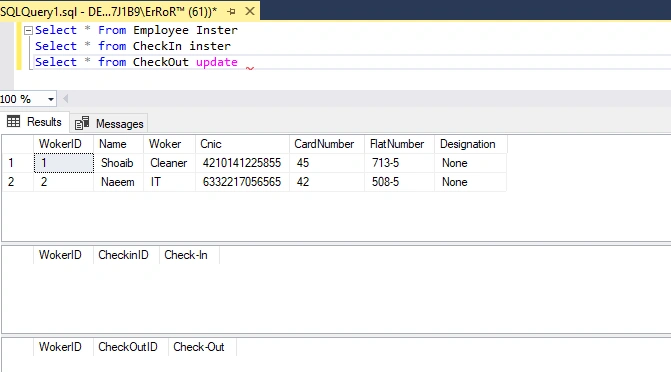
    Select * From Employee 
    only Data Insert  
    Select * from CheckIn
    only Data Insert  
    Select * from CheckOut update
    only Data Update 
     
    Employe Date And Checkin In Same id Save 
    +1
  • Jaydeep Patil
    +1
    Hi,
     
    Check the following link, I think that will help you
     
    https://stackoverflow.com/questions/15115759/update-multiple-tables-in-sql-server-using-inner-join 
    https://www.sqlshack.com/a-step-by-step-walkthrough-of-sql-inner-join/
     
    Regards,
    Jaydeep Patil 
    +1