
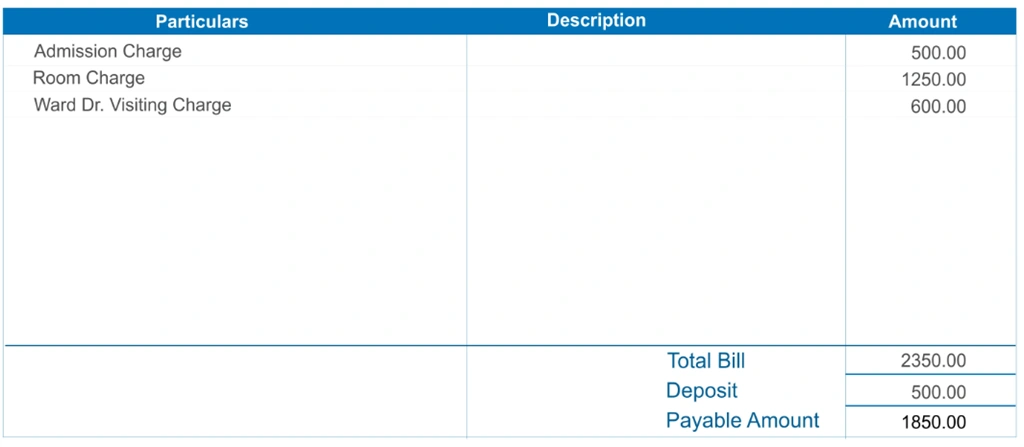
 Here I attached screenshot for making this kind of layout in WPF. How it is possible in wpf?
How to make table layout in WPF
Here I attached screenshot for making this kind of layout in WPF. How it is possible in wpf?3 Answers
Know the answer? Post it. Somebody with the same question will find it here.







Samir BeharaRank #2,181 · 648 reputationPosted Jan 22, 2016, 7:41 PM EST
Grid Margin="10"> Grid.ColumnDefinitions> ColumnDefinition Width="200" /> ColumnDefinition Width="*" /> Grid.ColumnDefinitions> Grid.RowDefinitions> RowDefinition Height="29" /> RowDefinition Height="29" /> RowDefinition Height="29" /> RowDefinition Height="*" /> Grid.RowDefinitions> Label Grid.Column="0" Grid.Row="0" HorizontalAlignment="Right" Content="Admission Charge" /> TextBlock Grid.Column="1" Grid.Row="0" FontWeight="Bold" VerticalAlignment="Center" Text="" /> Label Grid.Column="0" Grid.Row="1" HorizontalAlignment="Right" Content="Room Charge" /> TextBlock Grid.Column="1" Grid.Row="1" FontWeight="Bold" VerticalAlignment="Center" Text="" /> Label Grid.Column="0" Grid.Row="2" HorizontalAlignment="Right" Content="Ward Doctor Visiting Charge" /> TextBlock Grid.Column="1" Grid.Row="2" FontWeight="Bold" VerticalAlignment="Center" Text="" /> Grid>Samir BeharaRank #2,181 · 648 reputationPosted Jan 22, 2016, 7:44 PM EST
Mageshwaran RRank #411 · 6.1K reputationPosted Nov 24, 2019, 6:38 AM EST