I work on web design page i face issue i can't reach to same web design below desired
what i try as below
CSS
    Invoice - ??????

        body {
            background-image: url('');
            background-size: auto;
            background-position: center;
            background-repeat:no-repeat;
        }

        /* Top banner styling */
        .top-banner {
            padding: 10px;
            border: 4px solid #000080; /* Dark blue outer border */
        }

        /* Center content */
        .center-content {
            text-align: center;
        }
        .left-content {
            text-align: left;
        }
        .right-content {
            text-align: right;
        }
        .dark-blue {
            color: #000080;
        }
        .blue {
            color: #0103FF;
        }
        /* Center text */
        .center-text {
            margin: 0;
        }

        /* Logo styling */
        .logo {
            height: 50px; /* Adjust height as needed */
            width: auto;
        }

        /* Right align text */
        .right-align {
            text-align: right;
        }
        .bold-text {
            font-weight: bold;
        }
        /* Invoice container styling */
        .invoice-box {
            margin: auto;
            font-size: 16px;
            font-family: Arial, sans-serif;
            border: 4px solid #000080; /* Dark blue outer border */
            min-height: 1150px;
            /*page-break-after: always;*/
        }
        .invoice-footer {
            margin: auto;
            font-size: 16px;
            font-family: Arial, sans-serif;
            border: 4px solid #000080; /* Dark blue outer border */
            height:40px;
        }
        /* Header section styling */
        .invoice-header {
            display: flex;
            justify-content: space-between;
            padding: 20px;
            /*border-bottom: 1px solid #ddd;*/ /* Light border on bottom */
        }

        /* Invoice details section styling */
        .invoice-details {
            padding: 20px;
            display: flex;
            justify-content: space-between;
            /*border-top: 1px solid #ddd;*/ /* Light border on top */
            /*border-bottom: 1px solid #ddd;*/ /* Light border on bottom */
        }

        table {
        width: 95%;
        border-collapse: collapse;
        margin: 0 auto;
        border: 1px solid white; /* Add white border to table */
    }

    table th,
    table td {
        padding: 8px;
        border: 1px solid white; /* Add white border to table cells */
    }
th, td {
        padding: 10px; /* Adjust as needed */
    }
    table {
        border-spacing: 20px; /* Adjust as needed */
    }
            table th {
                text-align: left;
            }
        .items-headers {
            font-size: 20px;
        }
        /* Invoice total section styling */
        .invoice-total {
            padding: 20px;
            text-align: right;
        }

            .invoice-total p {
                margin-bottom: 10px;
            }

        /* Invoice number container styling */
        .invoice-number-container {
            background-color: #505E72; /* Green background */
            color: #fff; /* White text */
            padding: 3px;
            margin:10px;
            text-align: center;
        }

        /* Invoice number text styling */
        .invoice-number {
            margin: 0;
        }

        /* Adjustments for printing */
        @media print {
            .top-banner {
                display: table;
                width: 100%;
                color: #007bff; /* Dark blue text */
                border-spacing: 0;
                border-collapse: collapse;
                border-top-left-radius: 10px;
                border-top-right-radius: 10px;
            }
            /*body {
                background-image: url('D:/Repos/SabayekWinApp/SabayekWinApp/Reports/images/invoice-watermark-image.png');
                background-size: cover;
                background-position: center;
            }*/
                .top-banner td {
                    padding: 10px;
                    text-align: center;
                }

            .invoice-box {
                width: 100%;
                border: none; /* Remove border for printing */
                box-shadow: none; /* Remove box shadow for printing */
                margin: 0; /* Remove margin for printing */
                page-break-after: avoid; /* Avoid page breaks within the invoice */
            }

            .invoice-header {
                border-bottom: none; /* Remove border for printing */
            }
        }


                ??? ????????:
                1111
                ???????:
                22222


                ??? ??????:
                1111
                ????? ??????:
                22222


                ???????:
                1111
                ??? ??????:
                22222


                ???????:
                1111
                ???? ?????:
                22222


                    ?????
                    ?????
                    ??????
                    ?????
                    ??? ??????
                    ?????
                    ?????? ?????
                    ???????? ??????
                    ??? ???? ????????
                    ??? ??????
                    ?????? ?????


            ??? ???
            ???????
            ???? 21
            18g
            3000????
            30
            300
            100
            3100
            30
            3200


            Subtotal: $50.00
Tax (if applicable): $0.00
Total: $50.00
-->


                    ????????
                    100.0
                    100.0


            ???? ?????


            ??? ??????: 1 / 1


            ????? ???????
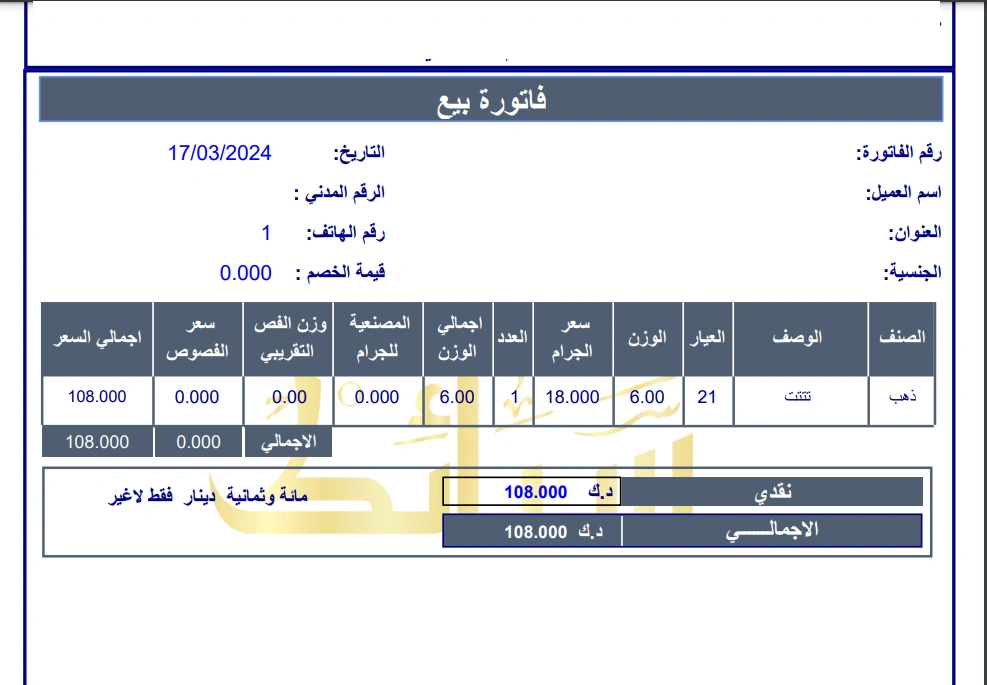
desired result i need as below







Abhishek YadavRank #217 · 11.3K reputationPosted Apr 30, 2024, 7:45 AM EDT
There are several AI tools and software that can generate HTML and CSS code from an image, such as:
1. Descript: This AI software uses machine learning algorithms to analyze images and automatically generate HTML and CSS code based on the design elements present in the image.
2. Dreamweaver: This popular web design tool also has a feature that allows users to generate HTML and CSS code from an image using its design extraction tools.
3. Deep Dream Generator: This online tool uses deep learning algorithms to analyze images and generate HTML and CSS code based on the visual elements present in the image.
4. Designify: This AI-powered tool can convert any design image into HTML and CSS code in a matter of seconds, making it easier for developers to create website designs quickly.
5. Vision AI: This tool uses computer vision technology to recognize and extract design elements from an image and automatically generate HTML and CSS code based on those elements.
These AI tools can be helpful for web designers and developers who want to quickly convert design images into code for their websites.
Sanjay JoshiRank #2,444 · 576 reputationPosted Aug 6, 2025, 8:18 AM EDT
I want to recommend to use Tailwind CSS Templates it's great instead of bootstrap
Shweta Jagtap15 reputationPosted Aug 6, 2025, 8:20 AM EDT
Try Shadcn or flowbite that it also good idea
William Gram25 reputationPosted Aug 9, 2025, 5:24 AM EDT
Create stunning web designs using pure HTML and CSS by mastering flexbox and grid — youcine official.