Hi masters,
I have some doubts on C#.
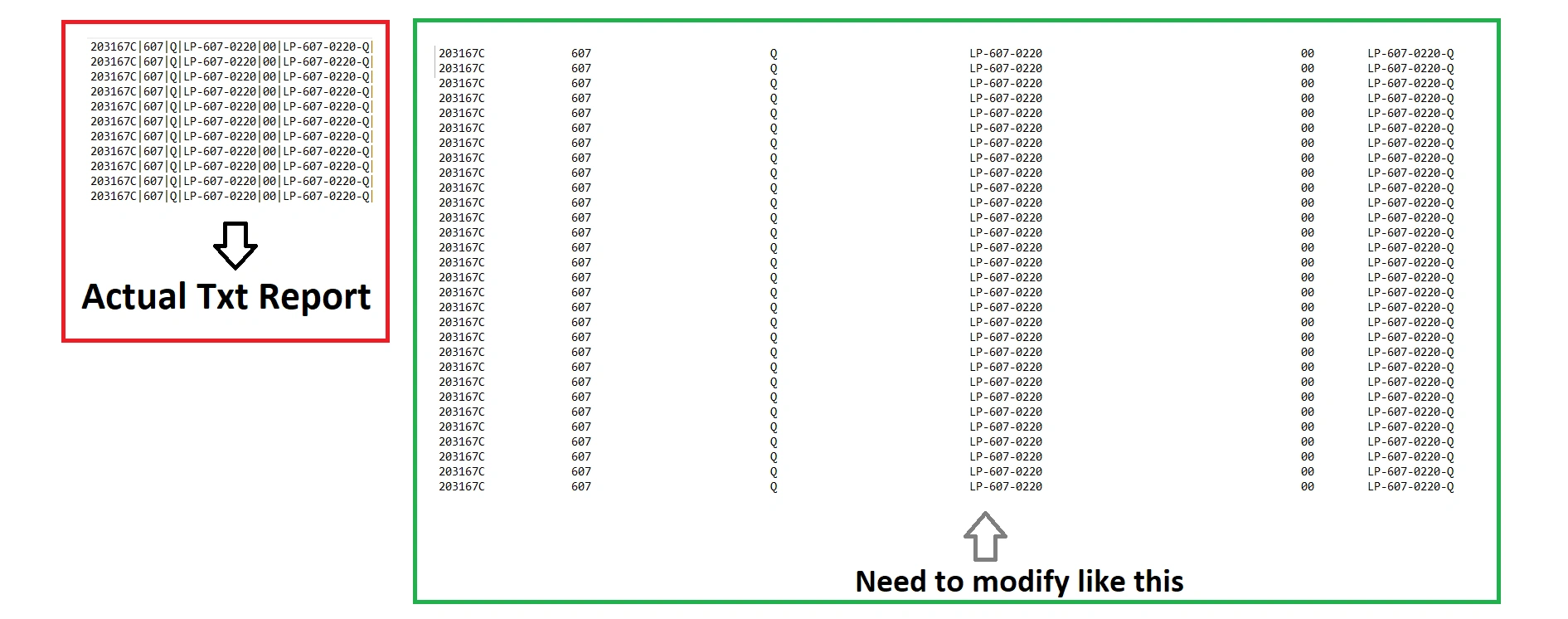
How to modify the text file using c# code(Using File.ReadAllLines)
The columns length is 1,21,51,81,131,141
How to acheive below snap using C#
Hi masters,
I have some doubts on C#.
How to modify the text file using c# code(Using File.ReadAllLines)
The columns length is 1,21,51,81,131,141
How to acheive below snap using C#
Know the answer? Post it. Somebody with the same question will find it here.
Answer a question in the forums and earn +20 SHARP for every answer.
See unanswered questions Arun PottiAnswers in the forums20answers02
 Tahir AnsariAnswers in the forums5answers03
 Kamlesh KumarAnswers in the forums5answers04
 Sam HobbsAnswers in the forums4answers05
 Željko PerićAnswers in the forums3answersFull leaderboard →
 DevSocialUpcoming · 3rd editionAI Agents ConferenceDec 1–3, 2026Live onlineFree to attend5days leftRegister

Jithu ThomasRank #437 · 5.7K reputationPosted Jul 24, 2024, 5:06 AM EDT
using System;
using System.IO;

class Program
{
    static void Main()
    {
        string inputFilePath = "input.txt";  // Path to the input file
        string outputFilePath = "output.txt"; // Path to the output file

        // Define column lengths
        int[] columnLengths = { 1, 21, 51, 81, 131, 141 };

        // Read all lines from the input file
        string[] lines = File.ReadAllLines(inputFilePath);

        // Create an array to hold the formatted lines
        string[] formattedLines = new string[lines.Length];

        // Process each line
        for (int i = 0; i < lines.Length; i++)
        {
            string line = lines[i];
            string formattedLine = "";

            // Split the line into columns based on the column lengths
            int currentIndex = 0;
            foreach (int length in columnLengths)
            {
                if (currentIndex < line.Length)
                {
                    int lengthToUse = Math.Min(length, line.Length - currentIndex);
                    string column = line.Substring(currentIndex, lengthToUse).Trim();
                    formattedLine += column.PadRight(length) + " ";
                    currentIndex += lengthToUse;
                }
            }

            // Add the formatted line to the array
            formattedLines[i] = formattedLine;
        }

        // Write the formatted lines to the output file
        File.WriteAllLines(outputFilePath, formattedLines);

        Console.WriteLine("File formatted successfully.");
    }
}
Dear
Try this,
Rajadurai127 reputationPosted Jul 24, 2024, 5:46 AM EDT
Hi Jithu,
Its Working thank you