
Hello,
I want to automatically populate 3 variables: acctNumber, ChkNumber and Date in a textbox and then submit them with the image to be saved in the database, base on the file: Index.txt which contains the path for each image, but I am totally lost on how to populate each variable to save them plus the image into database when I hit the save button.
734 = acctNumber, 7762= chkNumber, 04-03-2017 = ImgDate and png = Image extension
This is the file to read/image example:
Code
734|7762|6000|1015755710|322282894|04-03-2017|25002592|0|734-7762-1015755710-04032017.png
869|1601|101000|1015620730|322275348|04-03-2017|24001896|0|869-1601-1015620730-04032017.png
892|502673|10000|1015690570|43301601|04-03-2017|22003186|0|892-502673-1015690570-04032017.png
982|28862706|17700|1015674700|11900445|04-03-2017|22001593|0|982-28862706-1015674700-04032017.png
983|3342659|542750|1015661030|11900445|04-03-2017|22000220|0|983-3342659-1015661030-04032017.png
983|3363780|542750|1015661020|11900445|04-03-2017|22000219|0|983-3363780-1015661020-04032017.png
1365|8127|123098|1015737890|241274514|04-03-2017|11000215|0|1365-8127-1015737890-04032017.png
This is the interface:
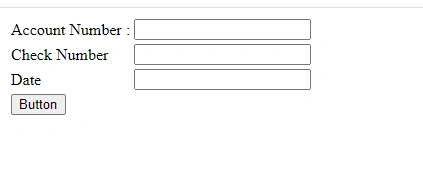
This is my code so far:
C#
using System;
using System.Configuration;
using System.Data;
using System.Data.SqlClient;
using System.IO;


namespace ImageToBinary
{
    public partial class Conversion : System.Web.UI.Page
    {
        protected void Button1_Click(object sender, EventArgs e)
        {
            if (!FileUpload1.HasFile) //Validation
            {
                Response.Write("No file Selected"); return;
            }
            else
            {
                string filename = FileUpload1.PostedFile.FileName;
                string imagePath = "1991|4145|42551|1015737750|321173483|04-03-2017|11000201|0|1991-4145-1015737750-04032017.png";

                // Extract variables from imagePath
                string[] parts = imagePath.Split('|');
                int acctNumber = int.Parse(parts[0]);
                int chkNumber = int.Parse(parts[1]);
                string imgDate = parts[5]; // Assuming 04-03-2017 is the date part of the image path

                // Load file meta data with FileInfo
                string path = Server.MapPath("~/Images/") + imagePath;
                FileInfo fileInfo = new FileInfo(path);

                // The byte[] to save the data in
                byte[] data = new byte[fileInfo.Length];

                // Load a filestream and put its content into the byte[]
                using (FileStream fs = fileInfo.OpenRead())
                {
                    fs.Read(data, 0, data.Length);
                }

                //convert the image into the byte


                //Insert the Data in the Table

                using (SqlConnection connection = new SqlConnection())
                {
                    connection.ConnectionString = ConfigurationManager.ConnectionStrings["DBCS"].ToString();

                    connection.Open();
                    SqlCommand cmd = new SqlCommand();
                    cmd.Connection = connection;

                    string commandText = "Insert into chkImages values (@acctNumber,@chknumber,@imgdate)";

                    cmd.CommandText = commandText;
                    cmd.CommandType = CommandType.Text;
                    cmd.Parameters.Add("@acctNumber", SqlDbType.Int);
                    cmd.Parameters.Add("@chknumber", SqlDbType.Int);
                    cmd.Parameters.Add("@imgdate", SqlDbType.VarChar);
                    cmd.ExecuteNonQuery();
                    cmd.Dispose();
                    connection.Close();

                    Response.Write("Image has been Added");
                }
            }
        }
    }
}






Chetan SanghaniRank #244 · 10.2K reputationPosted Jul 13, 2024, 2:07 AM EDT
To achieve the functionality of populating the variables
acctNumber,chkNumber, andImgDatefrom theIndex.txtfile and then saving them along with the image into the database, you can follow these steps:Index.txtfile and extract the necessary information.Here’s a complete example of how you can implement this:
Step-by-Step Implementation
Read and Extract Information from the
Index.txtFile:private void PopulateTextBoxes(string filePath) { var lines = File.ReadAllLines(filePath); foreach (var line in lines) { var parts = line.Split('|'); if (parts.Length >= 9) { // Extract required information int acctNumber = int.Parse(parts[0]); int chkNumber = int.Parse(parts[1]); string imgDate = parts[5]; string imagePath = parts[8]; // Populate the textboxes (assuming you have textboxes named accordingly) txtAcctNumber.Text = acctNumber.ToString(); txtChkNumber.Text = chkNumber.ToString(); txtDate.Text = imgDate; // Optionally, you could also store the imagePath if needed ViewState["ImagePath"] = imagePath; break; // Remove this if you want to handle multiple lines } } }Convert the Image to a Byte Array:
private byte[] ConvertImageToByteArray(string imagePath)
{
    string fullPath = Server.MapPath("~/Images/") + imagePath;
    return File.ReadAllBytes(fullPath);
}
Save the Data into the Database:
protected void Button1_Click(object sender, EventArgs e)
{
    if (!FileUpload1.HasFile) //Validation
    {
        Response.Write("No file Selected"); return;
    }
    else
    {
        // Read and populate textboxes from Index.txt
        string indexFilePath = Server.MapPath("~/Index.txt");
        PopulateTextBoxes(indexFilePath);

        // Extract values from textboxes
        int acctNumber = int.Parse(txtAcctNumber.Text);
        int chkNumber = int.Parse(txtChkNumber.Text);
        string imgDate = txtDate.Text;
        string imagePath = ViewState["ImagePath"].ToString();

        // Convert the image to byte array
        byte[] imageData = ConvertImageToByteArray(imagePath);

        // Insert the data into the database
        using (SqlConnection connection = new SqlConnection(ConfigurationManager.ConnectionStrings["DBCS"].ToString()))
        {
            connection.Open();
            SqlCommand cmd = new SqlCommand("INSERT INTO chkImages (acctNumber, chknumber, imgdate, imageData) VALUES (@acctNumber, @chknumber, @imgdate, @imageData)", connection);

            cmd.Parameters.AddWithValue("@acctNumber", acctNumber);
            cmd.Parameters.AddWithValue("@chknumber", chkNumber);
            cmd.Parameters.AddWithValue("@imgdate", imgDate);
            cmd.Parameters.AddWithValue("@imageData", imageData);

            cmd.ExecuteNonQuery();
            connection.Close();

            Response.Write("Image has been Added");
        }
    }
}
ASP.NET Frontend (ASPX):
Ensure you have textboxes and a file upload control in your ASPX page:
Summary
Index.txtfile, extracts the necessary information, and populates the textboxes.Index.txtfile, populates the textboxes, converts the image to a byte array, and inserts the data into the database.By following these steps, you can achieve the desired functionality of populating the variables and saving them along with the image into the database.