

Know the answer? Post it. Somebody with the same question will find it here.
Answer a question in the forums and earn +20 SHARP for every answer.
See unanswered questions Arun PottiAnswers in the forums20answers02
 Tahir AnsariAnswers in the forums5answers03
 Kamlesh KumarAnswers in the forums5answers04
 Sam HobbsAnswers in the forums4answers05
 Željko PerićAnswers in the forums3answersFull leaderboard →
 DevSocialUpcoming · 3rd editionAI Agents ConferenceDec 1–3, 2026Live onlineFree to attend5days leftRegister

Joginder BangerRank #360 · 7K reputationPosted Nov 4, 2014, 6:47 PM EST
select distinct Job.Job_no,To_SailorName,Solution,Ho_sailorName from yourTableName"
use this distinct keyword , you duplicate data automatic hide.
Chathurika Palliyaguruge31 reputationPosted Nov 4, 2014, 7:17 PM EST
Joginder BangerRank #360 · 7K reputationPosted Nov 4, 2014, 8:01 PM EST
Chathurika Palliyaguruge31 reputationPosted Nov 4, 2014, 8:08 PM EST
Riddhi ValechaRank #794 · 2.9K reputationPosted Nov 4, 2014, 8:28 PM EST
1 line remaining - Datagridview1.Databind();
Last line after assigning the DataSource.
In database, make Job_No as primary key... If this is not the mapping table.
Joginder BangerRank #360 · 7K reputationPosted Nov 4, 2014, 11:28 PM EST
WITH cte AS ( SELECT Job_NO,anotherColumnName,anotherColumnName
row_number() OVER ( PARTITION BY name ORDER BY Job_NO) AS row_num
FROM yourTable ) DELETE FROM cte WHERE row_num > 1
Vishal JadhavRank #2,563 · 545 reputationPosted Nov 5, 2014, 2:40 AM EST
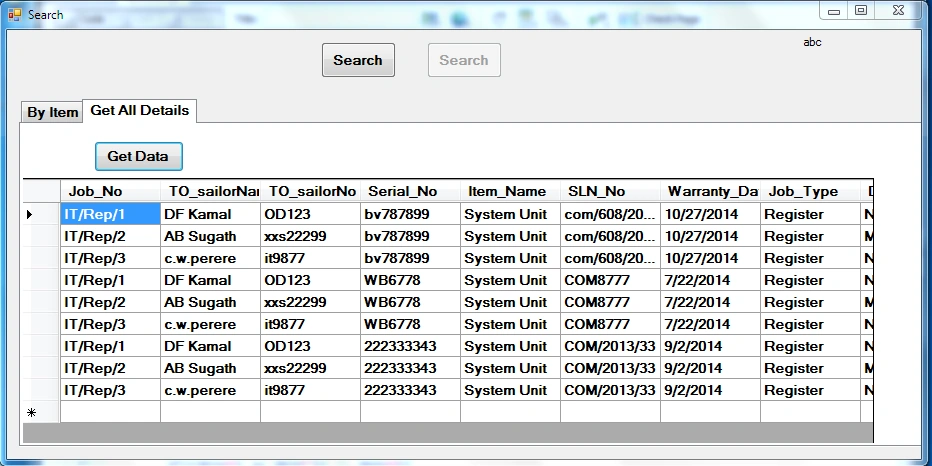
If you see the records carefully, they are not duplicate at all.
e.g. Each duplicate(as per your statement) Job_No have different Serial_No entry than previous ones.
So the records you are getting are nothing but distinct only.
Please check your data.
Thanks.