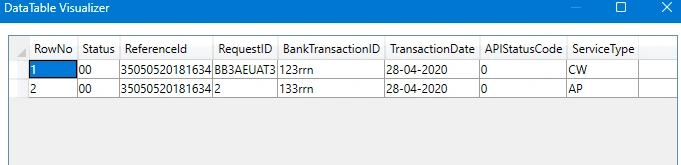
after service type im getting like extra column how can i remove it or is this normal??
Know the answer? Post it. Somebody with the same question will find it here.
Answer a question in the forums and earn +20 SHARP for every answer.
See unanswered questions Arun PottiAnswers in the forums20answers02
 Tahir AnsariAnswers in the forums5answers03
 Kamlesh KumarAnswers in the forums5answers04
 Sam HobbsAnswers in the forums4answers05
 Željko PerićAnswers in the forums3answersFull leaderboard →
 DevSocialUpcoming · 3rd editionAI Agents ConferenceDec 1–3, 2026Live onlineFree to attend5days leftRegister

Jignesh KumarRank #91 · 22.9K reputationPosted Mar 5, 2024, 3:41 AM EST
Hello Jaya Prakash,
In the last column, you see that is the expected behavior of the data table. You can check in Debugg mode its not empty column,
Mithilesh TataRank #862 · 2.6K reputationPosted Mar 5, 2024, 2:25 AM EST
If you're seeing an extra empty column in your database after a specific service type, it's likely due to the way the data is structured or queried. Here are a few steps you can take to troubleshoot and potentially remove the empty column:
DESCRIBE table_namein MySQL orSELECT * FROM INFORMATION_SCHEMA.COLUMNS WHERE TABLE_NAME = 'table_name'in PostgreSQL to view the table structure.ALTER TABLE table_name DROP COLUMN column_name;. In PostgreSQL, it'sALTER TABLE table_name DROP COLUMN column_name;.If you're unsure about whether the extra column is normal or not, consulting with your development team or a database administrator can provide additional insights and guidance tailored to your specific setup and requirements.
Abhishek YadavRank #217 · 11.3K reputationPosted Mar 5, 2024, 2:45 AM EST
I'd be glad to help you with removing empty columns from a DataTable in C#. Here's a combined approach that addresses the potential issues and offers more clarity:
Method 1: Using a Loop with Efficient Collection Handling
C#
public static void RemoveEmptyColumns(DataTable dt)
{
    // Create a list to store columns to be removed
    List columnsToRemove = new List();

    // Loop through columns in reverse order to avoid index issues
    for (int i = dt.Columns.Count - 1; i >= 0; i--)
    {
        bool isEmpty = true;

        // Check if any row in the column contains a non-empty value
        foreach (DataRow row in dt.Rows)
        {
            if (!row.IsNull(i))
            {
                isEmpty = false;
                break;
            }
        }

        // If the column is empty, add it to the removal list
        if (isEmpty)
        {
            columnsToRemove.Add(dt.Columns[i]);
        }
    }

    // Remove columns from the DataTable in a single operation
    dt.Columns.RemoveRange(columnsToRemove.ToArray());
}
Use code with caution.
content_copy
Explanation:
RemoveEmptyColumnsfunction: This function takes aDataTableas input.columnsToRemovelist: A list is created to store the columns that will be removed.forloop: The loop iterates through the columns of theDataTablein reverse order (usingi >= 0) to avoid issues with collection modification during removal.isEmptyflag: This flag is set totrueinitially, assuming the column is empty.foreachloop: This loop iterates through each row in theDataTable.!row.IsNull(i)check: This checks if the value in the current cell is not null. If it's not null, the column is not empty, andisEmptyis set tofalseand the loop breaks to avoid unnecessary checks.isEmptyremainstrueafter the loop, it means the column contains only null values, and it's added to thecolumnsToRemovelist.RemoveRange: After the loop, theRemoveRangemethod is used to remove all columns from thecolumnsToRemovelist in a single operation. This is more efficient than removing columns one by one in the loop.Method 2: Using LINQ (if applicable)
C#
public static void RemoveEmptyColumnsLinq(DataTable dt)
{
    // Remove columns where all rows have null values using LINQ
    dt.Columns.Remove(dt.Columns.Where(c => dt.AsEnumerable().All(r => r.IsNull(c.Ordinal))).ToArray());
}
Use code with caution.
content_copy
Explanation:
RemoveEmptyColumnsLinqfunction: This function takes aDataTableas input.Whereclause filters theColumnscollection to include only columns whereAllrows in theDataTable(converted to anIEnumerableusingAsEnumerable()) havenullvalues for the current column (accessed by its ordinal usingc.Ordinal).ToArrayandRemove: The filtered columns are converted to an array usingToArrayand then removed from theDataTableusingRemove.Choosing the Method:
DataTablestructure.Additional Considerations:
DataTableis initialized and populated before calling these functions.