Skip to content
Loading
    
  •         
  • }  
  • I am trying a pass a blog model inside the index view but I get an error:
     
    Line 1: @model IEnumerable
    Line 2: @model IEnumerable
    Line 3:
    Line 4: @{
    Parser Error Message: Only one 'model' statement is allowed in a file.
     
    see reference:
     
     
    How to render the blogdata (blogdescription and blogtype) inside the index view??
     
    please help?
     
    I am try this issue to solve last 1 day but still issue not solved?
      
  •   
  •         class="form-group">  
  •             @Html.LabelFor(model => model.blogtype, htmlAttributes: new { @class = "control-label col-md-2" })  
  •             class="col-md-10">  
  •                 @Html.DropDownListFor(x => x.blogtype, new List  
  •     {  
  •                         new SelectListItem() {Text = "public", Value="public"},  
  •                         new SelectListItem() {Text = "private", Value="private"},  
  •     })  
  •   
  •                 @*@Html.EditorFor(model => model.blogtype, new { htmlAttributes = new { @class = "form-control" } })*@  
  •                 @Html.ValidationMessageFor(model => model.blogtype, "", new { @class = "text-danger" })  

  •               
  •           
  •   
  •         class="form-group">  
  •             class="col-md-offset-2 col-md-10">  
  •                 "submit" value="Create" class="btn btn-default" />  
  •               
  •           
  •       
  • }  
  • Blog Data

      
  •   
  •   
  •     
  •   
  •         
  •   
  •         
  •   
  •     
  •   
  •   
  •     if (bloggs.Count>1)  
  •     {  
  •         @foreach (blog blg in bloggs)  
  •         {  
  •             
  •   
  •                 
  •   
  •                 
  •   
  •             
  •   
  •         }  
  •     }  
  • blogdescriptionblogtype
    @blg.blogdescription@blg.blogtype
      
  •  
     Index.cshtml
     
    1. @model IEnumerable  
    2.   
    3. @{  
    4.     ViewBag.Title = "Index";      
    5. }  
    6. Index


    7.   

    8.     @Html.ActionLink("Create New", "Create")   
    9.   
    10. class="table">  
    11.       
    12.           
    13.             @Html.DisplayNameFor(model => model.firstname)  
    14.           
    15.           
    16.             @Html.DisplayNameFor(model => model.lastname)  
    17.           
    18.           
    19.             @Html.DisplayNameFor(model => model.username)  
    20.           
    21.           
    22.             @Html.DisplayNameFor(model => model.password)  
    23.           
    24.           
    25.             @Html.DisplayNameFor(model => model.email)  
    26.           
    27.           
    28.       
    29.   
    30.     @foreach (var item in Model)  
    31.     {  
    32.           
    33.               
    34.                 @Html.DisplayFor(modelItem => item.firstname)  
    35.               
    36.               
    37.                 @Html.DisplayFor(modelItem => item.lastname)  
    38.               
    39.               
    40.                 @Html.DisplayFor(modelItem => item.username)  
    41.               
    42.               
    43.                 @Html.DisplayFor(modelItem => item.password)  
    44.               
    45.               
    46.                 @Html.DisplayFor(modelItem => item.email)  
    47.               
    48.               
    49.                 @Html.ActionLink("Edit", "Edit", new { id = item.studid })  
    50.               
    51.           
    52.     }  
    53.   
    54.   
    55.   
    56. @{ Html.RenderAction("BlogCreate", "Home"); }  
     see my full code which place need to be correction?
    +1
  • Arvind Kushwaha
    +1
    Hi Rahul,
     
    Don't copy paste the code on the page. Attached the solution.. While repling there is option to upload the source code. 
     
    Add your code into .zip and upload the code.
    +1
  • Arvind Kushwaha
    0
    Hi Rahul,
     
    Please check this article
     
    https://www.c-sharpcorner.com/UploadFile/ff2f08/multiple-models-in-single-view-in-mvc/ 
    0
  • Salman Beg
    0
    To resolve this issue the best thing is to use viewmodel but still some other ways exists. Check this link for more, http://www.dotnet-stuff.com/tutorials/aspnet-mvc/way-to-use-multiple-models-in-a-view-in-asp-net-mvc
    0
  • Salman Beg
    0
    Hey I think bloggs is null and due to that reason it is showing object reference not set to an instance of an object. First check whether it is null or not and then check why it is getting null. Thanks.
    0
  • Arvind Kushwaha
    0
    Hi Rahul,
     
    To handle and avoid above error please check the collection count. Iterate collection only when they have any items.
    1. if(bloggs.Count> 1) {  
    2. foreach (blog blg in bloggs)    
    3.         {    
    4.                 
    5.                 @blg.blogdescription    
    6.                 @blg.blogtype    
    7.                 
    8.         }    
    9. }  
    0
  • 0
    Hello Arvind kushwah and salman beg
     
    main issue is this line this line gives the null that is the reason object referance not set to an object


     //issue is here bloggs gives the null that is the reason object referance not set to an object?
    1. IEnumerable bloggs = ViewData["blogdatas"] as IEnumerable;    
     how to solve this issue?
    0
  • Arvind Kushwaha
    0
    Hi rahul,
     
    Try adding this header in BlogCreate.cshtml
     
    @using System.Web.Mvc.Html;
    0
  • 0
    Hello Arvind not work after add this line


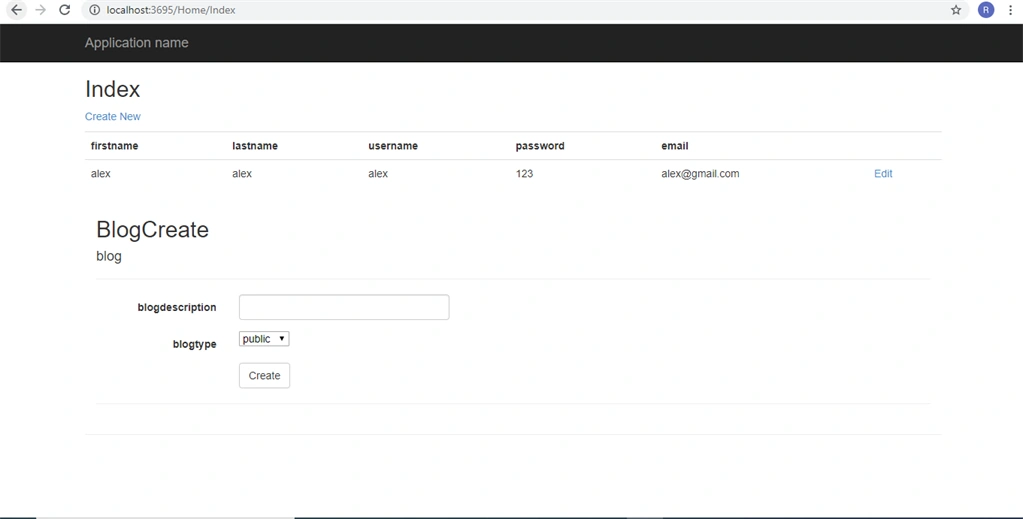
    not work see this image?
     
    issue is why giving the null? that is give the error object referance not set to an object 
    0
  • Arvind Kushwaha
    0
    Hi Rahul,
     
    I haven't tried but you can try and replace below code with
    1. HttpPost]    
    2. public ActionResult BlogCreate(blog blg)    
    3. {    
    4.       var blogcreate =  dbstud.blog.Add(blg);    
    5.     
    6.       ViewData["blogdatas"] = blg;    
    7.     
    8.       dbstud.SaveChanges();    
    9.       return View(blogcreate);    
    10. }
    this one.
    1. HttpPost]    
    2. public ActionResult BlogCreate(blog blg)    
    3. {    
    4.       var blogcreate =  dbstud.blog.Add(blg);    
    5.     
    6.       ViewData["blogdatas"] = blg;    
    7.     
    8.       dbstud.SaveChanges();    
    9.       return View();    
    10. }
    0
  • 0
    Hello Arvind
     
    as per your suggestion I add this 
    1. [HttpPost]  
    2. public ActionResult BlogCreate(blog blg)  
    3. {  
    4.     var blogcreate =  dbstud.blog.Add(blg);  
    5.   
    6.     ViewData["blogdatas"] = blg; 
    7.     dbstud.SaveChanges();
    8.     return View(blogcreate);  
    9. }  
     still not work 
     
    give an error object reference not set to an object?
    0
  • 0
    Hello Arvind
     
    I think main issue is this line
    1. IEnumerable bloggs = ViewData["blogdatas"] as IEnumerable;  
    bloggs this store the null?
    0
  • Arvind Kushwaha
    0
    Hi Rahul,
     
    You have added the wrong code. Add this one with return View();
    1. [HttpPost]    
    2. public ActionResult BlogCreate(blog blg)    
    3. {    
    4.     var blogcreate =  dbstud.blog.Add(blg);    
    5.     
    6.     ViewData["blogdatas"] = blg;    
    7.     
    8.     
    9.     dbstud.SaveChanges();    
    10.     
    11.     
    12.     return View();    
    13. }   
    0
  • 0
    hello Arvind
     
    1. [HttpPost]  
    2.  public ActionResult BlogCreate(blog blg)  
    3.  {  
    4.      var blogcreate =  dbstud.blog.Add(blg);  
    5.   
    6.      ViewData["blogdatas"] = blg;  
    7.   
    8.      dbstud.SaveChanges();  
    9.   
    10.      return View();  
    11.  }  
     
    still give the null and error object referance  not set to an object?
    0
  • Arvind Kushwaha
    0
    Hi Rahul,
     
    If possible, Please attached the source code. I will check and revert back you instead of unkown solutions.
     
    Thanks 
    0