Hi All,
i am working on a page to implement toggle grid. Please go through the code and help me to implement the toggle functionality.
Thanks in advance.
sample data i am putting here:-
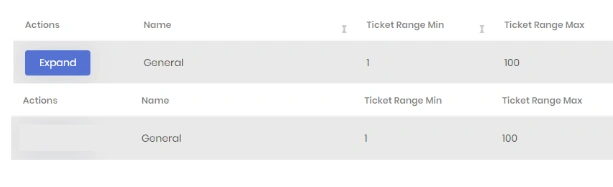
This is my view code(boilerplate)
SQL
                    @L["Actions"]
                    @L["Id"]
                    @L["Name"]
                    @L["TicketRangeMin"]
                    @L["TicketRangeMax"]
                    @L["TicketCode"]
                    @L["IsDefaultQueue"]
And my javascript code is given below:-
JavaScript
var dataTable = $("#QueuesTable").DataTable(abp.libs.datatables.normalizeConfiguration({
    processing: true,
    serverSide: true,
    paging: true,
    searching: false,
    scrollX: true,
    autoWidth: true,
    scrollCollapse: true,
    order: [[1, "asc"]],
    ajax: abp.libs.datatables.createAjax(queueService.getList, getFilter),
    columnDefs: [
        {
            rowAction: {
                items:
                    [
                        {
                            text: l("Expand"),
                            action: function (data) {
                                var queueId = data.record.queue.id;
                                alert(queueId);
                                if (dataTableOne) {
                                    //--- need to show toggle grid when click on this button

                                } else {

                                    alert('DataTableOne is not initialized.');
                                }

                            }
                        }


                    ]
            }
        },
        { data: "queue.id", visible: false },
        { data: "queue.name" },
        { data: "queue.ticketRangeMin" },
        { data: "queue.ticketRangeMax" },
        { data: "queue.ticketCode" },
        {
            data: "queue.isDefaultQueue",
            render: function (isDefaultQueue) {

            }
        }
    ]
}));






Jayraj ChhayaRank #304 · 8.2K reputationPosted Jan 3, 2024, 1:57 AM EST
To implement the toggle functionality in your grid, you can follow these steps:
{ text: "Toggle", action: function (data) { var queueId = data.record.queue.id; alert(queueId); if (dataTableOne) { //--- need to show toggle grid when click on this button } else { alert('DataTableOne is not initialized.'); } } }var dataTableOne = $("#ToggleGrid").DataTable({ // Configuration options for the toggle grid });if (dataTableOne) { //--- need to show toggle grid when click on this button $("#ToggleGrid").show(); } else { // Initialize the toggle grid dataTableOne = $("#ToggleGrid").DataTable({ // Configuration options for the toggle grid }); }Note: Make sure to replace
#ToggleGridwith the appropriate ID of your toggle grid element in the HTML markup and JavaScript code.Bineesh ViswanathRank #3,087 · 464 reputationPosted Jan 3, 2024, 6:14 AM EST
Hi Jayraj,
this code is not working as expected
Bineesh ViswanathRank #3,087 · 464 reputationPosted Feb 19, 2024, 2:25 AM EST
@Jayraj Chhaya,
I added code you provided. currently i am getting message "databtable not initialized"
below is the code where i am setting the table
var dataTableOne = $("#QueueTicketTable").DataTable({
processing: true,
serverSide: true, // You may need to set this to false if you're not handling server-side processing
paging: true,
searching: false,
scrollX: true,
autoWidth: true,
scrollCollapse: true,
order: [[0, "asc"]], // Set the default sort order, adjust as needed
ajax: abp.libs.datatables.createAjax(queueService.getTicketsByQueueId, data.record.queue.id),
columns: QueuedataTableColumns
});
var QueuedataTableColumns = [
{ data: "tickts.status" },
{ data: "tickts.TicketNumber" },
{ data: "tickts.SequenceNumber" }
];