Bash
    function PrintPanel() {
        var panel = document.getElementById("");
        var printWindow = window.open('', '', 'height=500,width=800');
        printWindow.document.write('DIV Contents');
        printWindow.document.write('');
        printWindow.document.write(panel.innerHTML);
        printWindow.document.write('


        QR Code Print
CS
C#
if (Request.QueryString["GenSampleCode"] != null)
{
    int GenSampleCode = Convert.ToInt32(Request.QueryString["GenSampleCode"]);

    DataTable aDtGenSampleCode = new DataTable();
    DataTable PivotDatatable = new DataTable();
    aDtGenSampleCode = QualityReport.SP_TruckWiseSampleDtlsQrPrint_V2(GenSampleCode);
    aDtGenSampleCode.Columns.Cast()
    .ToList()
    .ForEach(c => c.ColumnName = aDtGenSampleCode.Rows[0][c.Ordinal].ToString());

    aDtGenSampleCode.Rows.RemoveAt(0);


    PivotDatatable = GenerateTransposedTable(aDtGenSampleCode);//PivoteDataTable.Pivot(aDtGenSampleCode);

    foreach (DataRow dtRow in PivotDatatable.Rows)
    {

        foreach (var item in dtRow.ItemArray)
        {
            System.Web.UI.WebControls.Image imgbarcode = new System.Web.UI.WebControls.Image();
            System.Web.UI.WebControls.Label lblcode = new System.Web.UI.WebControls.Label();
            string code = item.ToString();
            imgbarcode.Height = 175;
            imgbarcode.Width = 175;
            var writer = new BarcodeWriter();
            writer.Format = BarcodeFormat.QR_CODE;
            var result = writer.Write(code);

            string path = Server.MapPath("~/Images/QRImages.jpg");
            var barcodeBitmap = new Bitmap(result);

            using (MemoryStream memory = new MemoryStream())
            {
                using (FileStream fs = new FileStream(path, FileMode.Create, FileAccess.ReadWrite))
                {
                    barcodeBitmap.Save(memory, ImageFormat.Jpeg);

                    byte[] bytes = memory.ToArray();

                    imgbarcode.ImageUrl = "data:image/png;base64," + Convert.ToBase64String(bytes);


                }
                lblJobcode.Text = code;
                plBarCode.Controls.Add(imgbarcode);
            }

        }
    }

}

private DataTable GenerateTransposedTable(DataTable inputTable)
{
    DataTable outputTable = new DataTable();

    // Add columns by looping rows

    // Header row's first column is same as in inputTable
    outputTable.Columns.Add(inputTable.Columns[0].ColumnName.ToString());

    // Header row's second column onwards, 'inputTable's first column taken
    foreach (DataRow inRow in inputTable.Rows)
    {
        string newColName = inRow[0].ToString();
        outputTable.Columns.Add(newColName);
    }

    // Add rows by looping columns
    for (int rCount = 1; rCount <= inputTable.Columns.Count - 1; rCount++)
    {
        DataRow newRow = outputTable.NewRow();

        // First column is inputTable's Header row's second column
        newRow[0] = inputTable.Columns[rCount].ColumnName.ToString();
        for (int cCount = 0; cCount <= inputTable.Rows.Count - 1; cCount++)
        {
            string colValue = inputTable.Rows[cCount][rCount].ToString();
            newRow[cCount + 1] = colValue;
        }
        outputTable.Rows.Add(newRow);
    }

    return outputTable;
}







Amit MohantyRank #112 · 20K reputationPosted Nov 3, 2023, 1:51 AM EDT
using ZXing.BarcodeWriter:
protected void Page_Load(object sender, EventArgs e) { DataTable dataTable = new DataTable(); dataTable.Columns.AddRange(new DataColumn[1] { new DataColumn("Id", typeof(string)) }); dataTable.Rows.Add("www.example-one.com"); dataTable.Rows.Add("www.example-two.com"); dataTable.Rows.Add("www.example-three.com"); dataTable.Rows.Add("www.example-four.com"); dataTable.Rows.Add("www.example-five.com"); dataTable.Rows.Add("www.example-six.com"); dataTable.Rows.Add("www.example-seven.com"); dataTable.Rows.Add("www.example-eight.com"); foreach (DataRow dtRow in dataTable.Rows) { foreach (var item in dtRow.ItemArray) { System.Web.UI.WebControls.Image imgbarcode = new System.Web.UI.WebControls.Image(); BarcodeWriter barcodeWriter = new BarcodeWriter(); barcodeWriter.Format = BarcodeFormat.QR_CODE; EncodingOptions options = new QrCodeEncodingOptions { Width = 175, // Width of the QR code image Height = 175, // Height of the QR code image }; barcodeWriter.Options = options; string qrCodeValue = item.ToString(); using (Bitmap qrCodeBitmap = barcodeWriter.Write(qrCodeValue)) { using (Graphics graphics = Graphics.FromImage(qrCodeBitmap)) { using (Font font = new Font("Arial", 10)) { // Set the position and color of the text PointF point = new PointF(10, 10); // Adjust the position as needed Color textColor = Color.Black; // Set the desired text color graphics.DrawString(qrCodeValue, font, new SolidBrush(textColor), point); } } using (MemoryStream ms = new MemoryStream()) { qrCodeBitmap.Save(ms, ImageFormat.Png); byte[] imageBytes = ms.ToArray(); string base64Image = "data:image/png;base64," + Convert.ToBase64String(imageBytes); imgbarcode.ImageUrl = base64Image; plBarCode.Controls.Add(imgbarcode); } } } } }Sandeep KumarRank #1,642 · 937 reputationPosted Nov 2, 2023, 7:37 AM EDT
pls can anyone help me
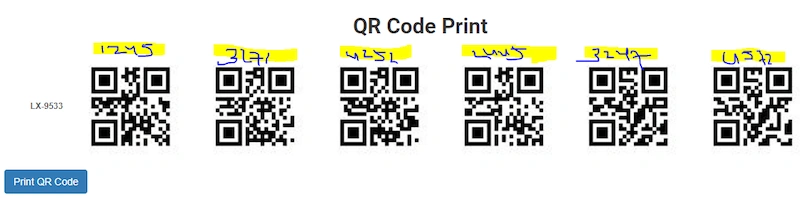
i want to code at top of every qr code like as image attached
Amit MohantyRank #112 · 20K reputationPosted Nov 2, 2023, 9:26 AM EDT
Check the below code.
            QR Code Print


        function PrintPanel() {
            var panel = document.getElementById("");
            var printWindow = window.open('', '', 'height=500,width=800');
            printWindow.document.write('DIV Contents');
            printWindow.document.write('');
            printWindow.document.write(panel.innerHTML);
            printWindow.document.write('');
            printWindow.document.close();
            setTimeout(function () {
                printWindow.print();
            }, 500);
            return false;
        }
.cs
// namespace using QRCoder; using System; using System.Data; using System.Drawing; using System.IO; protected void Page_Load(object sender, EventArgs e) { DataTable dataTable = new DataTable(); dataTable.Columns.AddRange(new DataColumn[1] { new DataColumn("Id", typeof(string)) }); dataTable.Rows.Add("www.example-one.com"); dataTable.Rows.Add("www.example-two.com"); dataTable.Rows.Add("www.example-three.com"); dataTable.Rows.Add("www.example-four.com"); dataTable.Rows.Add("www.example-five.com"); dataTable.Rows.Add("www.example-six.com"); dataTable.Rows.Add("www.example-seven.com"); dataTable.Rows.Add("www.example-eight.com"); foreach (DataRow dtRow in dataTable.Rows) { foreach (var item in dtRow.ItemArray) { QRCodeGenerator qrGenerator = new QRCodeGenerator(); QRCodeData qrCodeData = qrGenerator.CreateQrCode(item.ToString(), QRCodeGenerator.ECCLevel.Q); QRCode qrCode = new QRCode(qrCodeData); System.Web.UI.WebControls.Image imgBarCode = new System.Web.UI.WebControls.Image(); imgBarCode.Height = 175; imgBarCode.Width = 175; using (Bitmap bitMap = qrCode.GetGraphic(20)) { using (Graphics graphics = Graphics.FromImage(bitMap)) { using (Font font = new Font("Arial", 30)) { // Set the position and color of the text PointF point = new PointF(60, 20); // Adjust the position as needed Color textColor = Color.Black; // Set the desired text color // Draw the text on the image graphics.DrawString(item.ToString(), font, new SolidBrush(textColor), point); } } using (MemoryStream ms = new MemoryStream()) { bitMap.Save(ms, System.Drawing.Imaging.ImageFormat.Png); byte[] byteImage = ms.ToArray(); imgBarCode.ImageUrl = "data:image/png;base64," + Convert.ToBase64String(byteImage); } plBarCode.Controls.Add(imgBarCode); } } } }Kip Hackman61 reputationPosted Nov 9, 2023, 4:07 PM EST
You can use LEADTOOLS Document SDK technology in your application.
https://www.leadtools.com/sdk/barcode
https://www.leadtools.com/sdk/annotation
You can leverage the BarcodeWriter to write the QR code to the image and the AnnTextObject class to add a label above the QR code with the QR code data.
The code below output the below screenshot:
rivate void addBarcodeandLabel_Click(object sender, EventArgs e) { RasterImage createdImage = RasterImage.Create(800, 800, 24, 300, RasterColor.White); _viewer.Image = createdImage; _automation.Container.Size = _automation.Container.Mapper.SizeToContainerCoordinates(LeadSizeD.Create(_viewer.Image.ImageWidth, _viewer.Image.ImageHeight)); QRBarcodeData data = new QRBarcodeData { SymbolModel = QRBarcodeSymbolModel.Model1AutoSize, Symbology = BarcodeSymbology.QR, Value = "QR Data Value", Bounds = new LeadRect(250, 250, _viewer.Image.ImageWidth, _viewer.Image.ImageHeight) }; _barcodeValue = data.Value; QRBarcodeWriteOptions options = new QRBarcodeWriteOptions { GroupNumber = 0, GroupTotal = 0, XModule = 30, ECCLevel = QRBarcodeECCLevel.LevelL, HorizontalAlignment = BarcodeAlignment.Near, VerticalAlignment = BarcodeAlignment.Near }; barcodeEngine.Writer.WriteBarcode(_viewer.Image, data, options); AnnTextObject textObj = new AnnTextObject(); textObj.Rect = new LeadRectD(690, 580, 450, 100); textObj.Font.FontSize = 6; textObj.Text = _barcodeValue; _automation.Container.Children.Add(textObj); }Leon DRank #851 · 2.6K reputationPosted Nov 10, 2023, 4:53 AM EST
You can use Free Spire.Barcode to create QR code with QR code data.
https://www.e-iceblue.com/Introduce/barcode-for-net-introduce.html
Here is a code example:
using Spire.Barcode;
using System.Drawing;


namespace QRCode
{
    class Program
    {
        static void Main(string[] args)
        {
            BarcodeSettings settings = new BarcodeSettings();
            settings.Type = BarCodeType.QRCode;

            settings.Data = "Hello 123456789";
            settings.Data2D = "Hello 123456789";
            settings.QRCodeDataMode = QRCodeDataMode.AlphaNumber;
            settings.X = 1.0f;
            settings.QRCodeECL = QRCodeECL.H;

            BarCodeGenerator generator = new BarCodeGenerator(settings);
            Image image = generator.GenerateImage();
            image.Save("QRCode.png");
        }
    }
}