My code
-----------------------
public class TestListViewModel
{
public DateTime? CloseDate{ get; set; }
}
output
-----------------
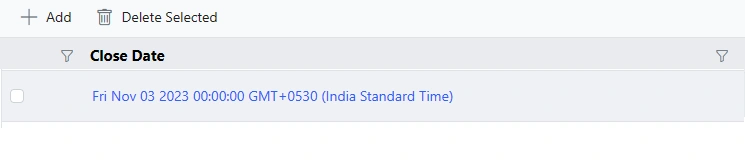
Actual need to
Close Date : 03-11-2023
My code
-----------------------
public class TestListViewModel
{
public DateTime? CloseDate{ get; set; }
}
output
-----------------
Actual need to
Close Date : 03-11-2023
Know the answer? Post it. Somebody with the same question will find it here.
Answer a question in the forums and earn +20 SHARP for every answer.
See unanswered questions Arun PottiAnswers in the forums20answers02
 Tahir AnsariAnswers in the forums5answers03
 Kamlesh KumarAnswers in the forums5answers04
 Sam HobbsAnswers in the forums4answers05
 Željko PerićAnswers in the forums3answersFull leaderboard →
 DevSocialUpcoming · 3rd editionAI Agents ConferenceDec 1–3, 2026Live onlineFree to attend5days leftRegister

Amit MohantyRank #112 · 20K reputationPosted Nov 8, 2023, 4:49 AM EST
Modify your ViewModel to format the
CloseDateproperty:public class TestListViewModel { private DateTime? closeDate; public DateTime? CloseDate { get { return closeDate; } set { closeDate = value; if (closeDate.HasValue) { // Format the date as "dd-MM-yyyy" CloseDateString = closeDate.Value.ToString("dd-MM-yyyy"); } else { CloseDateString = string.Empty; } } } // Additional property to store the formatted date as a string public string CloseDateString { get; set; } }Update your grid configuration to use the
CloseDateStringproperty for displaying the formatted date.Mithun Pradhan194 reputationPosted Nov 8, 2023, 5:14 AM EST
Its Working highlighted in yellow background
----------------------------
toolbar="toolbarItems" allowSorting="true" allowFiltering="true" allowTextWrap="true" allowSelection="true">
function load(args) {
this.columns[5].format = { type: 'date', format: 'dd-MM-yyyy' };
}