
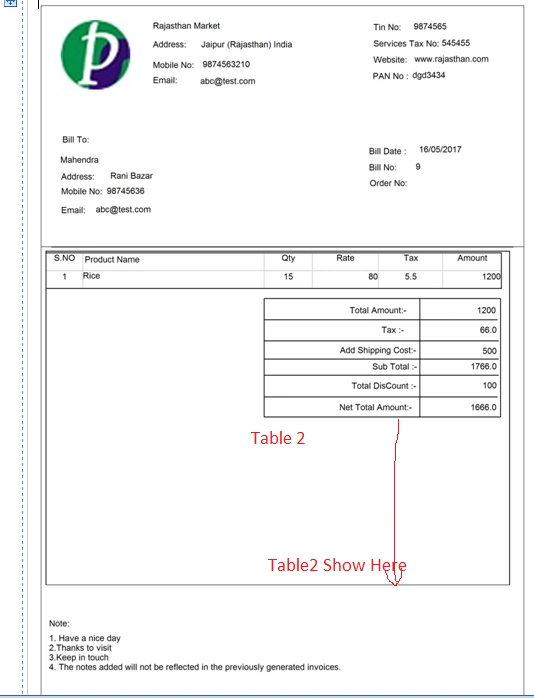
how to table2 show in near footer in Rdlc Report in Windows application c#
Know the answer? Post it. Somebody with the same question will find it here.
Answer a question in the forums and earn +20 SHARP for every answer.
See unanswered questions Arun PottiAnswers in the forums20answers02
 Tahir AnsariAnswers in the forums5answers03
 Kamlesh KumarAnswers in the forums5answers04
 Sam HobbsAnswers in the forums4answers05
 Željko PerićAnswers in the forums3answersFull leaderboard →
 DevSocialUpcoming · 3rd editionAI Agents ConferenceDec 1–3, 2026Live onlineFree to attend4days leftRegister

Rafnas T PRank #280 · 8.8K reputationPosted May 24, 2017, 3:10 AM EDT
Second- don't use the build-in Footer. Instead, use a sub-report that will contain your footer details.
Now, you need to define the sub-report as thin as possible in the main report (while in the actual sub-report - arrange your data as you want).
now add a page footer(in your sub report) you should right-click on the design surface, point to Insert, and then click Footer (Or it can be enabled through the Report menu –> Add page footer in BIDS ).
You could put the rectangle into a page footer and set its Hidden property to:
Strech the rectangle to cover all the footer area, then your are good - the footer will not be displayed until the last page.
Amit GuptaRank #190 · 12.8K reputationPosted May 23, 2017, 11:33 PM EDT
Amit GuptaRank #190 · 12.8K reputationPosted May 24, 2017, 1:03 AM EDT
Rafnas T PRank #280 · 8.8K reputationPosted May 24, 2017, 1:44 AM EDT
Rafnas T PRank #280 · 8.8K reputationPosted May 24, 2017, 1:50 AM EDT
Jyoti JodhaRank #1,408 · 1.2K reputationPosted May 24, 2017, 12:59 AM EDT
I am Use Rectangle
and set height and weight
but when print 2,3 page then printing format change.....
Jyoti JodhaRank #1,408 · 1.2K reputationPosted May 24, 2017, 1:24 AM EDT
Jyoti JodhaRank #1,408 · 1.2K reputationPosted May 24, 2017, 1:27 AM EDT
Jyoti JodhaRank #1,408 · 1.2K reputationPosted May 24, 2017, 1:47 AM EDT