I'm working with a measurement system (CL-200) and want to controll it with my computer.
So I connected it with the standart connection (BaudRate, DataBits, StopBits, Parity) but the original
software that I don't want to use sets the device in a "PC mode".
Only in this mode I can get answer with my Code requests.
So how do I set the needed values like this Software?
Cause with my connection the device isn't in a "Pc mode".
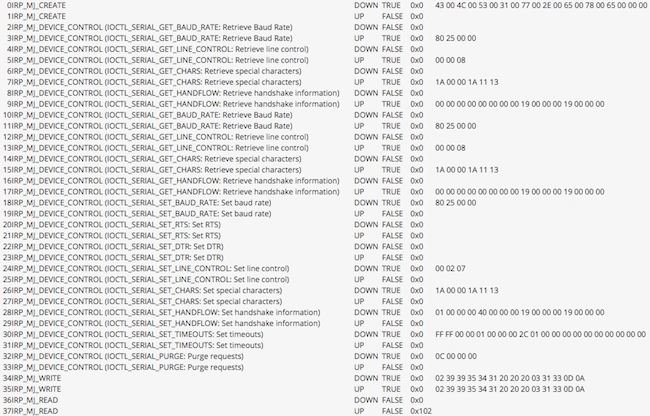
Here is a communication log from the software I want to emulate:
And here is the log of my current connection:
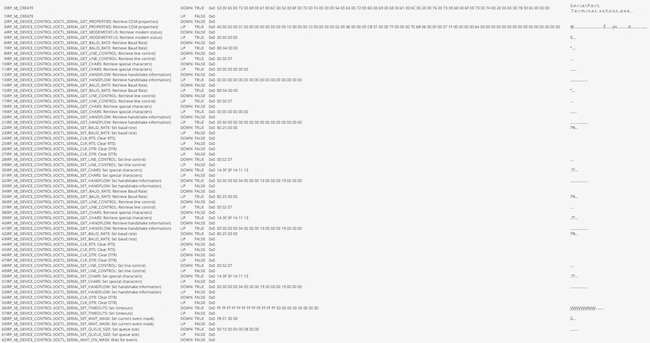
See mine is so much different than the connection I want to have.
Thanks for answers







Sam HobbsRank #107 · 20.5K reputationPosted Feb 19, 2010, 12:22 PM EST
Also, the term "PC Mode" is not a Windows term or a traditional serial communications term; at least not that I am aware of. PC Mode probably is essentially unique to the software you are using, so probably you must refer to the software documentation to determine what the parameters are.
Sascha B122 reputationPosted Feb 21, 2010, 10:23 PM EST
So but now I have a problem with the code.
I compared 5 different color measurements and this is the result.
on the left side is the Hexcode and on the right side the result of my measurement.
Sam HobbsRank #107 · 20.5K reputationPosted Feb 22, 2010, 8:57 AM EST
What part do you need to get? Do you need to convert the Hexcode or do you need to get the measurement values on the right?
Sascha B122 reputationPosted Feb 22, 2010, 9:00 AM EST
The values on the right side are the values that I can see on my measurement's display.
And the Hexcode is the log from my COM sniffer.
But I don't see the connection between the Hexcode and the display's values.
Sam HobbsRank #107 · 20.5K reputationPosted Feb 22, 2010, 2:43 PM EST
String s = "02 30 31 30 31 30 20 32 30 2B 38 37 38 39 33 2B 38 38 39 37 33 2B 36 36 35 30 33 03 30 43";
String[] sa = s.Split(' ');
foreach (string x in sa)
{
int Decimal = Convert.ToInt32(x, 16);
Console.Write(Char.ConvertFromUtf32(Decimal));
}
Console.WriteLine();
}
Sascha B122 reputationPosted Feb 22, 2010, 8:25 PM EST
I don't see it too. But maybe it is only a look-a-like Hexcode
cause this desvice also has a print option(button) and with this I can send
a "Hexcode" to the printer or pc. And it looked like this: "[...]35 36 32 2B 38[...]" in words: 562,8.
So I had to cross out the number 3 as the first number and 2B was declined as a comma.
Today I will make some other sniffer trys so that I'll have more code comparison.
And thanks for your effort!
This thread can be closed! Cause there are other problems in my way now...