I want to show a progress bar of week and month that how many hours has been passed till now
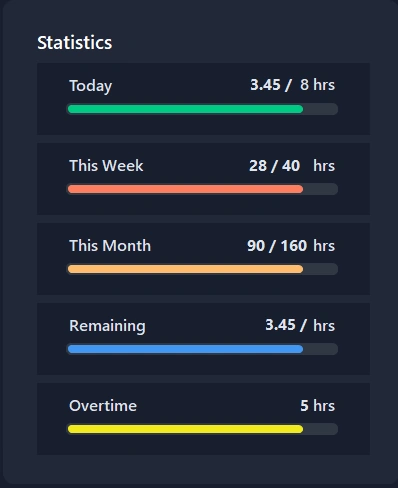
This Image form Example & Code Example Today Time
C#
lbltoday.Text = (decimal.Parse(DateTime.Now.ToString("HH")) -1 / 24 * 100).ToString();C#
private void lbltoday_TextChanged(object sender, EventArgs e)

}
  proToday.Value = (int)decimal.Parse(lbltoday.Text);
}






Pasang TamangRank #449 · 5.6K reputationPosted Jan 1, 2023, 10:39 PM EST
Hi,
I hav attached some code below.
'> / '> .camp { width: 50%; } .bar-success { background-color: #5cb85c; } .bar-info { background-color: #5bc0de; } .bar-warning { background-color: #f0ad4e; } .bar-danger { background-color: #d9534f; } function ShowProgressBar(percent, ele) { $(ele).removeClass().addClass('progress-bar'); if (percent > 80) { $(ele).addClass('progress-bar-success'); } else if (percent > 50 && percent 30 && percentprotected void Page_Load(object sender, EventArgs e) { var dailyLimit = 8.0; var weeklyLimit = 5*dailyLimit; var monthlyLimit = 22*dailyLimit; var weeklyOverTimeLimit = 5.0; var workDoneToday = 6.0; var workDoneThisWeek = 42.0; var workDoneMonthly = 154.0; var weeklyOverTime = 0.0; if (!this.IsPostBack) { if (workDoneThisWeek > weeklyLimit) { weeklyOverTime = workDoneThisWeek - weeklyLimit; workDoneThisWeek = weeklyLimit; } System.Data.DataTable dt = new System.Data.DataTable(); dt.Columns.Add("Id"); dt.Columns.Add("Parameter"); dt.Columns.Add("WorkDone"); dt.Columns.Add("TotalWork"); dt.Columns.Add("Percentage"); dt.Rows.Add("1", "Today", workDoneToday, dailyLimit, workDoneToday/dailyLimit*100); dt.Rows.Add("2", "Weekly", workDoneThisWeek, weeklyLimit, workDoneThisWeek / weeklyLimit * 100); dt.Rows.Add("3", "Monthly", workDoneMonthly, monthlyLimit, workDoneMonthly / monthlyLimit * 100); dt.Rows.Add("4", "Weekly Overtime", weeklyOverTime, weeklyOverTimeLimit, weeklyOverTime / weeklyOverTimeLimit * 100); ListView1.DataSource = dt; ListView1.DataBind(); } } protected void OnItemDataBound(object sender, ListViewItemEventArgs e) { if (e.Item.ItemType == ListViewItemType.DataItem) { string percentage = DataBinder.Eval(e.Item.DataItem, "Percentage").ToString(); string id = ("dvProgress_" + e.Item.DataItemIndex); ClientScript.RegisterStartupScript(this.GetType(), "alert" + e.Item.DataItemIndex, "ShowProgressBar('" + percentage + "','[id*=" + id + "]');", true); } }I hope these will be helpful to you.
Regards,
Pasang
Guest UserRank #1,881 · 787 reputationPosted Jan 1, 2023, 11:10 PM EST
This is Windows Form application
with datetime
Pasang TamangRank #449 · 5.6K reputationPosted Jan 2, 2023, 6:31 AM EST
For windows form application, I think you should make the UI with multiple controls. Panel, progressbar, label might be the controls you needed. You can first try with Progress Bar control to see if that fits for your requirement or not. You place a progress bar control and just above the progressbar control, you place a label.
Regards,
Pasang
Guest UserRank #1,881 · 787 reputationPosted Jan 2, 2023, 11:24 AM EST
i will send my first code working for me