Hi
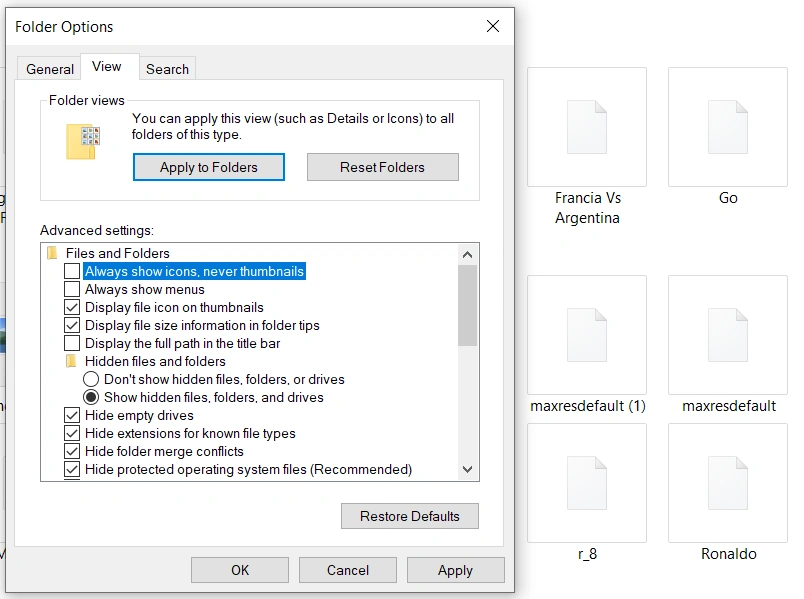
Images preview not getting displayed. Screenshot attched. Similarly WhatsApp Icon image not get displayed in toolbar.
Thanks
Hi
Images preview not getting displayed. Screenshot attched. Similarly WhatsApp Icon image not get displayed in toolbar.
Thanks
Know the answer? Post it. Somebody with the same question will find it here.
Answer a question in the forums and earn +20 SHARP for every answer.
See unanswered questions Arun PottiAnswers in the forums20answers02
 Tahir AnsariAnswers in the forums5answers03
 Kamlesh KumarAnswers in the forums5answers04
 Sam HobbsAnswers in the forums4answers05
 Željko PerićAnswers in the forums3answersFull leaderboard →
 DevSocialUpcoming · 3rd editionAI Agents ConferenceDec 1–3, 2026Live onlineFree to attend5days leftRegister

Naimish MakwanaRank #324 · 7.7K reputationPosted May 6, 2024, 12:25 AM EDT
Here are a few steps you can try:
Check View Settings: Open the folder where your images are stored. Click on the “View” tab in the top menu and make sure that the option “Large icons” or “Extra large icons” is selected. This will display the images as thumbnails in the folder.
Rebuild Thumbnail Cache: The issue might be due to a corrupted thumbnail cache. You can rebuild the thumbnail cache by following these steps:
Win + Sto open the search box.Disk Cleanupand open the application.OK.Thumbnailsand then clickOKandDelete Files.Check if Images are Hidden: Make sure the images are not set as hidden files. To view hidden files, open the folder, click on the “View” tab in the top menu, and check the box for “Hidden items”.
File Explorer Options: Open File Explorer Options (you can search for it in the Start Menu), go to the “View” tab, and make sure “Always show icons, never thumbnails” is unchecked.
If none of these solutions work, the images might be in a format that Windows doesn’t recognize, or they might be corrupted.
Thanks