Skip to content
Loading
    
if no vacancy admin side then below display image
  1. class="row">  
  2. //@ViewBag.message //here I am fetching controller viewbag message in model means **no content available**  
  
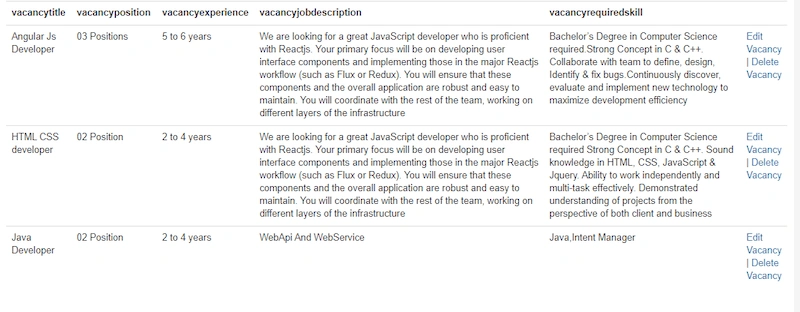
admin side vacancy:
 
client side vacancy(here I fetch the admin vacancy):
 
 
ViewModel
  1. public class ViewModel    
  2. {    
  3.     public Career Career { get; set; }    
  4.     public List Vacancy { get; set; }    
  5.     [NotMapped]    
  6.     public SelectList vacancyselectlist { get; set; }    
  7. }    
  8.     
  9. public class Career    
  10. {    
  11.     [Key]    
  12.     public int usercarrerid { get; set; }    
  13.         
  14.     public string useremailid { get; set; }    
  15.     
  16.     public string usercontactno { get; set; }    
  17.     
  18.     public string userresume { get; set; }    
  19.     
  20.     public Nullable<int> vacancyid { get; set; }    
  21.     
  22.     [ForeignKey("vacancyid")]    
  23.     public Vacancy vacancy { get; set; }    
  24.     
  25. }    
  26.     
  27. public class Vacancy    
  28. {    
  29.     public int vacancyid { get; set; }    
  30.     public string vacancytitle { get; set; }    
  31.     public string vacancyposition { get; set; }    
  32.     public string vacancyexperience { get; set; }    
  33.     public string vacancyjobdescription { get; set; }    
  34.     public string vacancyrequiredskill { get; set; }    
  35. }  
Career.cshtml
  1. @model projectname.Models.ViewModel  
  2. class="container">    
  3.     class="row">    
  4.         class="col-md-6">    
  5.             "margin-top:150px;">Current Job Openings    
  6.         
    
  •         
  •     
  •     
  • class="container">    
  •     "font-size:18px;">    
  •             
  •             
  •     
  •                 
  •     
  •             
  •     
  •     
  •             @foreach (var carr in Model.Vacancy)    
  •             {    
  •                 
  •     
  •                     
  •     
  •     
  •                 
  •     
  •             }    
  •     
  •             
  •     
  •                 
  •     
  •             
  •     
  •     
  •             @foreach (var carr in Model.Vacancy)    
  •             {    
  •                 
  •     
  •                     @{    
  •                         //here I am removing the dots and add the glyphiicon //split means remove the character    
  •                         var dataJobDescription = @carr.vacancyjobdescription.Split('.');    
  •                     }    
  •                     
  •     
  •                 
  •     
  •             }    
  •     
  •             
  •     
  •                 
  •     
  •             
  •     
  •     
  •             @foreach (var carr in Model.Vacancy)    
  •             {    
  •                 
  •     
  •                     @{    
  •                         //here I am removing the dots and add the glyphiicon //split means remove the character    
  •                         var dataRequiredSkill = @carr.vacancyrequiredskill.Split('.');    
  •                     }    
  •                     
  •     
  •                 
  •     
  •             }    
  •     
  •             
  •     
  •                 
  •     
  •             
  •     
  •         
  • Vacancy Title
        
  •                         -    
  •                         @carr.vacancytitle    
  •                     
  • Vacancy Position
        
  •                         -    
  •                         @carr.vacancyposition    
  •                     
  • Vacancy Experiance
        
  •                         -    
  •                         @carr.vacancyexperience    
  •                     
  • Vacancy Job Description
        
  •                         @for (var i = 0; i < dataJobDescription.Length; i++)    
  •                         {    
  •                                 
  •                                 "~/bootstrap-icons-1.0.0/chevron-right.svg" width="20" height="20" />    
  •                                 
  •                             @dataJobDescription[i]    
  •                                 
  •                         }    
  •                     
  • Vacancy Required Skill
        
  •                         @for (var i = 0; i < dataRequiredSkill.Length; i++)    
  •                         {    
  •                                 
  •                                 "~/bootstrap-icons-1.0.0/chevron-right.svg" width="20" height="20" />    
  •                                 
  •                             @dataRequiredSkill[i]    
  •                                 
  •                         }    
  •                     
  •     
  •                     class="btn btn-success applylink">Apply    
  •                 
  •     
  •         
  •    
  • HomeController.cs
    1. [HttpGet]     
    2.  public async Task Career(List _vacancy)    
    3.  {    
    4.      //some code    
    5.      HttpResponseMessage responseMessage = client.GetAsync("https://localhost:44325/Home/DisplayVacancyData").Result; //here I am fetching admin side vacancy to client side    
    6.     
    7.      if (responseMessage.IsSuccessStatusCode)    
    8.      {    
    9.          //some code    
    10.     
    11.          if (_vacancy.Count == 0)    
    12.          {    
    13.              ViewBag.message = "No content Available"; //if no vacancy avilable in admin side then display client side No content Available    
    14.          }    
    15.          else    
    16.          {    
    17.              return View("Career", test);     
    18.          }    
    19.      }    
    20.      return View("Index");    
    21.  }  
    problem is here
    1. @carr.vacancytitle //problem is here all the data get here need to implement logic  
    2. @carr.vacancyposition //problem is here all the data get here need to implement logic  
    3. @carr.vacancyexperience //problem is here all the data get here need to implement logic  
    which place to add foreach loop because data is dynamic here can not use for loop
     
    here need to implement foreach loop because data is dynamic not static
     
    please help
      
  •           
  •       
  •   
  •         counter++;  
  •     }  
  •  
  • +3
  • Sachin Singh
    +3
    why are you using foreach so many times, just use it one time and problem will be resolved but keep apply now on each row like below.
    1. class="container">  
    2.     "font-size:18px;">  
    3.           
    4.             
    5.   
    6.                 
    7.   
    8.                 
    9.   
    10.                 
    11.   
    12.                 
    13.   
    14.             
    15.   
    16.   
    17.             @foreach (var carr in Model.Vacancy)  
    18.             {  
    19.                 
    20.   
    21.                     
    22.   
    23.                     
    24.   
    25.                     
    26.   
    27.                     
    28.   
    29.                     
    30.   
    31.                 
    32.   
    33.              
    34.   
    35.               
    36.         
    37. Vacancy TitleVacancy PositionVacancy ExperianceVacancy Job Description
        
    38.                          
    39.                         @carr.vacancytitle  
    40.                     
    41.   
    42.   
    43.                         @carr.vacancyposition  
    44.                     
    45.   
    46.   
    47. @carr.vacancyexperience  
    48.                     
    49.   
    50.                         @carr.dataJobDescription  
    51.                     
    52.   
    53.                         class="btn btn-success applylink">Apply  
    54.                     
    55.   
    56.     
      
  •    
  •  
    +3
  • +2
    hello aashima
     
    thanks for your time
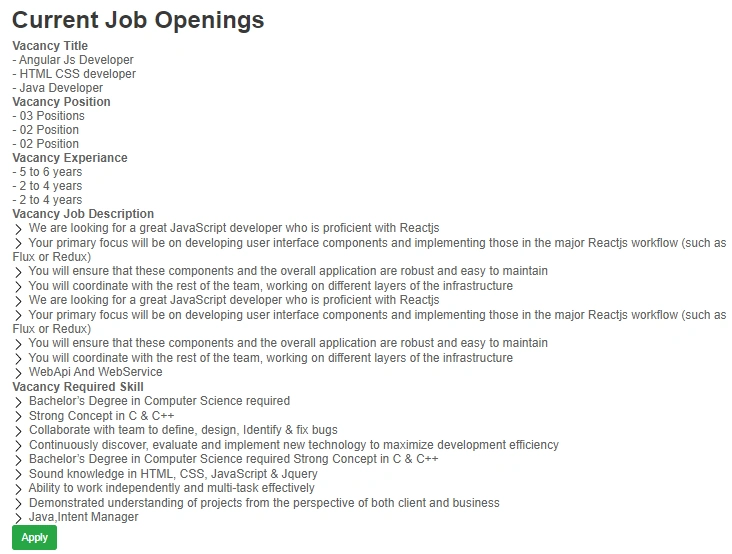
    I am trying to display data below this type
    I am fetching the admin data in client side successfully
    I am trying to set data in proper design means below design
    data is fetch successfully problem is set data in proper design means below design
    1. class="row">  
    2. class="col-md-6">  
    3. //first vacancy data and apply button  
      
  • class="col-md-6">  
  • //second vacancy data and apply button  

  •   
  •   
  • class="row">  
  • class="col-md-6">  
  • //third vacancy data and apply button  
  •   
  • class="col-md-6">  
  • //fourth vacancy data and apply button  
  •   
  •   
  • +2
  • +2
    hello aashima
     
    it is possible to loop over modal 
     
    see my view modal is a list means can I use iterate through model means get the one vacancy at a time and then display second vacancy 
    +2
  • Sachin Singh
    +2
     Everything is possible
     
    1. @{  
    2.      
    3.     int counter = 0;  
    4. }  
    5.   
    6.   
    7. class="row">  
    8.     @foreach (var item in Mode.Vaccancyl)  
    9.     {  
    10.         if (counter != 0 && counter % 2 == 0)  
    11.         {  
    12.             @:  
    13.         
      
  •          
  •         @:class="row">  
  •     }  
  •   
  •     class="col-md-6">  
  •         class="thumbnail">  
  •            
  •             class="caption">  
  •                 "thumbnail-label">@item.Name  
  •                 

    @item.Description

      
  •               
  •           
  •       
  •   
  •         counter++;  
  •     }  
  •  
  •  
    +2
  • +2
    hello aashima
     
    this is not work
    1. class="row">  
    2.     @foreach (var item in Model.Vacancy)  
    3.     {  
    4.         if (counter != 0 && counter % 2 == 0)  
    5.         {  
    6.             class="row">  
    7.   
    8.                 class="col-md-6">  
    9.                     class="thumbnail">  
    10.   
    11.                         class="caption">  
    12.                             "thumbnail-label">@item.vacancytitle  
    13.                             

      @item.vacancyposition

        
    14.                         
      
  •                       
  •                   
  •                 counter++;  
  •               
  •         }  
  •     }  
  •   
  •  I try your suggestion but not work
    +2
  • Sachin Singh
    +2
    @Rahul the code works perfectly , you dint paste my code correctly why did you remove below lines of code
     
    1. if (counter != 0 && counter % 2 == 0)    
    2.         {    
    3.             @:
        
  •             
  •         @:class="row">   
  •  
     There is a meaning of it , it closes the div tag and starts a new row
    +2