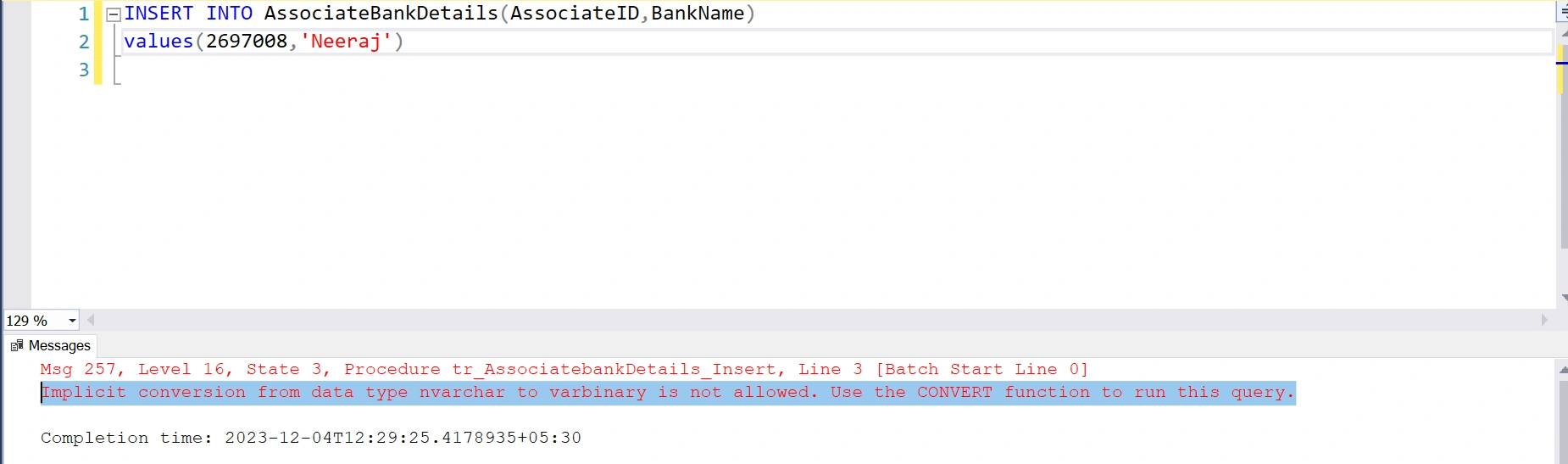
Implicit conversion from data type nvarchar to varbinary
Know the answer? Post it. Somebody with the same question will find it here.
Answer a question in the forums and earn +20 SHARP for every answer.
See unanswered questions Arun PottiAnswers in the forums20answers02
 Tahir AnsariAnswers in the forums5answers03
 Kamlesh KumarAnswers in the forums5answers04
 Sam HobbsAnswers in the forums4answers05
 Željko PerićAnswers in the forums3answersFull leaderboard →
 DevSocialUpcoming · 3rd editionAI Agents ConferenceDec 1–3, 2026Live onlineFree to attend5days leftRegister

Jignesh KumarRank #91 · 22.9K reputationPosted Dec 4, 2023, 2:10 AM EST
Hello Neeraj,
Please check your BankName Column DataType in SQL table. I think bankname column datatype is Binary and you are trying to insert nvarchar value to it.
Amit MohantyRank #112 · 20K reputationPosted Dec 4, 2023, 5:08 AM EST
In your error its showing Procedure tr_Asso...._Insert, but in your post it's just a simple insert query. So please provide the original code so others can better understand the problem.
neeraj kumar107 reputationPosted Dec 4, 2023, 3:36 AM EST
no datatype is nvarchar
pfa.
Jayraj ChhayaRank #304 · 8.2K reputationPosted Dec 5, 2023, 4:25 AM EST
In SQL, implicit conversion refers to the automatic conversion of one data type to another by the database engine. However, not all data type conversions are supported implicitly, and it is important to understand the rules and limitations of implicit conversions.
When it comes to converting from the NVARCHAR data type to the VARBINARY data type, SQL Server does not support implicit conversion. This means that you cannot directly assign an NVARCHAR value to a VARBINARY column or variable without explicitly converting the data.
neeraj kumar107 reputationPosted Jan 11, 2024, 7:34 AM EST
Note:- The graph is loading after 30 seconds of page loading but I want to optimize the performance, the graph should also load as soon as the page is loaded, please suggest.
A graph has to be created which should be of donut type for the data coming from the procedure and the graph should be loaded immediately as soon as the webpage is opened.
For this type data-
AgeGroup No column name Sequence
18-20 215 1
21-25 2276 2
26-30 2626 3
31-35 1233 4
35-40 401 5
41-45 110 6
46-50 37 7
51-55 10 8
services:-
public List
using (SqlConnection con = new SqlConnection(ConfigurationManager.ConnectionStrings["InnovOneEntities1"].ToString()))
{
using (SqlCommand command = new SqlCommand("usp_AssociateJobAgeingDashBoard", con))
{
command.Parameters.AddWithValue("@intMappingId", 4002189);
command.Parameters.AddWithValue("@intClientId", 0);
command.Parameters.AddWithValue("@intFacilityId", 0);
command.CommandType = CommandType.StoredProcedure;
con.Open();
using (SqlDataReader reader = command.ExecuteReader())
{
while (reader.Read())
{
ageGroupData.Add(new
{
AgeGroup = reader[0].ToString(),
Value = (int)reader[1]
});
}
}
}
}
return ageGroupData;
}
Controller:-
[HttpPost]
public JsonResult GetAgeGroupData()
{
var ageGroupData = objUser.GetAgeGroupData();
return Json(ageGroupData, JsonRequestBehavior.AllowGet);
}
View:-
$(document).ready(function () {
//DashboardOfferReleased();
//DashboardAssociateAgeing();
//DashboardAssociateJobsAgeing();
loadAgeGroupDonutChartJOB();
});
function loadAgeGroupDonutChartJOB() {
$.ajax({
type: "POST",
url: '@Url.Action("GetAgeGroupData", "User")',
contentType: 'application/json',
success: function (response) {
if (response && response.length > 0) {
var labels = response.map(item => item.AgeGroup);
var data = response.map(item => item.Value);
renderDonutChart(labels, data);
} else {
console.log('No data available.');
}
},
error: function (error) {
console.error(JSON.stringify(error));
}
});
}
function renderDonutChart(labels, data) {
var options = {
series: data,
chart: {
type: 'donut',//'donut',
//height: 320,
},
labels: labels,
dataLabels: {
enabled: true,
formatter: function (val) {
return val.toFixed(0);
}
},
};
var chart = new ApexCharts(document.querySelector("#ageGroupDonutChart"), options);
chart.render();
}