I'd like a subroutine to execute upon opening the workbook and for a specific sheet in the workbook.
Change the color of the text of the button in a cell based upon the value of another cell in the same column. There will be multiple buttons to do this so each having a corresponding value in a cell to interrogate and then change the button's text color.
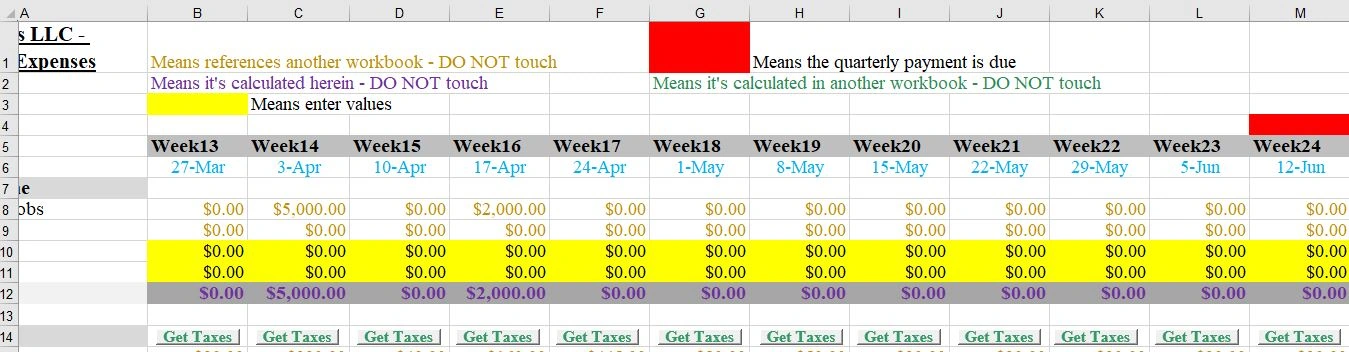
To start, on line 12, column B and traversing to Column M, if the value is greater than 0, I want the text of the button in the same column to change to red. So on line 14, those buttons from column B and traversing to Column M.
Here is the sheet.







Jay PankhaniyaRank #798 · 2.9K reputationPosted May 1, 2023, 9:25 AM EDT
Private Sub Workbook_Open() Dim ws As Worksheet Dim rng As Range Dim btn As Button Dim i As Long Set ws = ThisWorkbook.Sheets("Sheet1") 'change "Sheet1" to the name of your sheet For i = 12 To ws.Cells(ws.Rows.Count, "A").End(xlUp).Row 'loop through rows 12 to the last row with data in column A For Each btn In ws.Range("B" & i & ":M" & i).Buttons 'loop through buttons in the current row Set rng = ws.Cells(i, btn.TopLeftCell.Column - 1) 'get the cell to check for the button's color If rng.Value > 0 Then 'change button text color if the cell value is greater than 0 btn.Font.Color = vbRed Else btn.Font.Color = vbBlack 'change back to black if the cell value is not greater than 0 End If Next btn Next i End SubFirst LastRank #2,033 · 713 reputationPosted May 1, 2023, 11:16 AM EDT
I get this error. Failing on the highlighted line below.
Here's your code placed in the open event of the workbook.
Concern: Your comment: ' Loop through rows 12 to the last row with data in column A'.
1.) Why is column A mentioned?
2.) I only want to loop threw the columns of row 12 - being B12 threw M12. No other rows. Then set the buttons on row 14 - being B14 threw M14 accordingly.
Note: my buttons are form control buttons - not Active X.