Hello Team,
am using textbox to scan barcode but when I enter the barcode it return this error Incorrect syntax near '202406273, I tried severall ways to debbug it but no avail.
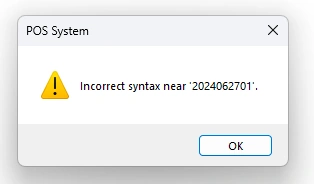
private void frmQty_KeyPress(object sender, KeyPressEventArgs e)
{
if ((e.KeyChar == 13) && (txtQty.Text != String.Empty))
{
bool found = false;
string sdate = DateTime.Now.ToString("yyyyMMdd");
cn.Open()
cm = new SqlCommand("select Invoice from tblCart where Invoice like @date order by CartId desc", cn);
cm.Parameters.AddWithValue("@date", "%" + sdate + "%");
cm.Parameters.AddWithValue("@Invoice", fSales.lblIvoiceNo.Text);
dr = cm.ExecuteReader();
dr.Read();
if (dr.HasRows)
{
found = true;
//id = dr["CartId"].ToString();
//cart_qty = int.Parse(dr["Qty"].ToString());
dr.Close();
}
else
{
found = false;
}
dr.Close();
cn.Close();
if (found == true)
{
fSales.txt_Search.Clear();
fSales.txt_Search.Focus();
fSales.LoadCart();
this.Dispose();
}
else
{
// validate product quantity to show avoid selling when product is out of stock
if (txtQty.Text == String.Empty)
{
cn.Close();
return;
}
cn.Open();
cm = new SqlCommand("insert into tblCart (Invoice, ProductId, Price, Qty, Sdate)values(@Invoice, @ProductId, @Price, @Qty, @Sdate)", cn);
cm.Parameters.AddWithValue("@Invoice", fSales.lblIvoiceNo.Text);
cm.Parameters.AddWithValue("@ProductId", lblPID.Text);
cm.Parameters.AddWithValue("@price", lblPrice.Text);
cm.Parameters.AddWithValue("@qty", int.Parse(txtQty.Text));
cm.Parameters.AddWithValue("@sdate", fSales.dtTransactionDate.Value);
// cm.Parameters.AddWithValue("@cashier", fSales.lblUser.Text);
cm.ExecuteNonQuery();
cn.Close();
MessageBox.Show("Product quatity has been successfully added", stitle, MessageBoxButtons.OK, MessageBoxIcon.Information);
fSales.txt_Search.Clear();
fSales.txt_Search.Focus();
fSales.LoadCart();
this.Dispose();
}
}
}







Jaimin ShethiyaRank #177 · 13.7K reputationPosted Jun 28, 2024, 2:04 AM EDT
Can you please debug your code and check the query?
var qry = "select Invoice from tblCart where Invoice like '%"+ sdate +"%' order by CartId desc";output of the above line code.
select Invoice from tblCart where Invoice like '%20240628%' order by CartId descCopy that query to the SQL query window and try to execute and check it will give an error or successfully executed your query.
Thanks
Emmmanuel FIADUFERank #947 · 2.2K reputationPosted Jun 27, 2024, 8:32 AM EDT
public void GetInvoice()
{
try
{
string sdate = DateTime.Now.ToString("yyyyMMdd");
string invoiceno;
int count;
Random random = new Random();
using (SqlConnection con = new SqlConnection(dbcon.MyConnection()))
{
cn.Open();
using (SqlCommand cm = new SqlCommand("select Invoice from tblCart", cn))
{
cm.Parameters.AddWithValue("@Sdate", "%" + sdate + "%");
using (SqlDataReader dr = cm.ExecuteReader())
{
if (dr.Read())
{
// Validate product quantity to avoid selling when the product is out of stock
invoiceno = dr[0].ToString();
count = random.Next(1, 9);
lblIvoiceNo.Text = sdate + (count + 1);
dr.Close(); // Close the reader
cn.Close();
}
else
{
invoiceno = sdate + "01";
lblIvoiceNo.Text = invoiceno;
}
// Close the reader before processing
dr.Close();
cn.Close();
}
}
}
}
catch (Exception ex)
{
cn.Close();
MessageBox.Show(ex.Message, "Error", MessageBoxButtons.OK, MessageBoxIcon.Warning);
}
}
Jaimin ShethiyaRank #177 · 13.7K reputationPosted Jun 27, 2024, 10:40 AM EDT
Hello Emmmanuel,
Can you please change the below line of your code and try.
cm.Parameters.AddWithValue("@date", "'%" + sdate + "%'");Thanks
Emmmanuel FIADUFERank #947 · 2.2K reputationPosted Jun 27, 2024, 1:10 PM EDT
Hello Jaimin, thank you for the respond.
I try this one too and it didn't work
cm = new SqlCommand("select Invoice from tblCart where Invoice like '%" + sdate + "%' order by CartId desc", cn);
and this is my current update and is still not working.
public void GetInvoice()
{
try
{
string sdate = DateTime.Now.ToString("yyyyMMdd");
string invoiceno;
int count;
Random random = new Random();
using (SqlConnection con = new SqlConnection(dbcon.MyConnection()))
{
cn.Open();
using (SqlCommand cm = new SqlCommand("select Invoice from tblCart", cn))
{
cm.Parameters.AddWithValue("@Sdate", "%" + sdate + "%");
using (SqlDataReader dr = cm.ExecuteReader())
{
if (dr.Read())
{
invoiceno = dr[0].ToString();
count = random.Next(1, 9);
lblIvoiceNo.Text = sdate + (count + 1);
dr.Close(); // Close the reader
cn.Close();
}
else
{
invoiceno = sdate + "01";
lblIvoiceNo.Text = invoiceno;
}
// Close the reader before processing
dr.Close();
cn.Close();
}
}
}
}
catch (Exception ex)
{
cn.Close();
MessageBox.Show(ex.Message, "Error", MessageBoxButtons.OK, MessageBoxIcon.Warning);
}
}
Emmmanuel FIADUFERank #947 · 2.2K reputationPosted Jun 28, 2024, 4:09 AM EDT
Hello Jaimin,
No error please
Emmmanuel FIADUFERank #947 · 2.2K reputationPosted Jun 28, 2024, 4:34 AM EDT
Ohk sorry I inputted the wrong value, the data is now coming
Jaimin ShethiyaRank #177 · 13.7K reputationPosted Jun 28, 2024, 4:15 AM EDT
It means that error is gone.
Jaimin ShethiyaRank #177 · 13.7K reputationPosted Jun 28, 2024, 4:15 AM EDT
Data is not availalbe in your database that's why it will return as empty.
Jaimin ShethiyaRank #177 · 13.7K reputationPosted Jun 28, 2024, 4:36 AM EDT
Sounds Good :)
Hope as your expectation it works.