Hello Team,
When I Add Item to the list, I want the itme qty, totalprice, total tax,amount received, change, grandtotal and overallgrand total listed in the lables.
public void CalculateTotal()
{
//int i = 0;
decimal Sum = 0;
decimal SubTotal = 0;
decimal tax = 0;
decimal discount = decimal.Parse(txt_Discount.Text);
decimal totalPrice = decimal.Parse(lbl_TotalPrice.Text);
decimal percentageDiscount = decimal.Parse(lbl_Discount.Text);
for (int i = 0; i
Sum =Convert.ToDecimal(Sum + dataGridView1.Rows[i].Cells[9].Value.ToString());
tax = Convert.ToDecimal(tax + dataGridView1.Rows[i].Cells[4].Value.ToString())/100 * int.Parse(dataGridView1.Rows[i].Cells[7].ToString()) * Convert.ToDecimal(dataGridView1.Rows[i].Cells[6].ToString());
SubTotal= (Convert.ToDecimal(tax + dataGridView1.Rows[i].Cells[4].Value.ToString()) * int.Parse(dataGridView1.Rows[i].Cells[7].ToString()));
lbl_NoOfItems.Text = (dataGridView1.Rows.Count -1 + 1).ToString();
lbl_SubTotal.Text = SubTotal.ToString("#,##0.00");
lbl_TotalTax.Text = Convert.ToDecimal(tax + SubTotal).ToString("#,##0.00");
lbl_Discount.Text = Convert.ToDecimal(discount * totalPrice / 100).ToString("#,##0.00");
lbl_GrandTotal.Text =Convert.ToDecimal(totalPrice * percentageDiscount).ToString("#,##0.00");
lbl_OverallGrandTotal.Text = Convert.ToDecimal(lbl_GrandTotal.Text).ToString("#,##0.00");
}
}
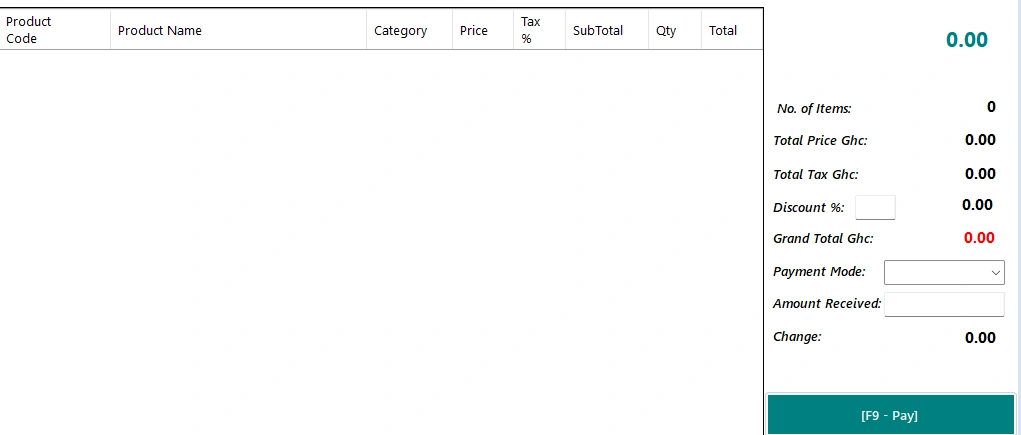
am also having a feedback from this variable saying that input string not in correct format.
decimal discount = decimal.Parse(txt_Discount.Text);
and in the dataGridView I hide the first column







Sarthak VarshneyRank #46 · 32K reputationPosted May 29, 2024, 10:53 PM EDT
It looks like you're having some issues with calculating totals and handling data from your DataGridView. Let's address both the calculations and the input string format issues.
First, the input string format error is likely occurring because the
txt_Discount.Textmight be empty or contain non-numeric values. You can handle this by usingdecimal.TryParseinstead ofdecimal.Parseto avoid exceptions.Next, let's ensure that the calculations for the quantities, prices, taxes, discounts, and totals are correct and clear. Here’s a revised version of your
CalculateTotalmethod:public void CalculateTotal() { decimal sum = 0; decimal subTotal = 0; decimal tax = 0; decimal discount = 0; decimal totalPrice = 0; decimal percentageDiscount = 0; // Check if txt_Discount.Text is a valid decimal if (!decimal.TryParse(txt_Discount.Text, out discount)) { discount = 0; // Default discount to 0 if the input is invalid } // Check if lbl_TotalPrice.Text is a valid decimal if (!decimal.TryParse(lbl_TotalPrice.Text, out totalPrice)) { totalPrice = 0; // Default total price to 0 if the input is invalid } // Check if lbl_Discount.Text is a valid decimal if (!decimal.TryParse(lbl_Discount.Text, out percentageDiscount)) { percentageDiscount = 0; // Default percentage discount to 0 if the input is invalid } int itemCount = 0; for (int i = 0; i < dataGridView1.Rows.Count; i++) { if (dataGridView1.Rows[i].Cells[0].Value != null) // Ensure the row is not empty { decimal rowPrice = 0; decimal rowTax = 0; int quantity = 0; // Parse row values safely if (!decimal.TryParse(dataGridView1.Rows[i].Cells[6].Value.ToString(), out rowPrice)) { rowPrice = 0; } if (!decimal.TryParse(dataGridView1.Rows[i].Cells[4].Value.ToString(), out rowTax)) { rowTax = 0; } if (!int.TryParse(dataGridView1.Rows[i].Cells[7].Value.ToString(), out quantity)) { quantity = 0; } sum += rowPrice * quantity; tax += rowTax / 100 * rowPrice * quantity; subTotal += rowPrice * quantity; itemCount++; } } lbl_NoOfItems.Text = itemCount.ToString(); lbl_SubTotal.Text = subTotal.ToString("#,##0.00"); lbl_TotalTax.Text = tax.ToString("#,##0.00"); decimal discountAmount = (discount / 100) * totalPrice; lbl_Discount.Text = discountAmount.ToString("#,##0.00"); decimal grandTotal = (subTotal + tax) - discountAmount; lbl_GrandTotal.Text = grandTotal.ToString("#,##0.00"); lbl_OverallGrandTotal.Text = grandTotal.ToString("#,##0.00"); // Calculate change if amount received is entered decimal amountReceived = 0; if (decimal.TryParse(txt_AmountReceived.Text, out amountReceived)) { lbl_Change.Text = (amountReceived - grandTotal).ToString("#,##0.00"); } else { lbl_Change.Text = "0.00"; } }Key Changes:
decimal.TryParseto safely parse the input values, avoiding exceptions if the input is not in the correct format.This should resolve the input format error and ensure your calculations are correct. Adjust any column indices or other specific logic as needed based on your actual DataGridView setup.
Emmmanuel FIADUFERank #947 · 2.2K reputationPosted May 30, 2024, 4:50 AM EDT
Hello Sarthak
Thank you so much, but there is one issue here.
the Tax has been added to the subtotal at the stockin page already, there is over calculating of overallgrandTotal, the item quantity, and the price sum up should be equal to subtotal and I want only the tax coulmns calculated in the lable and as you can see in the snip shot and additionally when I enter the discount the value of the overallgrandTotal doesn't change
Emmmanuel FIADUFERank #947 · 2.2K reputationPosted May 30, 2024, 11:16 AM EDT
Hello Sartha, I have been able to modify part of the code and is no longer over calculating the overallgrandTotal but the only problem is the total tax is not able to calculate the tax column in the DataGridView into the label
Sarthak VarshneyRank #46 · 32K reputationPosted May 30, 2024, 11:25 PM EDT
It seems like the calculation for the total tax is still problematic. Let's focus on ensuring that the tax calculation correctly reads from the DataGridView and sums up the values.
Below is an adjusted version of your
CalculateTotalmethod that emphasizes the correct calculation of the tax column:public void CalculateTotal() { decimal sum = 0; decimal subTotal = 0; decimal totalTax = 0; decimal discount = 0; decimal totalPrice = 0; decimal percentageDiscount = 0; // Check if txt_Discount.Text is a valid decimal if (!decimal.TryParse(txt_Discount.Text, out discount)) { discount = 0; // Default discount to 0 if the input is invalid } // Check if lbl_TotalPrice.Text is a valid decimal if (!decimal.TryParse(lbl_TotalPrice.Text, out totalPrice)) { totalPrice = 0; // Default total price to 0 if the input is invalid } // Check if lbl_Discount.Text is a valid decimal if (!decimal.TryParse(lbl_Discount.Text, out percentageDiscount)) { percentageDiscount = 0; // Default percentage discount to 0 if the input is invalid } int itemCount = 0; for (int i = 0; i < dataGridView1.Rows.Count; i++) { if (dataGridView1.Rows[i].Cells[0].Value != null) // Ensure the row is not empty { decimal rowPrice = 0; decimal rowTaxPercentage = 0; int quantity = 0; // Parse row values safely if (!decimal.TryParse(dataGridView1.Rows[i].Cells[6].Value.ToString(), out rowPrice)) { rowPrice = 0; } if (!decimal.TryParse(dataGridView1.Rows[i].Cells[4].Value.ToString(), out rowTaxPercentage)) { rowTaxPercentage = 0; } if (!int.TryParse(dataGridView1.Rows[i].Cells[7].Value.ToString(), out quantity)) { quantity = 0; } decimal rowTotal = rowPrice * quantity; decimal rowTax = (rowTaxPercentage / 100) * rowTotal; sum += rowTotal; totalTax += rowTax; subTotal += rowTotal; itemCount++; } } lbl_NoOfItems.Text = itemCount.ToString(); lbl_SubTotal.Text = subTotal.ToString("#,##0.00"); lbl_TotalTax.Text = totalTax.ToString("#,##0.00"); decimal discountAmount = (discount / 100) * subTotal; lbl_Discount.Text = discountAmount.ToString("#,##0.00"); decimal grandTotal = (subTotal + totalTax) - discountAmount; lbl_GrandTotal.Text = grandTotal.ToString("#,##0.00"); lbl_OverallGrandTotal.Text = grandTotal.ToString("#,##0.00"); // Calculate change if amount received is entered decimal amountReceived = 0; if (decimal.TryParse(txt_AmountReceived.Text, out amountReceived)) { lbl_Change.Text = (amountReceived - grandTotal).ToString("#,##0.00"); } else { lbl_Change.Text = "0.00"; } }Key Points:
Make sure the column indices in the code (such as
Cells[6],Cells[4], andCells[7]) correctly correspond to thePrice,Tax %, andQuantitycolumns in your DataGridView.This approach should ensure the tax is calculated correctly and displayed in the label. If there are still issues, please verify the content and format of the data in your DataGridView.