Hi,
Actucally I am looking for how to get dialog box reasult with key down event?
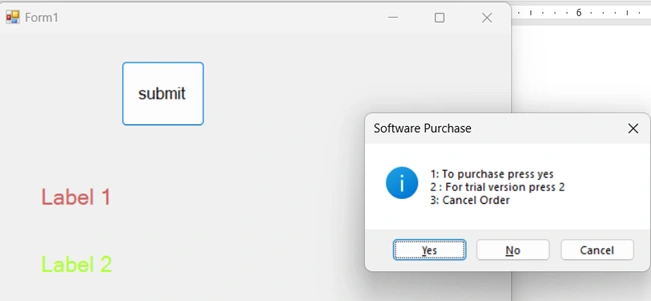
After pressing submit button , Message dialog box woking fine..But i want numbers 1,2,3 shoild work similar like below ..
if (dr == DialogResult.Yes)
{
label2.Text = " You have purchased the software , congratualtions";
} /// working fine
but how to get dr data in keydown event of same button
if(e.KeyCode == Keys.NumPad1) {
label2.Text = " You have purchased the software , congratualtions";
}







sasikala sRank #1,091 · 1.7K reputationPosted Dec 2, 2024, 1:06 AM EST
To hanlde Key even/Key Down event in a Windows Forms application and use them to interact with a message dialog box, you can handle the
KeyDownevent of the form or the specific control you want to capture the key presses from. Here's a simple example to guide you:Show the Dialog Box: When the submit button is clicked, show the dialog box.
Handle KeyDown Event: Capture the key presses in the form.
Here’s a sample code snippet to illustrate this:
\/\/ Assuming you have a button to show the dialog private void btnSubmit_Click(object sender, EventArgs e) { \/\/ Show your message dialog box DialogResult dr = MessageBox.Show(\"Do you want to purchase the software?\", \"Purchase Confirmation\", MessageBoxButtons.YesNo); \/\/ Handle the dialog result if (dr == DialogResult.Yes) { label2.Text = \"You have purchased the software, congratulations!\"; } } \/\/ Handle the KeyDown event for the form private void YourForm_KeyDown(object sender, KeyEventArgs e) { if (e.KeyCode == Keys.NumPad1) { label2.Text = \"You have purchased the software, congratulations!\"; } else if (e.KeyCode == Keys.NumPad2) { label2.Text = \"You have selected an alternative option.\"; } \/\/ Add more conditions as needed for other keys } \/\/ Don't forget to set the KeyPreview property to true private void YourForm_Load(object sender, EventArgs e) { this.KeyPreview = true; \/\/ This ensures that the form receives key events before they are sent to the control }Naimish MakwanaRank #324 · 7.7K reputationPosted Dec 3, 2024, 12:26 AM EST
To achieve this, you can handle the
KeyDownevent for your form or button and check for specific key presses. Here's an example of how you can integrate theDialogResultwith theKeyDownevent:KeyDownevent of your form or button.NumPad1,NumPad2,NumPad3).Here's a sample code snippet to demonstrate this:
// Assuming you have a button named 'submitButton'
submitButton.KeyDown += new KeyEventHandler(submitButton_KeyDown);

private void submitButton_KeyDown(object sender, KeyEventArgs e)
{
    if (e.KeyCode == Keys.NumPad1)
    {
        label2.Text = "You have purchased the software, congratulations";
    }
    else if (e.KeyCode == Keys.NumPad2)
    {
        label2.Text = "Option 2 selected";
    }
    else if (e.KeyCode == Keys.NumPad3)
    {
        label2.Text = "Option 3 selected";
    }
}

// Method to show the dialog and handle the result
private void ShowDialogAndHandleResult()
{
    DialogResult dr = MessageBox.Show("Do you want to purchase the software?", "Purchase Confirmation", MessageBoxButtons.YesNo);

    if (dr == DialogResult.Yes)
    {
        label2.Text = "You have purchased the software, congratulations";
    }
    else if (dr == DialogResult.No)
    {
        label2.Text = "Purchase cancelled";
    }
}

// Call this method when the submit button is clicked
private void submitButton_Click(object sender, EventArgs e)
{
    ShowDialogAndHandleResult();
}
In this example:
submitButton_KeyDownmethod handles theKeyDownevent and updates the label based on the key pressed.ShowDialogAndHandleResultmethod shows a dialog box and updates the label based on the dialog result.submitButton_Clickmethod calls the dialog method when the button is clicked.This way, you can handle both the dialog result and key presses to update the label accordingly.
Thanks